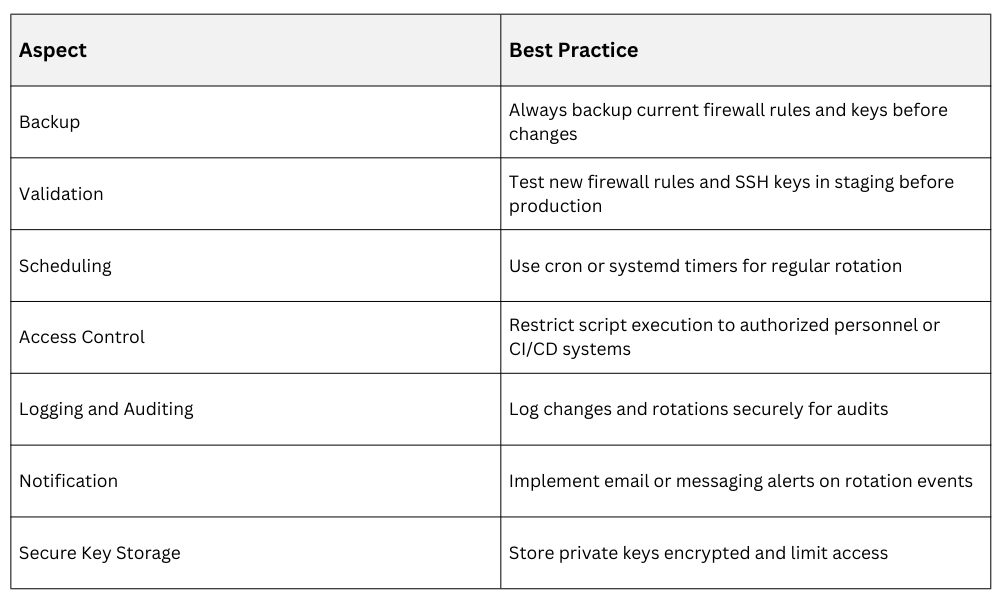
Regular rotation of firewall rules and SSH keys is a fundamental security practice that reduces exposure to compromised credentials and outdated configurations. Automation of these tasks within Linux environments boosts consistency, reduces human error, and ensures timely updates aligned with security policies.
Importance of Automating Firewall Rule Management
Automating firewall rule management is important because firewall configurations frequently change to accommodate evolving network requirements and emerging security threats. Relying on manual updates increases the risk of configuration errors, inconsistencies, and delayed responses to critical changes.
Automation enables firewall rules to be deployed in a controlled and tested manner, often with built-in rollback capabilities to quickly recover from failures. It also supports regular audits and ensures ongoing compliance with dynamic security policies and regulatory requirements.
Automating Firewall Rule Updates
Scripts can manage iptables or nftables rulesets by:
1. Loading updated rules from centrally managed configuration files.
2. Backing up current rules before applying changes.
3. Validating syntax and testing rules in a safe mode (e.g., dry run if supported).
4. Scheduling automated rule reloads with cron or systemd timers.
Example snippet to save and update iptables rules:
iptables-save > /etc/iptables/backup-$(date +%F).rules

iptables-restore < /etc/iptables/newrules.rules
Automating SSH Key Rotation
SSH key rotation is essential because SSH keys function as long-term credentials, and if they are compromised, attackers may gain persistent unauthorized access to systems. Regularly rotating keys reduces the impact of key exposure by limiting how long a compromised key remains valid. This practice also supports the principle of least privilege and helps organizations meet security and compliance requirements.
Automating SSH Key Rotation Process
1. Generate new key pair programmatically or via automation tools.
2. Distribute new public keys to target systems' authorized_keys.
3. Remove or disable old keys securely after verifying new keys function correctly.
4. Notify users of key changes with clear instructions.
5. Maintain audit trails for auditability.
Example Script Outline for User Key Rotation
# Generate new key

ssh-keygen -t ed25519 -f ~/.ssh/id_ed25519_new -N ""


# Append new key to remote server authorized_keys

ssh user@remote "cat >> ~/.ssh/authorized_keys" < ~/.ssh/id_ed25519_new.pub


# Validate new key works

ssh -i ~/.ssh/id_ed25519_new user@remote "echo 'Key valid'"


# Remove old key from server after validation

ssh user@remote "sed -i '/old_key_comment/d' ~/.ssh/authorized_keys"
Best Practices for Automation