Secure Shell (SSH) is the most widely used protocol for remote access and management of Linux servers. Because SSH provides encrypted communication over unsecured networks, it is vital to configure it securely to prevent unauthorized access, eavesdropping, and attacks such as brute force logins.
SSH Key Management
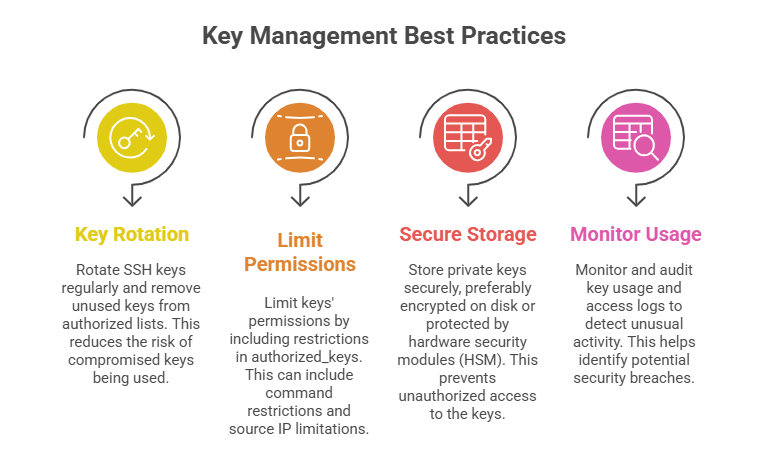
Key-based authentication replaces traditional password-based SSH access by using a pair of cryptographic keys: a public key and a private key. The private key is securely stored on the client machine and never shared, while the corresponding public key is placed on the server to verify the client’s identity.
This approach significantly enhances security by eliminating the risks associated with weak, reused, or stolen passwords, making unauthorized access much harder.
Generating and Using SSH Keys
1. Generate key pair using ssh-keygen:
ssh-keygen -t ed25519 -C "user@hostname"2. Public key is copied to the server’s ~/.ssh/authorized_keys file using ssh-copy-id or manual copy.
3. Use strong passphrases for private keys to add an extra layer of protection.
SSH Configuration for Security
Proper SSH configuration is a foundational task for system administrators. The settings listed here strengthen authentication, limit exposure, and improve monitoring and accountability.
Essential SSH Server Configuration Settings
1. Disable password authentication to enforce key-based logins only:
PasswordAuthentication no2. Change the default SSH port (22) to a less common port to reduce automated attacks:
Port 22223. Restrict root login by setting:
PermitRootLogin no4. Limit user logins by specifying allowed users or groups:
AllowUsers adminuser5. Enable and configure fail2ban or similar tools to block repeated failed login attempts.
Other Security Settings
1. Use strong cryptographic algorithms and disable weak ones:
Ciphers aes256-gcm@openssh.com,chacha20-poly1305@openssh.com2. Use AllowTcpForwarding and X11Forwarding judiciously or disable if not needed.
3. Employ enhanced logging and monitoring using SSH logs for audit trails.
SSH Tunneling
SSH tunneling (port forwarding) creates encrypted connections to securely route other types of traffic through an SSH session. Useful for encrypting insecure protocols, bypassing firewalls, or accessing internal network services.
Types of SSH Tunneling
1. Local Port Forwarding: Forward a local port to a remote server.
ssh -L local_port:destination:remote_port user@ssh_server2. Remote Port Forwarding: Forward a port from the remote server to the local machine.
ssh -R remote_port:destination:local_port user@ssh_server3. Dynamic Port Forwarding: Acts as a SOCKS proxy for flexible tunneling.
ssh -D local_port user@ssh_serverSecurity Considerations for Tunneling
Security considerations for tunneling focus on minimizing misuse while preserving legitimate access. Tunneling capabilities should be restricted in the sshd_config file when they are not required, reducing the attack surface of the system.
Traffic passing through SSH tunnels must be monitored to detect unauthorized or suspicious activity. For stronger protection, tunneling should be combined with firewall rules and SSH key–based restrictions, ensuring that only approved users and use cases are permitted.
