Managing users and groups securely on a Linux system is fundamental to ensuring that only authorized individuals can access the correct resources with the appropriate privileges. Linux uses users to represent human or system entities and groups to organize users and apply permissions collectively.
Secure user and group management minimizes insider threats, enforces the least privilege principle, and simplifies administration, making it a cornerstone of Linux system security.
Understanding Users and Groups in Linux
Users: Every person or service accessing a Linux system has a unique user ID (UID). Users can be categorized as:
1. Regular users
2. System or service users (typically with UID below 1000)
3. Administrative users with sudo privileges
Groups: Groups are collections of users that simplify permission management. Each user belongs to one primary group and zero or more secondary groups.
Groups allow assigning shared permissions on files or resources instead of configuring individual user permissions repeatedly.
Secure User Management Practices
Following secure user management practices reduces exposure to unauthorized access and compliance risks. The key practices below highlight strong password enforcement, controlled privileges, and regular account reviews.
1. User Creation and Deletion
Use commands like useradd, usermod, and userdel with mandatory flags to set secure defaults.
Always specify home directory, shell, and group memberships explicitly.
2. Password Management
Enforce strong password policies with tools like passwd and /etc/login.defs.
Configure password expiration and complexity requirements to mitigate brute-force or unauthorized access.
3. Use of sudo for Privilege Management
Avoid direct root login; grant limited administrative privileges via sudo.
Configure /etc/sudoers carefully to restrict commands users can execute with elevated privileges.
4. Regular Account Audits
Periodically audit user accounts for inactivity or inappropriate permissions using commands like lastlog and reviewing /etc/passwd and /etc/shadow.
Remove or disable unused accounts promptly.
Secure Group Management Practices
Secure group management supports both operational efficiency and access control. The list below covers group creation, role-based assignment, and routine audits to ensure proper permissions.
1. Creating and Managing Groups
Groups can be created using the groupadd command, and their details can be modified with groupmod. Users can be assigned to groups using usermod -aG, which appends the user to the group without removing any existing memberships. This approach ensures that users maintain all relevant access while being added to new groups as needed.
2. Role-based Group Design
Groups should be structured according to job roles or organizational functions, such as developers, system administrators, or auditors. Keeping group memberships minimal is essential to uphold the principle of least privilege, ensuring that users have access only to the resources necessary for their specific roles.
3. Group Permission Audits
Regularly reviewing group memberships is crucial to remove unnecessary access and maintain system security. Tools such as groups or getent group can be used to report current group memberships, providing visibility into access controls and helping administrators enforce proper permissions.
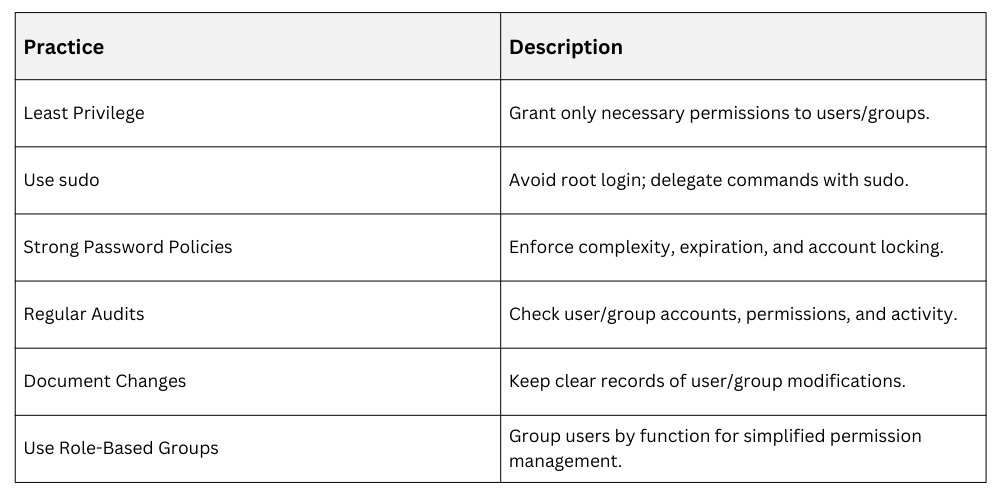
Best Practices
 Monitoring and Logging
Authentication logs, typically located at /var/log/auth.log or an equivalent path, should be enabled and regularly monitored to detect any suspicious login attempts. Additionally, auditing group membership changes and tracking user privilege escalations on a regular basis helps ensure that access controls remain appropriate and any unauthorized activities are promptly identified.
