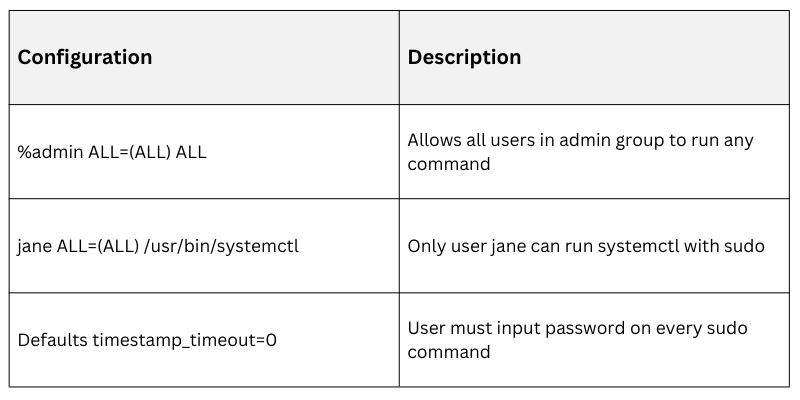
The sudo command is a critical tool in Linux environments for managing privilege escalation securely. It allows authorized users to perform commands with elevated privileges without sharing the root password, enforcing accountability and granular access control. Proper configuration of sudo is essential to minimizing risks associated with privilege misuse and unauthorized access.
Understanding Sudo and Privilege Escalation
Sudo (Superuser Do): Enables permitted users to execute specific commands or all commands as the root user or another user.
Privilege Escalation: The process where a user gains higher privileges than initially assigned. sudo is a controlled and auditable method for this.
Careful management of sudo prevents abuse, reduces exposure to root access, and supports compliance and auditing.
Best Practices for Sudo Configuration
Following best practices for sudo ensures controlled, accountable, and secure administrative operations. The main points below outline strategies for limiting privileges, auditing usage, and educating users.
1. Use the Principle of Least Privilege: Grant users only the minimum necessary privileges by defining specific commands they can execute with sudo. Avoid broad permissions like ALL unless absolutely required, and fine-tune command aliases to limit scope and reduce security risks.
2. Avoid Direct Root Logins: Direct root logins, whether over SSH or locally, should be disabled whenever possible. Instead, use sudo for all administrative tasks to maintain accountability and generate logs for auditing purposes.
3. Carefully Edit the sudoers File: Always modify /etc/sudoers using visudo to prevent syntax errors that could lock out administrative access. Using %group syntax to assign policies to groups rather than individual users simplifies management and enhances security.
4. Enable Logging and Auditing: Configure sudo to log all executed commands, optionally including command output. Regularly monitor logs such as /var/log/auth.log or /var/log/secure to detect unusual or suspicious activity.
5. Require Authentication for sudo Commands: Users should enter their own passwords to confirm identity before executing sudo commands, reducing the risk of misuse. Carefully configure timeout settings to limit prolonged unauthorized access.
6. Use Sudo Aliases and Defaults for Fine Control: Command aliases can group related commands for easier management. Set restrictions selectively, such as !authenticate, and control environment variables to prevent privilege escalation exploits.
7. Limit Sudo Access by Time and Terminal: Use sudo extensions like pam_time for time-based access control and restrict sudo usage to specific terminals or IP addresses when applicable to enhance security.
8. Educate and Train Users: Ensure users understand their responsibilities when using sudo and the associated security implications. Providing training helps prevent mistakes, such as unnecessarily running shell commands with elevated privileges.
Example sudoers Entries