Mediapipe
MediaPipe is an open-source, cross-platform framework developed by Google for building real-time, machine-learning–powered computer vision and multimedia applications. It provides ready-made pipelines and highly optimized models for tasks such as face detection, hand tracking, pose estimation, object detection, and gesture recognition, all designed to run efficiently on mobile devices, desktops, and even web environments. MediaPipe simplifies complex vision workflows by combining pre-trained ML models with customizable processing graphs, allowing developers to focus on application logic rather than implementing algorithms from scratch. Its speed, accuracy, and ability to run on-device make it widely used in AR/VR, fitness apps, gaming, virtual makeup, sign-language detection, and interactive AI-based systems. With its modular design and real-time performance, MediaPipe has become a powerful tool for building intelligent, interactive, and production-ready computer vision applications.
Importance of MediaPipe in the Real World
MediaPipe is extremely important in real-world applications because it brings advanced, real-time computer vision and machine learning capabilities to everyday devices with exceptional speed and accuracy. It enables developers to build intelligent interactive systems—such as AR effects, gesture-based controls, fitness apps, and virtual assistants—without needing deep expertise in machine learning. Its ready-to-use pipelines and optimized architectures make complex visual tasks easy to implement, even on low-power hardware. With cross-platform compatibility and pre-trained models, MediaPipe has become a crucial backbone for modern AI-powered applications across industries.
1. Real-Time Visual Intelligence
MediaPipe provides highly accurate, real-time visual analysis for tracking faces, hands, bodies, and gestures. Its ability to detect movements instantly makes it essential for systems that rely on user interaction, such as AR filters, VR controls, and real-time monitoring apps. By delivering fast and stable performance, it enhances user experience and makes visual AI more responsive and natural. This real-time capability is one of the biggest reasons MediaPipe is used widely in industry applications.
2. Highly Optimized ML Pipelines
One of MediaPipe’s biggest strengths is that it offers fully optimized machine learning pipelines that run smoothly even on phones with average hardware. These pipelines reduce dependency on cloud servers or high-end GPUs, making applications lighter, faster, and more cost-effective. Developers can integrate advanced ML features without worrying about heavy processing requirements. This optimization brings powerful AI features into daily-use mobile applications.
3. Cross-Platform Deployment
MediaPipe supports multiple platforms including Android, iOS, web browsers, Python environments, and embedded devices. This cross-platform flexibility allows developers to build once and deploy everywhere without rewriting code for each platform. It significantly reduces development time while ensuring a consistent experience across devices. This level of portability makes MediaPipe ideal for startups, enterprises, and educational projects.
4. Pre-Trained ML Models
MediaPipe provides a large collection of pre-trained models such as Face Mesh, Hands, Pose Estimation, Iris Detection, and Objectron 3D. These models allow developers to instantly integrate advanced vision features without spending weeks or months on training datasets and model development. This saves time, cost, and effort and allows even beginners to create intelligent applications quickly. Pre-trained models make MediaPipe a powerful and accessible tool for rapid prototyping and production use.
5. Accuracy in Complex Tasks
MediaPipe delivers high precision in tasks like landmark detection, gesture recognition, and segmentation, even in challenging conditions. Its advanced algorithms ensure stable and reliable outputs, which is critical for fields like healthcare diagnostics, robotics, physiotherapy apps, and AR-based training systems. Higher accuracy reduces the chances of errors and ensures that AI-powered systems behave intelligently. This reliability is what makes MediaPipe suitable for professional and commercial use.
6. Lightweight and Efficient
Unlike many heavy machine learning frameworks, MediaPipe is designed to be lightweight and optimized for mobile performance. It allows AI models to run without draining battery, causing lag, or slowing down the device. This efficiency helps bring advanced ML features to low-cost phones, IoT devices, and wearable gadgets. As a result, MediaPipe makes real-time AI accessible to a wider global audience.
7. Scalability for Large Applications
MediaPipe’s pipelines and modular graph-based architecture are built to scale efficiently. Large enterprises use it for real-time monitoring systems, customer analytics, automated tracking, and security applications. Its ability to handle multiple complex workloads at once makes it suitable for production-grade systems. Scalability ensures that applications built with MediaPipe can grow without performance issues.
8. Customizable Modules
MediaPipe is highly modular, which allows developers to modify and customize pipelines according to project-specific needs. Whether it's adjusting face landmarks, changing gesture detection rules, or adding new visual components, MediaPipe provides the flexibility required for innovation. This makes it useful in diverse fields including gaming, retail, healthcare, robotics, and education. Its adaptability increases the scope of what developers can create.
9. Open-Source and Developer Friendly
MediaPipe is fully open-source, supported by extensive documentation, demos, tutorials, and an active developer community. This makes it easy to learn, experiment, and integrate into projects, even for beginners. Its open nature promotes continuous improvements and encourages developers worldwide to innovate using its tools. This accessibility is a major reason behind its widespread adoption in real-world applications.
Uses of MediaPipe in the Real World
MediaPipe is a versatile framework that enables real-time computer vision and machine learning applications.
It is widely used to track faces, hands, body poses, and objects accurately across videos and live streams.
Its high efficiency and pre-built modules make it essential for interactive apps in AR, fitness, healthcare, gaming, and robotics.
1. Face Tracking and Analysis
MediaPipe is widely used for advanced face tracking tasks, including face recognition, face mesh generation, and expression or emotion analysis. Video calling and conferencing platforms rely on its capabilities to apply features like background blur, beauty filters, face alignment, and automatic lighting correction in real time. Augmented reality applications also depend on MediaPipe’s precise facial landmark detection to accurately map virtual objects onto a user’s face, making AR effects more stable and realistic.
2. Hand Tracking and Gesture Control
MediaPipe plays a major role in building gesture-based interfaces, virtual keyboards, and touchless control systems by providing high-accuracy hand tracking and finger-landmark detection. It enables gaming platforms to capture and interpret hand movements, creating immersive and interactive gameplay experiences. Additionally, its detailed hand-pose tracking supports the development of sign language recognition systems, making communication more accessible in assistive technologies.
3. Pose Estimation in Fitness and Sports
Fitness and workout applications use MediaPipe’s pose estimation models to count exercise repetitions, correct form, and guide users through routines with real-time feedback. Sports training systems analyze athletes’ body movements to improve technique, reduce errors, and enhance overall performance. Physiotherapy and rehabilitation platforms also depend on MediaPipe for posture monitoring and movement tracking, helping patients recover with guided and precise exercise evaluation.
4. AR and VR Applications
MediaPipe powers key AR and VR experiences by enabling real-time tracking of users’ faces, hands, and body movements, which are essential for creating interactive and immersive environments. Applications use its virtual try-on features for makeup, accessories, and clothing, while the Objectron model helps track 3D objects for AR-based product visualization. Its accurate movement mapping significantly improves the quality and realism of AR filters, virtual environments, and gaming experiences.
5. Robotics and Automation
In robotics, MediaPipe is used for visual recognition tasks such as detecting objects, tracking movement paths, and assisting robots in navigating through environments. Industrial robots benefit from MediaPipe’s visual intelligence to automate processes that require accurate detection and classification of items. Service robots use gesture and body movement recognition to interact more naturally with humans, enhancing human-robot communication and safety.
6. Security and Monitoring
MediaPipe plays a crucial role in modern security and surveillance systems by enabling real-time face detection and behavior analysis. It helps identify suspicious movements, monitor crowds, and provide real-time alerts based on visual inputs. Smart security devices also utilize gesture recognition powered by MediaPipe to allow hands-free control and intuitive interaction, improving both safety and user convenience.
7. Healthcare and Medical Applications
MediaPipe supports various healthcare solutions, including posture tracking, exercise monitoring, and remote physiotherapy, enabling patients to receive accurate guidance without visiting clinics. Its facial analysis capabilities assist medical researchers in detecting signs of fatigue, stress, or emotional changes during studies. By providing a non-invasive method of monitoring body movements through cameras, MediaPipe enhances telehealth and remote diagnosis systems.
8. Education and E-Learning
MediaPipe improves digital education by enabling features such as attention tracking, gesture-based learning, and AI-powered virtual teaching assistants. Interactive learning applications use it to interpret student engagement by analyzing face, eye, and body movements. This enhances the teaching process and makes virtual learning more personalized, interactive, and effective for students.
9. Retail and Customer Interaction
Retail applications use MediaPipe to power virtual try-on systems for items like glasses, jewelry, and makeup through accurate face and hand modeling. Stores enhance customer behavior analysis with its pose and facial tracking, allowing them to understand browsing patterns and improve product placement. Interactive kiosks and shopping displays also use gesture control enabled by MediaPipe, offering a touchless and modern shopping experience.
Comparison Between MediaPipe and OpenCV
1. Overview
OpenCV: OpenCV is an open-source library that provides a comprehensive set of tools for computer vision, image processing, and video analysis. It focuses on low-level image operations and algorithmic flexibility. OpenCV is widely used for both academic research and industrial applications, offering developers the ability to implement complex image processing pipelines from scratch. Its modular design allows integration with multiple programming languages and other AI frameworks, making it versatile for a variety of projects.
MediaPipe: MediaPipe is a cross-platform framework designed for building real-time machine learning pipelines. It emphasizes high-level, pre-trained solutions for tasks like face, hand, and pose tracking, optimized for real-time applications. MediaPipe abstracts much of the complexity involved in building vision-based AI systems, providing developers with ready-to-use pipelines that are efficient, accurate, and suitable for interactive applications across devices.
2. Purpose and Focus
OpenCV: Focuses on general-purpose computer vision tasks, such as filtering, edge detection, image transformations, and object detection. Developers can create custom pipelines by combining these low-level functions. It is intended for users who want fine-grained control over image and video analysis algorithms, making it ideal for experimentation, research, and building fully customized vision solutions.
MediaPipe: Focuses on ready-to-use, real-time AI solutions for interactive applications, such as AR filters, gesture recognition, and body pose estimation. It abstracts the complexity of underlying algorithms, enabling developers to implement sophisticated machine learning features without deep knowledge of the math or model training behind them. Its main goal is to accelerate the deployment of practical, real-time AI applications.
3. Level of Abstraction
OpenCV: Provides low-level functions that require manual integration to perform higher-level tasks. Suitable for developers who want full control over processing pipelines and wish to tailor algorithms for specific requirements. This approach offers flexibility but requires deeper technical knowledge to build end-to-end vision systems.
MediaPipe: Provides high-level, pre-built pipelines and models. Users can perform complex vision tasks directly without designing the algorithms themselves. This high level of abstraction allows quick implementation and reduces development time, especially for real-time interactive applications where speed and reliability are critical.
4. Real-Time Processing
OpenCV: Supports real-time video processing, but complex AI tasks require additional model integration and optimization. Performance heavily depends on the developer’s implementation, hardware capabilities, and efficiency of custom pipelines. It provides the tools to achieve real-time performance but demands more effort to optimize deep learning models or multi-stage workflows.
MediaPipe: Optimized for low-latency, real-time applications on mobile, web, and embedded devices. Its pipelines are designed for immediate deployment in interactive scenarios, providing smooth and efficient tracking of faces, hands, and bodies without heavy manual optimization. MediaPipe’s architecture prioritizes speed while maintaining high accuracy in dynamic environments.
5. Pre-Trained Models
OpenCV: Limited pre-trained models for traditional tasks (e.g., face detection, object recognition). For modern deep learning-based tasks, integration with external frameworks like TensorFlow, PyTorch, or Caffe is required. While OpenCV includes some classical models, the focus remains on low-level vision operations, so developers often need to train or import advanced models themselves.
MediaPipe: Includes multiple pre-trained models such as Face Mesh, Hands, Pose, Holistic, and Objectron. These models are ready to use and optimized for real-time performance. MediaPipe simplifies deployment by providing tested and highly optimized ML models, eliminating the need for model training or complicated configuration in many use cases.
6. Ease of Use
OpenCV: Requires understanding of image processing techniques and sometimes integration with other libraries. Offers high flexibility but comes with a steeper learning curve, as developers must manage low-level operations, pipelines, and algorithmic details themselves.
MediaPipe: User-friendly and beginner-friendly. Pre-built modules and pipelines allow quick deployment of advanced applications with minimal coding. It is ideal for developers who want to focus on application logic rather than the complexities of algorithm design and model training.
7. Platform Support
OpenCV: Cross-platform support including Windows, Linux, macOS, Android, and iOS. Integration with deep learning models may need additional dependencies, such as TensorFlow or PyTorch. OpenCV is highly versatile but may require careful configuration for mobile or embedded deployment.
MediaPipe: Cross-platform support including Android, iOS, Web, Python, and embedded devices. Optimized for mobile and low-power hardware, making it ideal for interactive apps. Its framework ensures consistent performance across platforms and simplifies deployment in production environments.
MediaPipe Architecture and Components
MediaPipe is a cross-platform framework for building customizable, high-performance pipelines for processing audio, video, and sensor data. Its architecture is designed around the concept of modular components that process data in a streaming fashion, enabling real-time applications such as hand tracking, pose detection, face mesh, and object detection. MediaPipe pipelines are constructed using graphs, calculators, packets, and streams, which together allow developers to build complex vision and audio processing systems in a modular and efficient way. This architecture ensures scalability, flexibility, and reusability across different platforms like Android, iOS, web, and desktop.
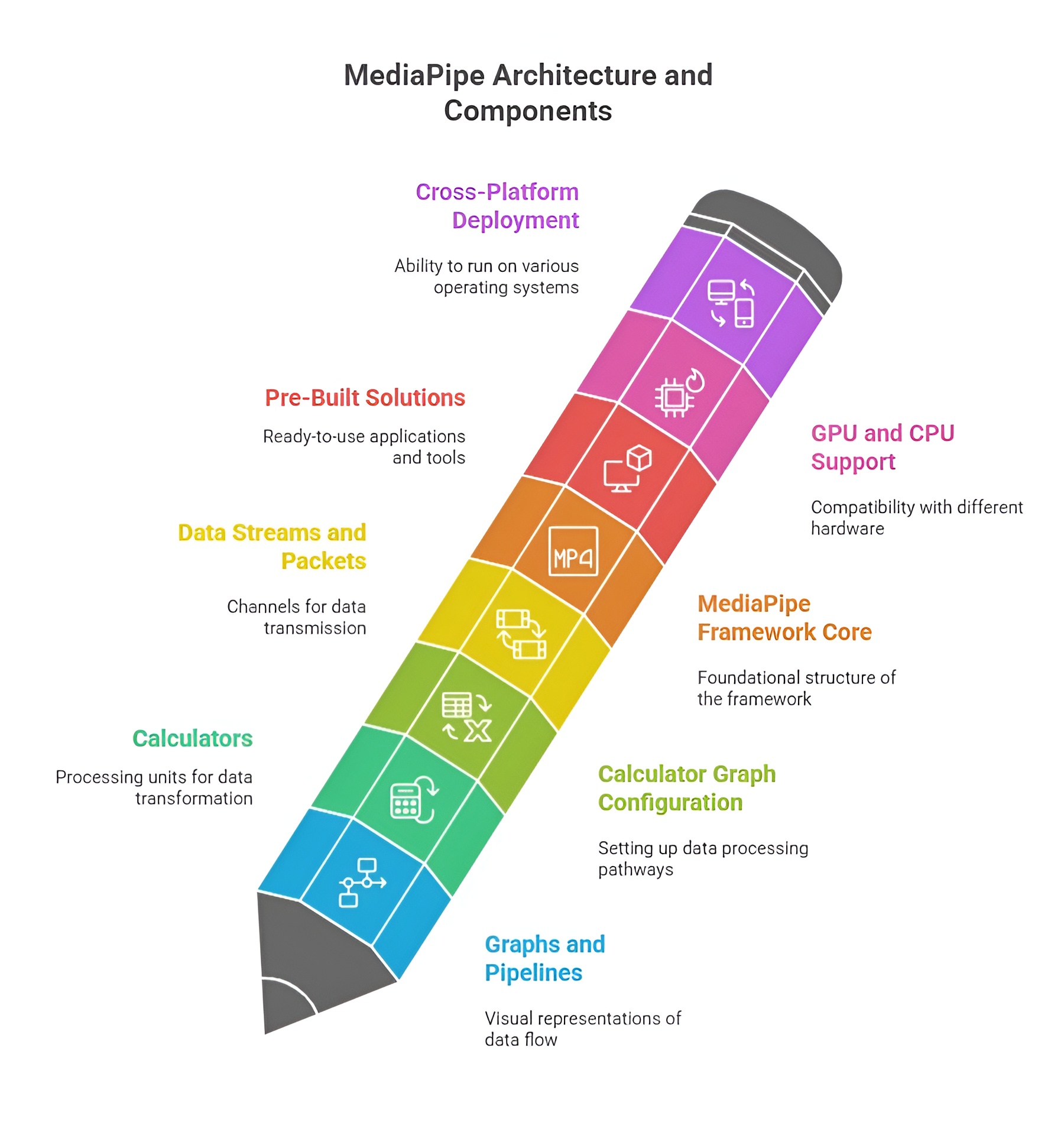
MediaPipe Graph: Nodes and Streams
The MediaPipe graph is the backbone of the framework. It is a directed graph where each node represents a calculator that performs a specific operation, and edges represent streams that carry data between calculators. Nodes can include preprocessing steps, inference models, post-processing, or visualization modules. Streams provide continuous data flow, allowing real-time processing without manually handling frame-by-frame operations. The graph design allows multiple calculators to work in parallel, supporting modularity and efficient pipeline execution.
Example: A simple face detection pipeline may have nodes for video input, face detection, landmark calculation, and rendering, connected via streams to pass data sequentially.
Calculator: Role in the Pipeline
A calculator is the fundamental processing unit in MediaPipe. Each calculator receives input packets, performs a defined operation (e.g., filtering, classification, or transformation), and outputs processed packets to the next calculator. Calculators are modular and reusable, enabling developers to assemble complex pipelines by connecting multiple calculators in a graph. Their role is to encapsulate individual processing logic while remaining agnostic to the source of input or destination of output, which makes MediaPipe highly flexible and maintainable.
Example: A "Hand Landmark Calculator" might take an image frame as input, run a neural network to detect hand keypoints, and output a structured list of landmarks.
Packet: Data Movement Between Calculators
A packet is a container for data that flows through the MediaPipe pipeline. Packets can carry images, audio buffers, landmark coordinates, or any other data type. Each packet is timestamped, ensuring synchronization across different streams. This packet-based design allows MediaPipe to handle asynchronous data sources, manage real-time inputs, and maintain consistency in multi-stream pipelines. Packets serve as the basic unit of communication, enabling smooth and ordered flow of data through the calculators.
Example: An input packet could contain a single video frame, which is then processed by a face detection calculator and output as a packet containing face bounding boxes.
Input and Output Streams
Streams define the flow of data into, between, and out of calculators. Input streams provide data to calculators, while output streams carry results to downstream calculators or to external modules such as display, logging, or storage. Streams are essential for real-time processing, as they allow continuous, frame-by-frame data handling. Each stream is strongly typed, so the type of data it carries must match the expectations of connected calculators, ensuring type safety and correctness in the pipeline.
How Pipelines Work: Example Flow
1. Modular Pipeline Architecture
MediaPipe works by creating modular, real-time processing pipelines called graphs, which consist of interconnected units called calculators. Each calculator performs a specific task on the data, and the data is passed between calculators in the form of packets. These packets contain frames from a camera, video, or sensor along with timestamps to maintain synchronization. This architecture allows high-frequency, real-time processing while keeping multiple streams aligned.
2. Input Capture
MediaPipe captures data from sources like webcams, video files, or sensors. Each frame or sample is wrapped in a packet, which carries both the data and a timestamp. This ensures all downstream calculators process frames in the correct sequence and allows multiple streams to run simultaneously without losing timing integrity.
3. Preprocessing
Before analysis, raw input is standardized to ensure reliable performance in later stages. Preprocessing involves resizing frames to fixed resolutions suitable for neural networks, converting color spaces (e.g., RGB to grayscale or HSV), normalizing pixel intensity, and filtering or smoothing images to remove noise. This ensures consistent and high-quality input for the core processing stage.
4. Core Processing / Inference
The core stage is where the main computation occurs, often powered by machine learning models embedded within calculators. Examples include hand tracking, where 21 keypoints are predicted; face mesh generation, which outputs 468 3D facial landmarks; and object detection, which identifies bounding boxes and labels. Calculators receive packets from preprocessing, perform computations, and output processed packets containing results like landmark coordinates or detection data.
5. Post-Processing
After inference, MediaPipe refines and formats the output. Post-processing may include smoothing landmark positions to reduce jitter, filtering out low-confidence predictions, transforming coordinates for display, or annotating frames for visualization. This ensures that results are usable for applications such as AR overlays, pose estimation, gesture recognition, or gesture-controlled interfaces.
6. Output Delivery
Finally, MediaPipe delivers the processed data through output streams to the intended destination. This can include displaying annotated frames on a screen, sending structured data like hand or body positions to applications, or storing processed videos or sensor data for analysis. The streaming architecture allows multiple calculators to work in parallel without losing synchronization, ensuring high-performance, real-time operation across desktop, mobile, and embedded platforms.
MediaPipe Pre-Built Solutions
MediaPipe offers a collection of pre-built solutions that allow developers to perform complex computer vision tasks without manually designing or training machine learning models. These solutions encapsulate advanced neural networks, image processing calculators, and post-processing modules into ready-to-use pipelines. Each solution is optimized for real-time performance and cross-platform compatibility, enabling developers to focus on application logic instead of low-level algorithm implementation. Pre-built solutions cover tasks such as face detection, facial landmark estimation, hand tracking, body pose estimation, and even object detection in 3D space. They are designed to take image or video input, process it through MediaPipe graphs, and produce structured outputs that can be directly used in applications.
Face Detection
Face detection is the process of identifying and locating faces within images or video frames. MediaPipe’s face detection solution uses a lightweight yet accurate neural network that identifies faces in real time. The input is usually an RGB image or video frame, and the output consists of bounding boxes around detected faces along with confidence scores for each detection. This solution is widely used in applications such as facial recognition, emotion detection, virtual try-on, video conferencing, and augmented reality filters. MediaPipe handles multiple faces per frame and provides fast detection suitable for mobile and desktop environments.
Example Use-Case: Detecting faces in a webcam feed to apply real-time filters or face blurring for privacy.
import cv2
import mediapipe as mp
mp_face_detection = mp.solutions.face_detection
face_detection = mp_face_detection.FaceDetection(min_detection_confidence=0.5)
cap = cv2.VideoCapture(0)
while cap.isOpened():
success, frame = cap.read()
if not success:
break
frame_rgb = cv2.cvtColor(frame, cv2.COLOR_BGR2RGB)
results = face_detection.process(frame_rgb)
if results.detections:
for detection in results.detections:
bbox = detection.location_data.relative_bounding_box
h, w, _ = frame.shape
x, y, w_box, h_box = int(bbox.xmin * w), int(bbox.ymin * h), int(bbox.width * w), int(bbox.height * h)
cv2.rectangle(frame, (x, y), (x + w_box, y + h_box), (0, 255, 0), 2)
cv2.imshow("Face Detection", frame)
if cv2.waitKey(1) & 0xFF == ord('q'):
break
cap.release()
cv2.destroyAllWindows()
Face Mesh
Face Mesh extends detection to 468 3D facial landmarks, mapping precise features like eyes, nose, lips, and jawline. This is essential for applications like virtual makeup, AR face filters, expression tracking, and medical facial assessments. It provides detailed 3D coordinates for each landmark, allowing realistic overlays or measurements.
Example: Draw detailed facial landmarks on webcam frames.
import cv2
import mediapipe as mp
mp_face_mesh = mp.solutions.face_mesh
face_mesh = mp_face_mesh.FaceMesh(max_num_faces=1)
cap = cv2.VideoCapture(0)
while cap.isOpened():
success, frame = cap.read()
if not success:
break
frame_rgb = cv2.cvtColor(frame, cv2.COLOR_BGR2RGB)
results = face_mesh.process(frame_rgb)
if results.multi_face_landmarks:
for face_landmarks in results.multi_face_landmarks:
for landmark in face_landmarks.landmark:
h, w, _ = frame.shape
x, y = int(landmark.x * w), int(landmark.y * h)
cv2.circle(frame, (x, y), 1, (0, 255, 0), -1)
cv2.imshow("Face Mesh", frame)
if cv2.waitKey(1) & 0xFF == ord('q'):
break
cap.release()
cv2.destroyAllWindows()
Hands Tracking
Hands Tracking detects 21 landmarks per hand. The input is an RGB frame, and the output is normalized x, y, z coordinates for each landmark. Applications include gesture control, sign language recognition, AR hand overlays, and virtual keyboards. MediaPipe supports multiple hands and provides smooth, real-time tracking.
Example: Draw hand landmarks with connections.
import cv2
import mediapipe as mp
mp_hands = mp.solutions.hands
hands = mp_hands.Hands(max_num_hands=2)
mp_draw = mp.solutions.drawing_utils
cap = cv2.VideoCapture(0)
while cap.isOpened():
success, frame = cap.read()
if not success:
break
frame_rgb = cv2.cvtColor(frame, cv2.COLOR_BGR2RGB)
results = hands.process(frame_rgb)
if results.multi_hand_landmarks:
for hand_landmarks in results.multi_hand_landmarks:
mp_draw.draw_landmarks(frame, hand_landmarks, mp_hands.HAND_CONNECTIONS)
cv2.imshow("Hand Tracking", frame)
if cv2.waitKey(1) & 0xFF == ord('q'):
break
cap.release()
cv2.destroyAllWindows()
Pose Detection
Pose Detection estimates full-body landmarks including shoulders, elbows, hips, knees, and ankles. The input is an RGB image, and the output is a structured set of coordinates with visibility scores. Use cases include fitness apps, posture monitoring, motion capture, and sports analytics.
Example: Draw body pose landmarks on video frames.
import cv2
import mediapipe as mp
mp_pose = mp.solutions.pose
pose = mp_pose.Pose()
mp_draw = mp.solutions.drawing_utils
cap = cv2.VideoCapture(0)
while cap.isOpened():
success, frame = cap.read()
if not success:
break
frame_rgb = cv2.cvtColor(frame, cv2.COLOR_BGR2RGB)
results = pose.process(frame_rgb)
if results.pose_landmarks:
mp_draw.draw_landmarks(frame, results.pose_landmarks, mp_pose.POSE_CONNECTIONS)
cv2.imshow("Pose Detection", frame)
if cv2.waitKey(1) & 0xFF == ord('q'):
break
cap.release()
cv2.destroyAllWindows()
Holistic Tracking
Holistic Tracking combines face mesh, hand landmarks, and body pose into a single pipeline. The input is an RGB image, and the output is a complete set of landmarks for the face, both hands, and body. This solution is ideal for full-body interactive AR, avatars, and gesture-based applications.
Example: Draw all landmarks for holistic tracking.
import cv2
import mediapipe as mp
mp_holistic = mp.solutions.holistic
holistic = mp_holistic.Holistic()
mp_draw = mp.solutions.drawing_utils
cap = cv2.VideoCapture(0)
while cap.isOpened():
success, frame = cap.read()
if not success:
break
frame_rgb = cv2.cvtColor(frame, cv2.COLOR_BGR2RGB)
results = holistic.process(frame_rgb)
if results.face_landmarks:
mp_draw.draw_landmarks(frame, results.face_landmarks, mp_holistic.FACEMESH_TESSELATION)
if results.left_hand_landmarks:
mp_draw.draw_landmarks(frame, results.left_hand_landmarks, mp_holistic.HAND_CONNECTIONS)
if results.right_hand_landmarks:
mp_draw.draw_landmarks(frame, results.right_hand_landmarks, mp_holistic.HAND_CONNECTIONS)
if results.pose_landmarks:
mp_draw.draw_landmarks(frame, results.pose_landmarks, mp_holistic.POSE_CONNECTIONS)
cv2.imshow("Holistic Tracking", frame)
if cv2.waitKey(1) & 0xFF == ord('q'):
break
cap.release()
cv2.destroyAllWindows()
Objectron / Object Detection
Objectron detects and tracks 3D objects with orientation information. The input is an RGB frame, and the output is 3D bounding boxes. Applications include AR shopping, robotics, inventory management, and real-time 3D object interaction.
Example: Draw 3D object landmarks on detected objects.
import cv2
import mediapipe as mp
mp_objectron = mp.solutions.objectron
objectron = mp_objectron.Objectron(model_name='Shoe', max_num_objects=1)
mp_draw = mp.solutions.drawing_utils
cap = cv2.VideoCapture(0)
while cap.isOpened():
success, frame = cap.read()
if not success:
break
frame_rgb = cv2.cvtColor(frame, cv2.COLOR_BGR2RGB)
results = objectron.process(frame_rgb)
if results.detected_objects:
for detected_object in results.detected_objects:
mp_draw.draw_landmarks(frame, detected_object.landmarks_2d, mp_objectron.BOX_CONNECTIONS)
cv2.imshow("Objectron Detection", frame)
if cv2.waitKey(1) & 0xFF == ord('q'):
break
cap.release()
cv2.destroyAllWindows()
Applications of MediaPipe
MediaPipe is a powerful framework for building real-time, cross-platform computer vision and audio processing pipelines. It enables developers to implement advanced applications such as gesture recognition, face and body tracking, augmented reality filters, and object detection without designing models from scratch. With its modular architecture, pre-built solutions, and optimized performance, MediaPipe finds applications across mobile, web, and desktop platforms. Its ability to process images, video, and sensor data efficiently makes it ideal for interactive, AI-driven experiences in gaming, fitness, robotics, and multimedia.
1. Virtual Makeup and AR Filters
MediaPipe’s face tracking and face mesh models allow real-time mapping of virtual objects onto users’ faces. This enables virtual makeup applications, beauty filters, and animated AR effects for social media, video calls, and entertainment platforms. Its precision ensures that virtual elements stay aligned even with rapid facial movements or changes in expression, creating immersive and realistic AR experiences.
2. Fitness Tracking and Health Applications
3. Gesture-Based Controls
4. Educational and Research Applications
MediaPipe enables interactive learning tools, attention tracking systems, and virtual teaching assistants. Facial and body tracking can measure student engagement, assess learning progress, and provide interactive feedback. Researchers use MediaPipe’s pre-trained models for studying human behavior, analyzing biomechanics, and exploring computer vision techniques, reducing the need to develop complex models from scratch.
5. Robotics and Human-Computer Interaction
MediaPipe’s combination of pre-trained models, real-time processing, high accuracy, and modular pipelines makes it suitable for AR/VR experiences, fitness tracking, gesture-based controls, education, research, and robotics. Its ability to run efficiently on mobile, web, and embedded platforms has made it a versatile tool for developing interactive and AI-powered applications across diverse industries.
