Computer Vision Library
A Computer Vision Library is a collection of pre-built functions, algorithms, and tools that help computers understand and analyze images and videos. It provides ready-made code that performs complex tasks such as reading images, detecting edges, recognizing objects, identifying faces, filtering images, and processing video frames.
These libraries simplify the entire computer vision process by handling mathematical operations, image transformations, and model implementation automatically. Instead of writing long, complex logic from scratch, developers can use these libraries to perform advanced vision tasks with just a few lines of code.
In simple words, a computer vision library acts as a toolbox that makes it easier, faster, and more accurate for computers to “see” and “understand” visual data, enabling applications like surveillance, robotics, medical imaging, AR/VR, and AI-powered image recognition.
Importance of Computer Vision in the Real World
Computer Vision is a branch of Artificial Intelligence that enables computers and machines to interpret, analyze, and understand visual information from the world. It focuses on teaching systems how to extract meaningful insights from images, videos, and live camera feeds just like humans do using their eyes and brain. It acts as the technological bridge that converts raw visual data into intelligent decisions and automated actions.
1. Automation of Visual Tasks
Computer vision refers to the technology that enables machines to interpret, understand, and process visual information in a way similar to human vision. Its importance lies in its ability to completely automate tasks that were earlier dependent on human eyes and judgment. By identifying objects, extracting text from images, recognizing patterns, and checking quality through visual inspection, computer vision transforms traditional manual processes into automated workflows. This automation reduces human effort, eliminates fatigue-based errors, and increases productivity across sectors such as manufacturing, retail, packaging, and logistics. In essence, computer vision acts as a digital visual worker that performs repetitive visual tasks with unmatched speed, consistency, and accuracy.
2. Enhancement of Safety and Security Systems
Computer vision plays a vital role in strengthening modern security and surveillance ecosystems. It acts as an intelligent visual monitoring system that analyzes live video feeds to detect suspicious behavior, recognize faces, track movements, and observe crowded areas without human supervision. These systems continuously interpret visual inputs, allowing real-time threat detection and immediate response to irregular activities. This automated understanding of visual scenes enhances public safety, supports law enforcement, and reduces the need for constant human monitoring. Computer vision therefore becomes the backbone of intelligent surveillance that is both scalable and highly reliable.
3. Improvement in Healthcare and Medical Imaging
In the medical field, computer vision is a transformative tool that enhances the accuracy and speed of diagnosis. It provides automated analysis of medical images, including X-rays, CT scans, MRIs, and ultrasound outputs. By identifying minute patterns, detecting tumors, highlighting abnormalities, and measuring anatomical structures, computer vision supports healthcare professionals in making quick and precise decisions. Its ability to process large amounts of visual medical data reduces human error, offers early disease detection, and ensures that treatment plans are based on highly accurate image interpretation. This elevates the overall quality of patient care and medical efficiency.
4. Support for Autonomous Vehicles and Robotics
Computer vision is fundamental to the development and functioning of autonomous vehicles and intelligent robots. It serves as the main sensory system that allows these machines to observe the world, interpret traffic signals, detect obstacles, identify road markings, and understand their surroundings. In self-driving cars, computer vision enables safe navigation and real-time decision-making. In robotics, it is used to recognize objects, grasp items accurately, and move intelligently within indoor and outdoor environments. This visual intelligence allows autonomous machines to operate safely, adapt to changing conditions, and perform complex tasks without direct human control.
5. Enhancement of Retail, E-Commerce, and Customer Experience
The retail and e-commerce industries benefit greatly from computer vision by integrating smart visual processing into everyday operations. Computer vision ensures faster product recognition, automated checkout, real-time inventory tracking, and accurate shelf monitoring. In online shopping, it enables virtual try-on tools by analyzing user images and fitting products digitally, such as glasses, clothing, or accessories. These capabilities enhance customer experience by making shopping more interactive, personalized, and efficient. Through visual automation and intelligent product handling, computer vision improves service delivery and operational accuracy.
6. Significant Role in Agriculture and the Food Industry
Computer vision brings scientific precision to agriculture by enabling detailed analysis of crops, soil, and plant health. It helps identify diseases at early stages, monitor crop growth patterns, evaluate plant color changes, and predict future yields with high accuracy. In the food industry, computer vision ensures strict quality standards by inspecting items for defects, sorting produce, detecting impurities, and maintaining cleanliness during processing. This visual intelligence allows farmers to adopt smart farming practices and helps food companies deliver safer and better-quality products. As a result, productivity increases and waste decreases significantly.
7. Better Quality Control in Manufacturing
In manufacturing environments, computer vision is an essential tool for achieving consistent quality and precision. It allows machines to visually inspect products on assembly lines, identify defects instantly, verify measurements, and confirm that each item meets predefined standards. Unlike human inspectors, computer vision systems work continuously without fatigue and maintain the same level of accuracy throughout the production cycle. This results in reduced wastage, fewer defective products, and higher manufacturing efficiency. Computer vision therefore becomes a key element in maintaining industrial reliability and product excellence.
8. Development of AR/VR and Digital Applications
Computer vision is the core technology behind augmented reality (AR), virtual reality (VR), and mixed reality solutions. It helps digital systems track user movement, interpret hand gestures, analyze surrounding environments, and accurately overlay virtual elements onto real-world scenes. These capabilities make AR and VR more immersive, interactive, and realistic. Industries such as gaming, interior design, education, training, and simulation heavily rely on computer vision to create dynamic digital experiences. By connecting the virtual world with real-world visuals, computer vision expands the scope of digital technology and opens the door to innovative applications.
Important Computer Vision Libraries
1) OpenCV
OpenCV (Open Source Computer Vision Library) is a powerful open-source library designed for computer vision and image processing tasks. It provides a large collection of built-in functions and algorithms that help computers analyze, understand, and process images and videos quickly. OpenCV supports operations such as image filtering, edge detection, face recognition, object detection, motion tracking, and real-time video analysis. Because it is highly optimized and works on multiple platforms like Windows, Linux, macOS, Android, and iOS, it is widely used in robotics, AI-based systems, surveillance, AR/VR, and scientific research. In simple terms, OpenCV is a complete toolkit that makes it easier for developers and machines to “see” and interpret visual data efficiently.
Importance of OpenCV in real-world applications
OpenCV is a widely used computer vision library in Python that enables real-time image and video processing for practical applications. It is essential for tasks like facial recognition, object detection, autonomous driving, medical imaging, and surveillance systems. OpenCV provides optimized functions for filtering, transformations, feature detection, and machine learning integration. Overall, its efficiency, versatility, and ease of use make OpenCV crucial for implementing real-world computer vision solutions.
1. Foundation for Image Processing and Visual Understanding
OpenCV is extremely important in the real world because it provides the core capabilities needed to understand and process images. It enables computers to perform tasks such as filtering, resizing, enhancing, and transforming images that human eyes do naturally. This visual foundation becomes essential for building intelligent systems that rely on accurate image input. From improving image quality to identifying meaningful features within visuals, OpenCV acts as the base tool that empowers machines to develop human-like visual understanding. Its efficient performance and wide range of functions make it a key component in photography apps, scanning tools, and digital imaging platforms.
2. Real-Time Object Detection and Tracking
A major importance of OpenCV lies in its ability to perform real-time object detection and tracking, which powers many modern applications around us. OpenCV allows cameras and systems to identify objects such as vehicles, people, faces, animals, or products and track their movement across video frames. This real-time ability is essential for surveillance cameras, traffic monitoring systems, sports analysis tools, and interactive robotics. Because OpenCV is optimized for high-speed processing, it ensures that visual detection happens instantly, allowing systems to react quickly to changes in their environment.
3. Support for Automation and Industrial Quality Control
OpenCV plays a crucial role in industrial automation by enabling machines to handle visual inspection tasks with great accuracy. Manufacturing lines use OpenCV-based systems to detect defects, measure dimensions, check alignment, and ensure product consistency without human involvement. Its image analysis functions ensure that every product meets quality standards before reaching customers. The importance of OpenCV in industries comes from its reliability, precision, and ability to work continuously without fatigue. This reduces waste, increases production speed, and ensures high-quality manufacturing output.
4. Enhancement of Safety and Surveillance Systems
OpenCV is widely used in modern safety and security systems because it helps analyze live video feeds and capture important visual events. It can detect suspicious movements, recognize faces, identify intrusions, and alert authorities in real time. Its ability to understand and interpret scenes automatically strengthens public security in airports, shopping malls, offices, and smart cities. OpenCV empowers surveillance cameras to become intelligent observers that monitor environments without the need for constant human attention. This automated visual awareness greatly enhances safety and situational analysis.
5. Vital Role in Healthcare Imaging and Diagnosis
In the healthcare sector, OpenCV contributes significantly to analyzing medical images such as X-rays, CT scans, MRI visualizations, and ultrasound frames. It assists doctors by highlighting abnormalities, enhancing image quality, segmenting regions of interest, and supporting early disease detection. This automated visual analysis reduces human error and allows medical professionals to diagnose conditions faster and with greater precision. OpenCV’s importance in healthcare lies in its ability to convert complex medical visuals into structured information that improves patient care and treatment planning.
6. Essential for Robotics and Autonomous Systems
Robots and autonomous machines rely heavily on OpenCV to understand their surroundings and interact intelligently with the environment. OpenCV allows robots to identify objects, navigate spaces, avoid obstacles, align with targets, and perform tasks that require visual judgment. In drones, self-driving cars, warehouse robots, and delivery bots, OpenCV enables real-time decision-making based on visual data. This visual intelligence allows autonomous systems to operate safely and efficiently, making OpenCV a fundamental part of modern robotics and AI-driven mobility.
7. Important for Augmented Reality and Digital Experiences
OpenCV plays a key role in augmented reality (AR), virtual reality (VR), and mixed reality experiences by enabling devices to detect surfaces, track hand movements, recognize faces, and understand spatial depth. It helps AR applications overlay digital objects onto real environments accurately and smoothly. This supports gaming, virtual try-on tools, educational simulations, interior design apps, and professional training programs. OpenCV makes these digital experiences interactive and realistic by providing devices with precise visual interpretation capabilities.
8. Enabling Smart Retail and Customer Experience Systems
In the retail and e-commerce world, OpenCV enhances operations by enabling barcode detection, automated checkout, product recognition, inventory tracking, and customer movement analysis. It helps businesses deliver a seamless shopping experience through smart visual systems. For example, automated billing counters use OpenCV to identify items instantly, and online platforms use it for image-based recommendations. Its real-world importance lies in improving accuracy, reducing wait times, and offering personalized services that enhance customer satisfaction.
Uses of OpenCV in Real-World Applications
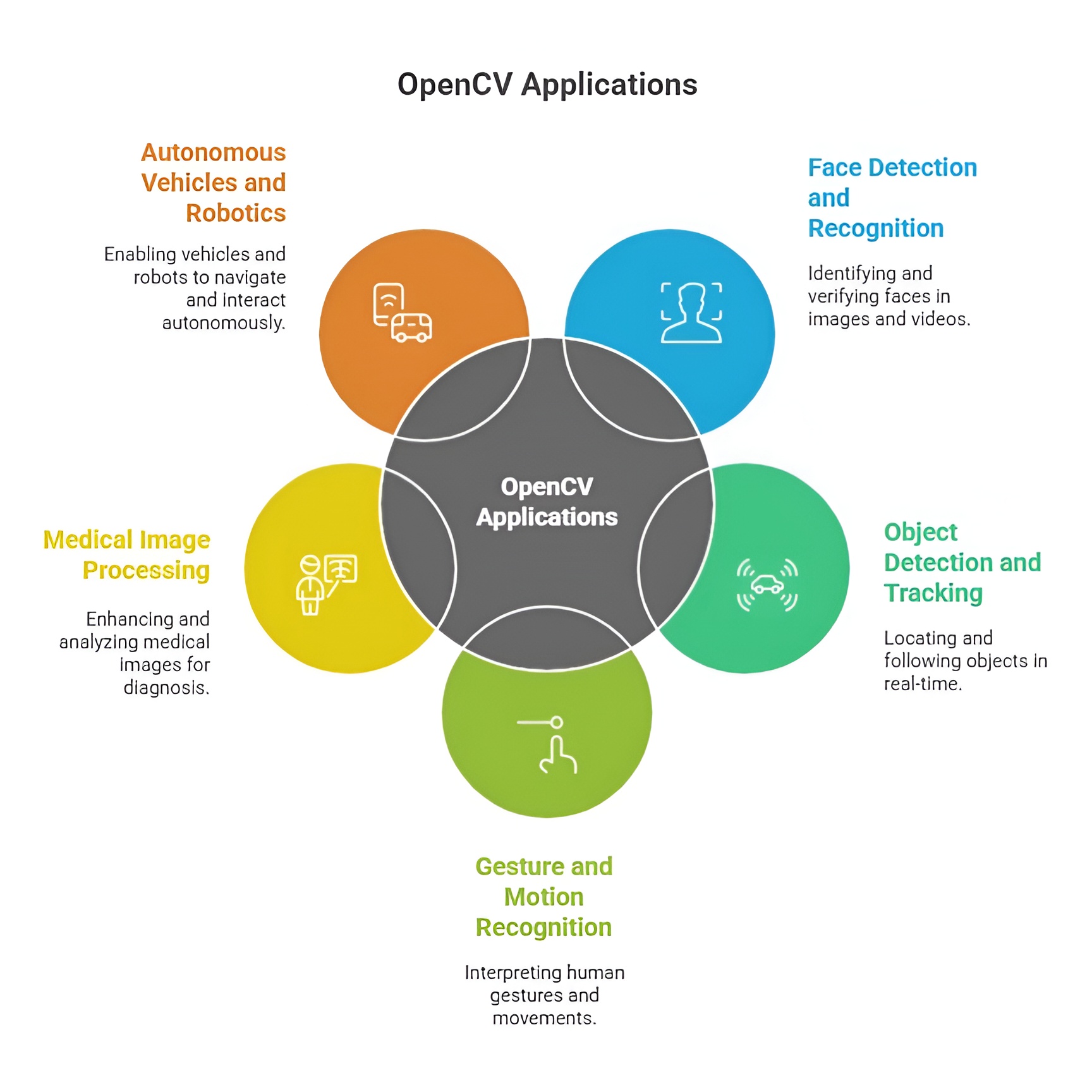
OpenCV is widely used in face detection and recognition systems found in smartphones, security devices, and attendance systems where fast identification is essential. It plays a major role in surveillance and traffic monitoring by enabling object tracking, vehicle counting, and activity detection for safety and law enforcement. In automation and robotics, OpenCV supports tasks like path tracking, obstacle detection, and visual inspection, helping machines navigate and interact with their surroundings intelligently. In the healthcare sector, it assists with analyzing medical images and detecting abnormalities, improving diagnostic speed and accuracy. It is also used in retail for barcode scanning, product recognition, and visual search features that enhance customer experience and operational efficiency.
1. Use in Image Processing and Enhancement
OpenCV is widely used for processing and enhancing digital images to make them suitable for further analysis. It performs essential tasks such as noise removal, sharpening, blurring, contrast adjustment, and image transformation. These operations help convert raw images into clearer, more structured formats that computer systems can understand easily. This use is especially important in fields like photography, digital media, scanning, and forensic imaging, where image clarity and quality play a critical role. Through its efficient algorithms, OpenCV ensures that images are refined enough to support accurate computer vision tasks.
2. Use in Object Detection and Facial Recognition
OpenCV is frequently used in systems that need to detect and recognize objects or faces from video streams and images. This includes identifying vehicles on roads, detecting people entering buildings, recognizing faces for authentication, and spotting specific items in retail stores. The library offers pre-built algorithms like Haar cascades and deep learning support, allowing developers to implement recognition systems with high accuracy. This use has become foundational in smartphones, biometric devices, security gateways, attendance systems, and smart surveillance technologies.
3. Use in Video Analysis and Motion Tracking
OpenCV plays a major role in analyzing video content and tracking movements across frames. It allows systems to understand how objects move, how fast they travel, and how their positions change with time. This capability is essential in areas such as traffic monitoring, sports analytics, behavior analysis, and robotics. Motion tracking powered by OpenCV enables real-time decision-making, such as identifying lane changes, monitoring crowd flow, or guiding robots to follow moving targets. Its ability to process video continuously makes it a dependable tool for dynamic visual applications.
4. Use in Industrial Automation and Quality Inspection
OpenCV is extensively used in manufacturing industries to automate the inspection of products on assembly lines. It helps detect defects, identify misalignments, verify shape and size, and ensure that each product meets quality standards before packaging. By using cameras and OpenCV-based visual analysis, factories achieve faster production, reduced error rates, and consistent product quality. This use supports industries like electronics, automotive manufacturing, pharmaceuticals, and food processing, where visual accuracy is crucial for safety and reliability.
5. Use in Healthcare and Medical Image Interpretation
Healthcare systems rely on OpenCV for interpreting medical images such as MRI scans, X-rays, CT images, and ultrasound visuals. It helps isolate regions of interest, highlight abnormalities, analyze tissues, and perform automated measurements. This supports doctors with faster diagnosis, early detection of critical conditions, and improved treatment planning. The use of OpenCV in medical imaging enhances precision and reduces the chances of human oversight, making it an essential tool in modern diagnostic systems and medical research.
6. Use in Robotics, Automation, and Navigation
Robotics heavily depends on OpenCV to give machines the power of vision. Robots use the library to detect objects, estimate depth, identify pathways, avoid obstacles, and understand their surroundings. OpenCV helps robots navigate spaces like warehouses, hospitals, homes, and production floors with intelligent decision-making based on visual input. From drones scanning environments to robotic arms picking objects with precision, this use enables smoother automation and human-robot collaboration in real-world environments.
7. Use in Augmented Reality and Virtual Reality
OpenCV is used in AR and VR applications to track human gestures, detect surfaces, identify markers, and overlay digital elements in real time. It ensures that virtual objects blend seamlessly with the real world, making interactive experiences more accurate and lifelike. Industries like gaming, interior design, virtual education, and simulation-based training use OpenCV to build immersive platforms. The library’s ability to understand spatial visuals makes AR filters, virtual try-ons, and interactive holographic systems more responsive and intelligent.
8. Use in Retail, E-Commerce, and Smart Stores
OpenCV supports visual automation in retail by enabling smart checkout systems that recognize items without barcodes, track product movements, monitor shelf stock, and analyze customer behavior. E-commerce platforms use it to match products from images, recommend items visually, and support virtual try-on technologies. This use enhances operational efficiency, reduces human workload, and delivers more personalized shopping experiences. OpenCV’s visual intelligence helps retailers create faster, more accurate, and user-friendly service models.
Basics of Image Processing in OpenCV
Basics of image processing in OpenCV involve manipulating and analyzing digital images using Python to extract meaningful information. Common operations include reading and displaying images, converting color spaces, resizing, cropping, and applying filters for enhancement. OpenCV also supports edge detection, thresholding, and morphological transformations for feature extraction. Overall, these fundamental techniques form the foundation for advanced computer vision and real-world image analysis applications.
1. Reading and Displaying Images
Reading an image in OpenCV means converting a normal photo into a detailed grid of pixel values where each pixel carries color and intensity information. This pixel matrix is the fundamental data structure that allows all computer vision algorithms to interpret shapes, colors, textures, and patterns. Without this conversion, an image would remain just a visual file that machines cannot analyze. Displaying the image simply opens a window that renders this matrix back into a picture so you can visually inspect what the computer is working with.
import cv2
# Read the image as a matrix of pixel values
img = cv2.imread("photo.jpg")
# Display the image to verify it was loaded correctly
cv2.imshow("Original Image", img)
cv2.waitKey(0)
2. Color Space Conversion
Color space conversion refers to changing the mathematical model used to represent color information in an image. Different color models highlight different visual properties; for example, RGB focuses on red-green-blue intensities, while grayscale captures only brightness levels. By converting an image to grayscale, we simplify its structure, reduce computational effort, and make it easier to detect edges, textures, and patterns. Conversions to HSV or LAB are used when tasks depend on color shades, illumination, or saturation.
# Convert to grayscale to simplify intensity-based processing
gray = cv2.cvtColor(img, cv2.COLOR_BGR2GRAY)
# Show the grayscale version
cv2.imshow("Gray Image", gray)
3. Image Resizing and Scaling
Image resizing changes the physical dimensions of an image while keeping the content visually consistent. This operation is important because many machine learning models require fixed-size inputs, and processing smaller images is computationally faster. Scaling ensures that even large, high-resolution images can be standardized for efficient execution. Resizing can either shrink or enlarge images, depending on the application, while preserving essential structural details as much as possible.
# Resize image to 300x300 to standardize its dimensions
resized = cv2.resize(img, (300, 300))
# Display resized image
cv2.imshow("Resized Image", resized)
4. Image Smoothing and Noise Removal
Smoothing is a process of reducing random disturbances called noise that appear due to sensor issues, low light, or environmental factors. Noise disrupts the clarity of images and negatively affects later stages like edge detection or segmentation. By applying blurring filters such as Gaussian Blur, we make the image more visually uniform, enhance important regions, and suppress irrelevant pixel variations. This helps algorithms focus on meaningful structures instead of being confused by random pixel-level fluctuations.
# Apply Gaussian Blur to remove noise and smooth the image
blur = cv2.GaussianBlur(img, (5, 5), 0)
# Display blurred image
cv2.imshow("Blurred Image", blur)
5. Edge Detection
Edge detection extracts the outlines and boundaries where significant changes in brightness occur. These edges represent the structural skeleton of objects, allowing machines to understand shape, geometry, and separation between regions. Without edge detection, computer vision models would struggle to differentiate between one object and another or recognize form and contour. The Canny edge detector uses gradients to detect the most important edges while filtering out unnecessary details.
# Detect object boundaries using Canny edge detection
edges = cv2.Canny(gray, 100, 200)
# Show edges on the screen
cv2.imshow("Edges", edges)
6. Thresholding
Thresholding converts grayscale images into binary images that contain only black and white pixels. This process simplifies complex visual data by separating essential objects from the background. It works by comparing each pixel’s brightness to a defined threshold value; pixels above it become white (foreground) and below become black (background). This transformation is extremely useful in object extraction, shape matching, document scanning, and identifying region-of-interest areas.
# Apply binary thresholding to create a black and white image
_, th = cv2.threshold(gray, 120, 255, cv2.THRESH_BINARY)
# Display binary image
cv2.imshow("Threshold Image", th)
7. Morphological Operations
Morphological operations modify the shape and structure of objects within a binary image by using a small structural pattern called a kernel. These operations help remove imperfections, fill gaps, refine edges, and enhance object formations. Dilation expands white regions, making objects thicker and connecting broken segments, while erosion shrinks white areas by removing small noise points. These techniques ensure that binary images become clean, sharp, and ready for more advanced tasks like contour detection.
import numpy as np
# Create a 3x3 kernel for morphological processing
kernel = np.ones((3, 3), np.uint8)
# Apply dilation to expand object boundaries
dilated = cv2.dilate(th, kernel, iterations=1)
# Display the dilated output
cv2.imshow("Dilated Image", dilated)
8. Contour Detection
Contour detection identifies the continuous curves that form the boundaries of objects in a binary image. These contours capture geometric information about objects, making them essential for measuring dimensions, analyzing shapes, counting items, or detecting specific patterns. Contours convert raw pixel information into structured outlines that algorithms can interpret and compare much more easily.
# Find contours from thresholded image
contours, _ = cv2.findContours(th, cv2.RETR_EXTERNAL, cv2.CHAIN_APPROX_SIMPLE)
# Draw the contours on the original image
cv2.drawContours(img, contours, -1, (0, 255, 0), 2)
# Display image with contours highlighted
cv2.imshow("Contours", img)
9. Image Transformations
Image transformations manipulate the geometric layout of images by rotating, shifting, scaling, or altering perspective. These changes help correct misaligned images, create data augmentation for machine learning, or provide consistent orientation for recognition tasks. Rotation is one of the most common transformations, allowing images to be realigned or analyzed from different viewing angles without losing content.
# Get the image height and width
(h, w) = img.shape[:2]
# Generate a rotation matrix to rotate the image 45 degrees
M = cv2.getRotationMatrix2D((w // 2, h // 2), 45, 1)
# Apply the rotation transformation
rotated = cv2.warpAffine(img, M, (w, h))
# Display the rotated image
cv2.imshow("Rotated Image", rotated)
Image Manipulation Techniques in OpenCV
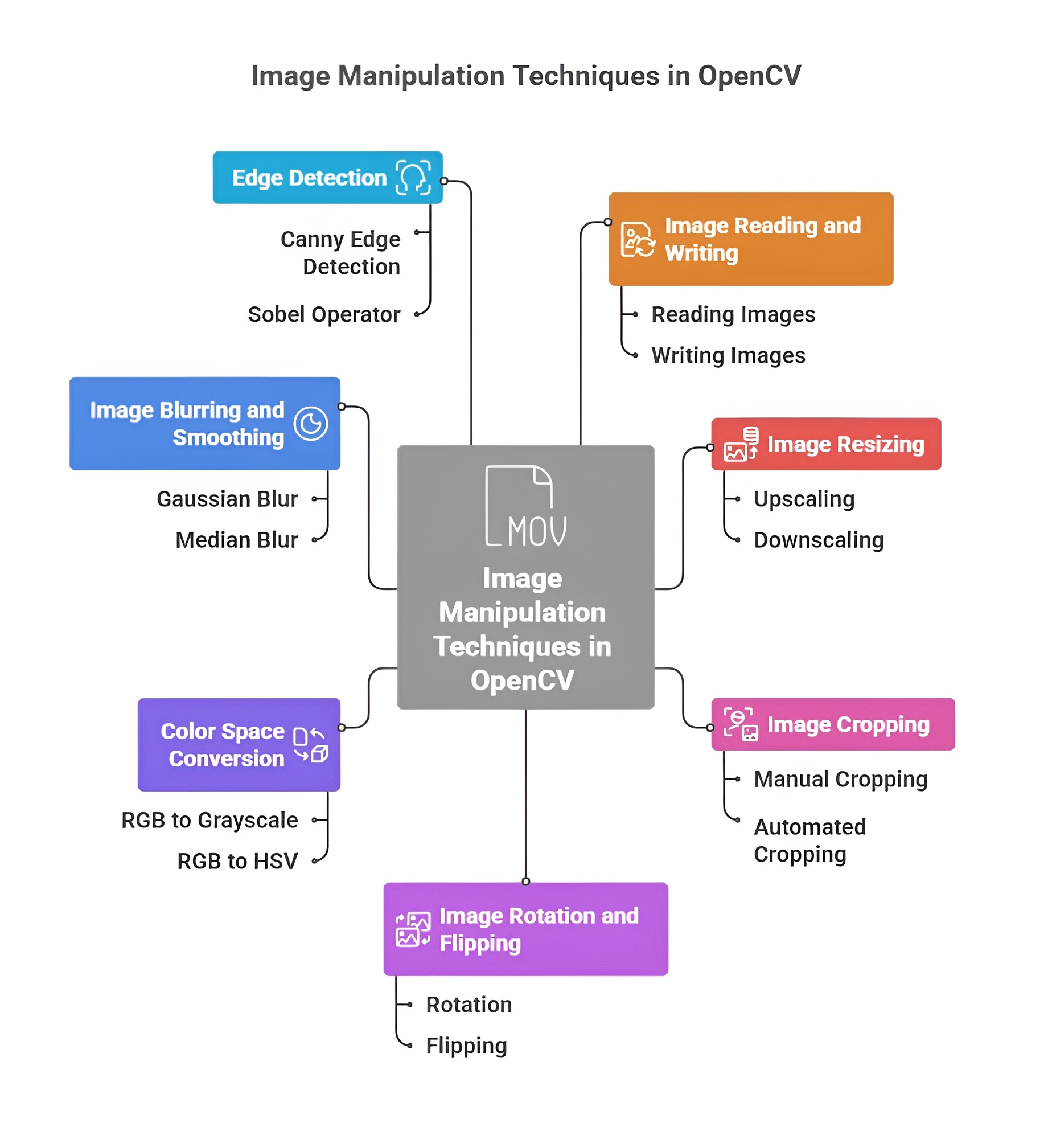
Image manipulation in OpenCV represents the foundational layer of transforming raw pixel data into a structured form that computers can easily analyze, interpret, or use for advanced computer vision tasks. These techniques modify the geometry, scale, orientation, or visual content of an image, allowing systems to standardize input data, highlight essential regions, remove distortions, and create augmented variations needed for training robust AI models. By offering direct control over pixel matrices, OpenCV makes image manipulation an essential part of preprocessing, visualization, and algorithm development in real-world vision applications.
1. Resizing and Scaling
Resizing and scaling refer to altering the dimensions of an image by modifying its width and height values. This technique ensures that every image fed into a system follows a uniform size, which is crucial for machine learning models, real-time detection systems, and memory optimization. It helps maintain consistent input shapes, improves processing speed, and makes image datasets more manageable for algorithms that rely on fixed resolution formats.
import cv2
img = cv2.imread("img.jpg")
# Resize to 300x300
resized = cv2.resize(img, (300, 300)) # changes width and height
2. Cropping
Cropping is the process of cutting out a specific rectangular region of interest (ROI) from an image. It eliminates unwanted background noise, focuses on core objects, and reduces computational load by restricting analysis to the most meaningful part of the image. Cropping is a powerful preprocessing step that helps vision models learn more precisely by isolating relevant visual elements.
# Crop region (y1:y2, x1:x2)
crop = img[50:250, 100:300] # extracts specific portion of the image
3. Rotating Images
Rotation manipulates the orientation of an image around its central axis or any defined pivot point. This helps correct tilted photos, generate angle-based variations for data augmentation, and ensure models perform accurately regardless of orientation. Rotational transformations preserve image integrity while adjusting its angular alignment, making them essential in aerial imaging, OCR, robotics, and pattern recognition.
(h, w) = img.shape[:2]
matrix = cv2.getRotationMatrix2D((w/2, h/2), 45, 1) # rotate 45 degrees
rotated = cv2.warpAffine(img, matrix, (w, h))
4. Flipping (Mirror / Upside-Down)
Flipping produces a mirrored version of the image across horizontal, vertical, or both axes. This transformation maintains the structural composition but reverses the orientation, making it useful for generating left-right variations in datasets. It also corrects images captured in reversed orientation and enhances model performance by introducing symmetrical data patterns.
flip_h = cv2.flip(img, 1) # horizontal mirror flip
flip_v = cv2.flip(img, 0) # vertical upside-down flip
5. Image Translation
Translation shifts the entire image in any direction by adjusting its pixel coordinates. It does not distort the image but repositions it, making it useful for positioning corrections, simulating object motion, and generating spatially-varied training samples. Translation ensures that models learn from images appearing in different parts of the frame, increasing their adaptability to real-world scenarios.
import numpy as np
matrix = np.float32([[1, 0, 50], [0, 1, 30]]) # shift right 50px, down 30px
translated = cv2.warpAffine(img, matrix, (w, h))
6. Drawing Shapes (Circle, Rectangle, Line)
Drawing shapes enables users to mark, annotate, or highlight specific regions directly on an image. These shapes act as visual indicators for detections, boundaries, or areas of interest in tasks like object tracking, segmentation, or result visualization. By providing precise control over color, thickness, and coordinates, OpenCV allows developers to create custom overlays essential for debugging and clarifying visual outputs.
rect = cv2.rectangle(img.copy(), (50, 50), (200, 200), (0, 255, 0), 2) # draw rectangle
circle = cv2.circle(img.copy(), (150, 150), 40, (255, 0, 0), 2) # draw circle
line = cv2.line(img.copy(), (0, 0), (200, 200), (0, 0, 255), 2) # draw line
7. Adding Text on Images
Adding text is the process of placing readable labels, annotations, or descriptions directly on the image surface. This feature is crucial for displaying detection results, highlighting classifications, naming objects, or explaining features in educational and presentation visuals. OpenCV supports multiple fonts, adjustable sizes, colors, and positioning, making text overlays a key tool in informative computer vision outputs.
text = cv2.putText(img.copy(), "Hello OpenCV", (50, 100),
cv2.FONT_HERSHEY_SIMPLEX, 1, (255, 255, 255), 2) # add text
Image Filtering & Blurring in OpenCV
Image filtering and blurring in OpenCV are core operations that modify how pixel intensities are distributed across an image to control smoothness, sharpness, or clarity. These filters work by applying mathematical kernels or neighborhood-based transformations that enhance or suppress certain visual features such as noise, edges, and textures. Filtering acts as a foundational preprocessing step that prepares images for advanced tasks like detection, tracking, segmentation, and recognition by reducing unwanted variations and highlighting meaningful patterns. Blurring removes high-frequency details, while sharpening enhances them, creating balanced visual representations that improve algorithm accuracy and reliability in complex environments.
1. Gaussian Blur
Gaussian blur is a smoothing method that uses a bell-shaped Gaussian distribution to determine how much influence neighboring pixels have on a target pixel. This ensures that closer pixels contribute more significantly than distant ones, creating a natural and visually pleasing blur effect. It is widely used to remove random noise, soften harsh details, and prepare images for operations like edge detection, because it eliminates abrupt variations that can confuse algorithms. Gaussian blur is essential in computer vision pipelines where stability and noise-free input significantly improve the performance of object detection and tracking.
gauss = cv2.GaussianBlur(img, (5, 5), 0)
# Smooths using Gaussian distribution, reducing high-frequency noise
2. Median Blur
Median blur replaces each pixel with the median of surrounding pixel intensities, making it exceptionally effective against impulse noise like salt-and-pepper particles. Unlike averaging filters, median blur maintains sharp boundaries because replacing values with the median avoids blending edges into blur. This makes it particularly valuable in medical imaging, document processing, and low-resolution photo cleanup where preserving structural integrity is crucial. The filter excels in scenarios where noise appears as isolated bright or dark pixels that must be removed without sacrificing important image details.
median = cv2.medianBlur(img, 5)
# Removes salt-and-pepper noise while keeping edges intact
3. Bilateral Filtering
Bilateral filtering performs edge-preserving smoothing by combining spatial distance with intensity similarity. This means it blurs regions of similar color while keeping sharp borders intact, making it superior to standard blurs for applications requiring detail preservation. It reduces noise without sacrificing fine structures, making it ideal for face beautification filters, cartoon effects, and photo enhancement systems. In real-world uses such as portrait editing, bilateral filtering smooths skin textures while maintaining the shape of facial features, producing clear but natural-looking results.
bilateral = cv2.bilateralFilter(img, 9, 75, 75)
# Preserves edges while removing noise
4. Custom Kernels and Convolution
Custom kernels allow complete creative control over how an image is transformed by defining the mathematical relationship between neighboring pixels. Through convolution, these kernels slide over the image and apply operations that can detect edges, enhance contrast, highlight textures, or create visual effects like embossing. This approach forms the basis of many advanced vision algorithms because it manipulates pixel gradients—the primary cue used to identify shapes and patterns. Custom kernels enable developers to tailor filters precisely to application needs, making them a powerful tool in research-level computer vision systems.
kernel = np.array([[1, 1, 1],
[1, -7, 1],
[1, 1, 1]])
custom = cv2.filter2D(img, -1, kernel)
# Applies user-defined convolution filter
5. Sharpening Images
Sharpening enhances the contrast between neighboring pixels, making edges appear more defined and improving the visibility of fine textures. It emphasizes boundaries where pixel intensity changes sharply, which helps bring out details hidden in soft or slightly blurry images. Sharpening is widely used in OCR (optical character recognition), photography correction, fingerprint analysis, and applications where clearly visible edges improve recognition accuracy. By increasing local contrast, sharpening helps algorithms detect planes, contours, and shapes more accurately, improving overall system performance.
sharpen_kernel = np.array([[0, -1, 0],
[-1, 5, -1],
[0, -1, 0]])
sharpened = cv2.filter2D(img, -1, sharpen_kernel)
# Enhances edges and fine detail
Video Processing with OpenCV
Video processing in OpenCV involves handling continuous sequences of images known as frames, which together form a moving visual stream. It allows computers to read, interpret, and analyze real-time or stored video content by treating each frame as an individual image. These techniques enable applications like surveillance, motion tracking, gesture recognition, video analytics, augmented reality, and real-time computer vision systems. With OpenCV, video processing becomes a powerful tool that provides direct access to frame manipulation, annotation, extraction, and live camera interaction, allowing developers to build intelligent, responsive, and dynamic visual applications.
1. Reading Video Files
Reading video files in OpenCV means loading a stored video and breaking it into sequential frames that can be processed one-by-one. OpenCV uses the VideoCapture class to open video formats like MP4, AVI, and MOV, enabling the system to access each frame for analysis, filtering, or object detection. This allows developers to extract information, perform tracking, count objects, or apply visual effects across the entire video stream. Reading video files is essential for offline tasks such as analyzing CCTV recordings, processing film footage, or generating automated annotations for datasets.
import cv2
cap = cv2.VideoCapture("video.mp4") # load video file
while True:
ret, frame = cap.read() # read each frame
if not ret:
break
cv2.imshow("Video", frame) # display frame
if cv2.waitKey(1) & 0xFF == 27: # exit on ESC
break
cap.release()
cv2.destroyAllWindows()
2. Using Webcam with OpenCV
Using a webcam with OpenCV allows real-time video capture directly from the system’s connected camera. It enables live interaction with computer vision algorithms, making tasks like gesture detection, face recognition, motion tracking, and AR overlays possible in real-world environments. OpenCV continuously reads frames from the camera, providing a real-time stream that responds instantaneously to user movements. Webcam access is crucial for applications in robotics, security systems, smart mirrors, and interactive AI tools.
cap = cv2.VideoCapture(0) # 0 = default webcam
while True:
ret, frame = cap.read() # live frame capture
cv2.imshow("Webcam Feed", frame)
if cv2.waitKey(1) & 0xFF == ord('q'): # quit
break
cap.release()
cv2.destroyAllWindows()
3. Frame-by-Frame Analysis
Frame-by-frame analysis refers to examining each individual frame from a video stream to extract information such as object movement, facial expressions, scene changes, or motion direction. Each frame is processed like a normal image, allowing filters, detection models, segmentation algorithms, and trackers to be applied in real time. This technique transforms videos into analyzable sequences, enabling systems to detect suspicious activities, count people or vehicles, identify gestures, or maintain tracking continuity. It forms the backbone of video-based AI systems where every frame contributes to meaningful insights.
cap = cv2.VideoCapture("video.mp4")
while True:
ret, frame = cap.read()
if not ret:
break
gray = cv2.cvtColor(frame, cv2.COLOR_BGR2GRAY) # example processing
cv2.imshow("Processed Frame", gray)
if cv2.waitKey(30) & 0xFF == 27:
break
4. Drawing on Videos
Drawing on videos means overlaying shapes, text, markers, or annotations directly on each frame to visualize detections or highlight tracked objects. It allows developers to add bounding boxes, labels, paths, and measurement indicators that help in debugging and result visualization. This technique enhances video clarity by making system decisions visible, enabling applications like face detection highlighting, motion path drawing, alerts, and analytical dashboards. Drawing on video frames transforms raw footage into an informative visual output that communicates insights clearly and interactively.
cap = cv2.VideoCapture("video.mp4")
while True:
ret, frame = cap.read()
if not ret:
break
# Draw a rectangle on each frame
cv2.rectangle(frame, (50, 50), (200, 200), (0, 255, 0), 2)
# Add text on video
cv2.putText(frame, "Tracking...", (40, 40),
cv2.FONT_HERSHEY_SIMPLEX, 1, (255, 255, 255), 2)
cv2.imshow("Video with Drawings", frame)
if cv2.waitKey(30) & 0xFF == 27:
break
Face and Object Detection in OpenCV
Face and object detection in OpenCV refers to the process of automatically identifying the presence and location of human faces, eyes, or other predefined objects within an image or video. These detection techniques use pre-trained models that analyze pixel patterns, edges, intensity variations, and structural features to determine what the object looks like. By scanning the image with mathematical classifiers, OpenCV can detect multiple faces or objects simultaneously, making it useful in surveillance, attendance systems, photography, robotics, and authentication applications. This detection forms the foundation for higher-level tasks such as recognition, tracking, and emotion analysis.
1. Haar Cascades
Haar cascades are classical machine learning–based object detection models trained using thousands of positive and negative images to learn distinctive visual patterns. They work by sliding a detection window across the image and applying Haar features — patterns of black and white pixel regions — to identify whether a particular region matches the target object. The term "cascade" refers to a layered structure where simple features are checked first, followed by increasingly complex ones, ensuring fast and efficient detection. Haar cascades became one of the earliest techniques for real-time face detection and remain widely used due to their speed, simplicity, and lightweight nature.
import cv2
face_cascade = cv2.CascadeClassifier("haarcascade_frontalface_default.xml")
img = cv2.imread("face.jpg")
gray = cv2.cvtColor(img, cv2.COLOR_BGR2GRAY)
faces = face_cascade.detectMultiScale(gray, 1.3, 5)
# 1.3 = scale factor, 5 = minimum neighbors
for (x, y, w, h) in faces:
cv2.rectangle(img, (x, y), (x+w, y+h), (0, 255, 0), 2)
cv2.imshow("Detected Faces", img)
cv2.waitKey(0)
2. Face Detection (Pre-Trained Models)
Face detection using pre-trained models involves loading ready-made classifiers that have already learned the structure of human faces from large datasets. These models automatically understand the spatial arrangement of facial features such as eyes, nose, mouth, and jawline, allowing them to detect faces in different lighting conditions, angles, and backgrounds. Modern pre-trained models offer higher accuracy and robustness compared to traditional methods because they are trained using advanced machine learning or deep learning architectures. This makes them widely used in smartphones, CCTV surveillance, biometric authentication, social media filters, and real-time video analytics.
face_cascade = cv2.CascadeClassifier(
cv2.data.haarcascades + "haarcascade_frontalface_default.xml"
)
cap = cv2.VideoCapture(0)
while True:
ret, frame = cap.read()
gray = cv2.cvtColor(frame, cv2.COLOR_BGR2GRAY)
faces = face_cascade.detectMultiScale(gray, 1.3, 5)
for (x, y, w, h) in faces:
cv2.rectangle(frame, (x, y), (x+w, y+h), (255, 255, 255), 2)
cv2.imshow("Face Detection", frame)
if cv2.waitKey(1) & 0xFF == ord('q'):
break
3. Eye Detection
Eye detection finds and locates human eyes inside detected face regions using specialized classifiers. Eyes have unique patterns such as circular dark pupils, bright sclera, and a consistent shape, which allow trained models to identify them even when lighting varies. Eye detection is commonly used in applications like blink detection, drowsiness monitoring, gaze tracking, face alignment, and AR filters. By combining face and eye detection, systems can achieve more accurate recognition, better cropping, and improved understanding of facial expressions.
face_cascade = cv2.CascadeClassifier(
cv2.data.haarcascades + "haarcascade_frontalface_default.xml"
)
eye_cascade = cv2.CascadeClassifier(
cv2.data.haarcascades + "haarcascade_eye.xml"
)
img = cv2.imread("face.jpg")
gray = cv2.cvtColor(img, cv2.COLOR_BGR2GRAY)
faces = face_cascade.detectMultiScale(gray, 1.3, 5)
for (x, y, w, h) in faces:
cv2.rectangle(img, (x, y), (x+w, y+h), (0, 255, 0), 2)
roi_gray = gray[y:y+h, x:x+w] # region inside face
roi_color = img[y:y+h, x:x+w]
eyes = eye_cascade.detectMultiScale(roi_gray)
for (ex, ey, ew, eh) in eyes:
cv2.rectangle(roi_color, (ex, ey), (ex+ew, ey+eh), (255, 0, 0), 2)
cv2.imshow("Face and Eyes", img)
cv2.waitKey(0)

Class Sessions
1- Introduction to Python
2- Basic Syntax and Variables
3- Basic Input & Output
4- Control Flow Statements
5- Introduction to Python in AI
6- Libraries supported in Python for AI
7- OpenCV
8- Scikit-image
9- Mediapipe
10- Introduction to Tenserflow
11- Introduction to Pytorch
12- Machine Learning in Python
13- Deep Learning in Python
14- Introduction to Robotics and Automation Applications in Python