Sckilit Image
Scikit-Image is an open-source Python library designed specifically for performing a wide range of image processing and computer vision tasks with simplicity and efficiency. Built on top of powerful scientific computing libraries like NumPy, SciPy, and Matplotlib, it provides a collection of easy-to-use functions that allow users to analyze, transform, and understand digital images without needing complex mathematical implementations. The library focuses on making image manipulation accessible by offering tools for filtering, segmentation, feature extraction, denoising, color manipulation, and geometric transformations. Scikit-Image is widely used in research, education, and practical applications because of its clean syntax, modular structure, and strong documentation, enabling beginners and experts to implement vision algorithms quickly. Its emphasis on clarity, readability, and scientific accuracy makes it an essential tool for building foundational image processing workflows in Python.
Uses of scikit-image in Real-World Applications
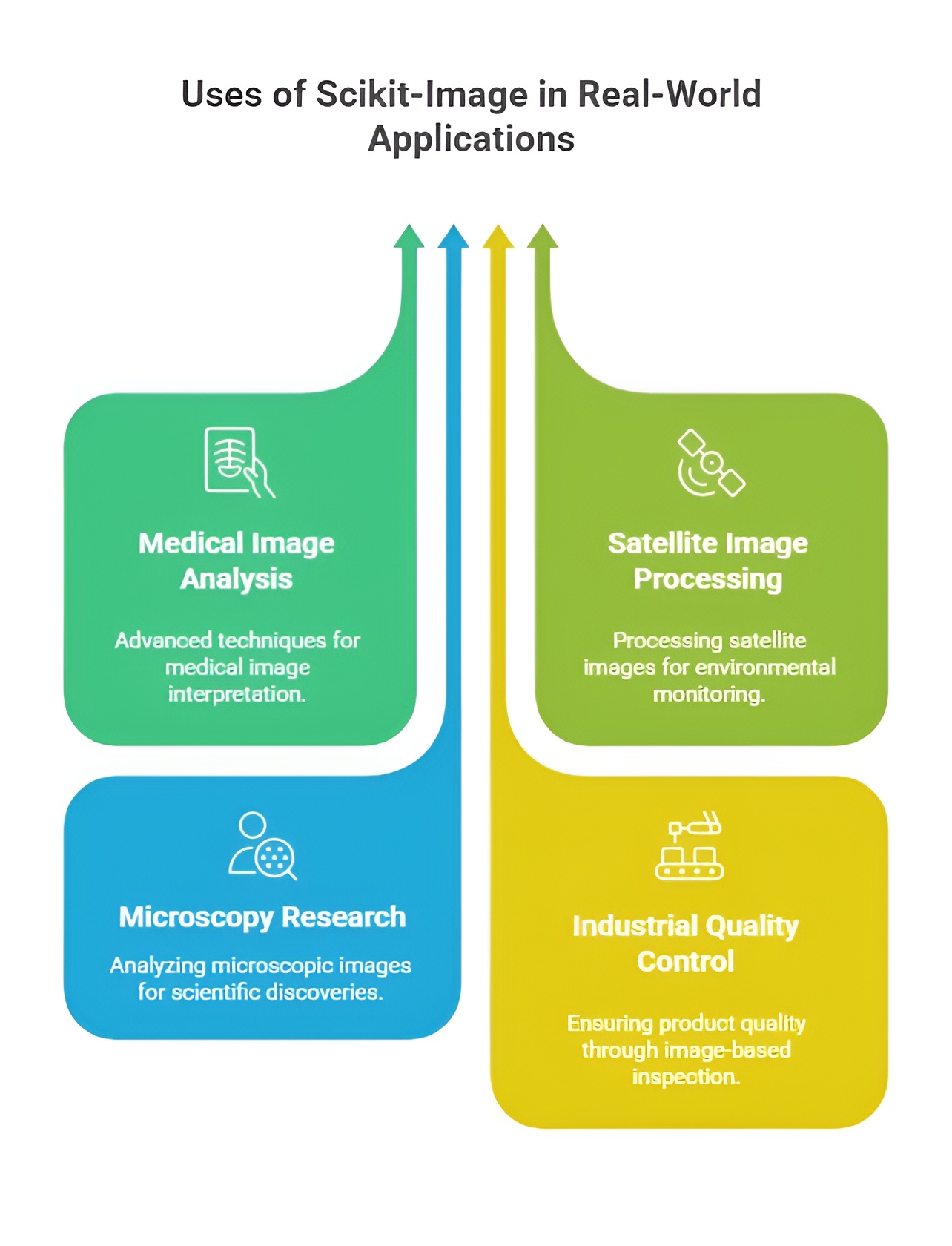
Scikit-Image is widely used in real-world applications where efficient and accurate image processing is required. Its clean and scientific design makes it suitable for tasks like medical image analysis, industrial inspection, and scientific research. The library helps convert raw images into meaningful information through filtering, segmentation, and feature extraction.
1. Use in Scientific Image Processing and Research
scikit-image is widely used in scientific and academic environments because it provides clean, precise, and transparent tools for handling image data. Researchers use it to study microscopic images, analyze biological samples, examine chemical patterns, and process satellite visuals with scientific accuracy. The library allows scientists to apply reliable algorithms for filtering, segmentation, and measurement without the complexity of deep learning frameworks. This helps convert raw scientific images into meaningful insights that support experiments, publications, and scientific discoveries. Its popularity in research comes from its consistency, mathematical clarity, and the reproducibility it offers for scientific studies.
2. Use in Image Segmentation and Object Identification
scikit-image plays an important role in tasks where images need to be divided into meaningful sections through segmentation. It allows systems to isolate objects, detect shapes, highlight boundaries, and separate regions based on color, texture, or intensity. This use is essential in fields like medical imaging, agriculture analysis, material inspection, and environmental study, where identifying specific regions is crucial. By providing a clear interface for segmentation algorithms such as thresholding, watershed, and region-growing, scikit-image helps users extract information that supports accurate decision-making and detailed analysis.
3. Use in Feature Extraction and Pattern Recognition
scikit-image is used extensively for extracting important features from images such as edges, corners, textures, and shapes. These features help in recognizing patterns, classifying objects, and understanding visual structures. This use becomes valuable in areas like handwriting analysis, fabric inspection, fingerprint study, and geological image evaluation. By allowing systems to convert visual patterns into quantitative data, scikit-image supports machine learning workflows, data-driven predictions, and high-level visual reasoning. Its feature extraction tools make it easy to analyze even complex image patterns in a structured way.
4. Use in Quality Inspection and Industrial Analysis
Industries use scikit-image for visual inspection tasks where accuracy and consistency are needed. It helps inspect product surfaces, analyze textures, detect cracks, measure dimensions, and identify defects in manufacturing processes. Because scikit-image offers stable algorithms and does not depend on heavy hardware, it becomes suitable for non-real-time quality checks in labs and controlled environments. Industries such as textiles, metallurgy, electronics, and food processing use the library to study product quality and maintain standards. It supports slow, detailed inspection processes where scientific precision is more important than speed.
5. Use in Environmental and Geospatial Image Processing
scikit-image plays a meaningful role in processing geographic, environmental, and satellite images by offering tools that simplify the interpretation of natural structures. It is used to study vegetation patterns, soil textures, water bodies, land cover changes, and geological formations through clean image analysis techniques. The library supports tasks like image thresholding, region marking, and texture classification, which are crucial for environmental monitoring and research. Its lightweight nature makes it ideal for analyzing large datasets that require high accuracy without complex computational frameworks.
6. Use in Medical and Biological Image Analysis
Medical researchers and lab professionals use scikit-image to analyze biological images obtained from microscopes, scans, and medical instruments. It helps identify cells, count tissues, highlight abnormalities, trace biological structures, and measure organ shapes with scientific accuracy. This use supports disease research, lab automation, medical imaging studies, and biological experiments where clear image interpretation is required. scikit-image provides high-quality image processing methods that help medical professionals and researchers handle biomedical visuals without needing advanced machine learning models.
7. Use in Preprocessing Images for Machine Learning
scikit-image is widely used for preparing images before they are passed into machine learning or deep learning pipelines. It helps normalize images, resize them, adjust colors, remove noise, and enhance important features. This preprocessing is essential because machine learning models perform better when input images are clean and structured. By acting as a reliable preprocessing tool, scikit-image ensures that visual datasets are consistent, high-quality, and ready for training. Its scientifically accurate algorithms allow developers to transform raw images into well-prepared data that improves model performance.
8. Use in Education and Learning Environments
scikit-image is frequently used in universities, coding courses, and training programs because it provides simple and intuitive functions that help students understand the basics of image processing. It allows beginners to learn concepts such as filtering, transformations, segmentation, and feature detection without dealing with complex neural networks. This use makes scikit-image an ideal tool for building strong foundational knowledge in computer vision. Its easy-to-read code and clear documentation support smooth learning for students, educators, and early-stage developers.
Importance of scikit-image in Real-World Applications
Scikit-Image is important in real-world applications because it provides reliable, scientifically accurate tools for processing and analyzing images with ease. It helps extract meaningful information from images in fields like healthcare, manufacturing, and research. Its simplicity, open-source nature, and strong integration with the Python ecosystem make it essential for building efficient image-processing workflows.
1. Importance as a Scientific and Research-Oriented Image Processing Tool
scikit-image holds major importance in scientific and research environments because it provides transparent, reliable, and mathematically accurate algorithms for image processing. Unlike heavy deep learning frameworks, it focuses on classical, well-tested image operations that researchers can trust for experiments and publications. Its precise and explainable outputs make it suitable for academic studies in biology, chemistry, physics, astronomy, and material science. The library allows researchers to analyze images without worrying about neural network complexity, ensuring that results are reproducible, scientifically valid, and easy to interpret. This makes scikit-image a critical tool for scientific investigation and data-driven discovery.
2. Importance in Building Strong Foundations for Image Analysis
scikit-image plays an important role in helping learners and developers understand the core concepts of computer vision. It offers simple, clean, and intuitive functions that clearly demonstrate how image segmentation, filtering, transformation, and feature extraction work. This clarity makes it ideal for beginners, educators, and students who want to build a solid foundation before moving to advanced deep learning models. scikit-image’s educational value lies in its ability to explain visual processing without hiding the logic behind complex layers, making it essential for conceptual learning and training programs.
3. Importance in High-Precision Image Segmentation and Object Analysis
Segmentation is one of the most important tasks in computer vision, and scikit-image provides scientifically accurate methods for dividing images into meaningful regions. Its importance becomes clear in fields like medical imaging, geographical analysis, agriculture, and laboratory research where object boundaries must be detected with precision. scikit-image offers stable algorithms such as watershed, thresholding, and region-labeling that help isolate structures, measure sizes, and identify patterns. These capabilities are crucial for situations where accuracy is more important than speed, giving scikit-image a central place in professional image evaluation.
4. Importance in Industrial and Quality Inspection Environments
scikit-image plays a key role in industries that require controlled, detailed, and consistent visual inspection. It helps businesses analyze textures, detect imperfections, measure surface patterns, and classify defects in products with scientific accuracy. Its importance lies in its reliability and ability to run on simple hardware, making it suitable for quality labs, testing centers, and research-based industrial workflows. Because it is lightweight yet precise, scikit-image helps industries maintain high standards and ensure product consistency without the need for complex AI systems.
5. Importance in Medical and Biological Image Interpretation
In the medical and biological fields, scikit-image is valued for its ability to process images from microscopes, scanners, and diagnostic equipment with high reliability. It helps identify cells, classify tissues, highlight abnormalities, and measure biological structures with fine detail. Its importance comes from its accuracy and its ability to support doctors and researchers in analyzing visuals without deep learning dependencies. scikit-image becomes essential in environments where clear image understanding is necessary for diagnosis, biological studies, and laboratory experiments.
6. Importance in Environmental and Geospatial Image Analysis
scikit-image holds significant importance in environmental research and geospatial analysis by allowing scientists to interpret satellite images, soil textures, land formations, and environmental changes. Its robust segmentation and feature extraction tools help researchers study natural landscapes, map ecosystems, and detect environmental patterns. The library’s lightweight architecture makes it ideal for handling large datasets in ecological studies without requiring advanced hardware. Its scientific reliability ensures accurate environmental interpretations, which is essential for climate analysis, agriculture planning, and land-use research.
7. Importance in Preparing Data for Machine Learning Models
scikit-image is extremely important in machine learning pipelines because it prepares images for model training by cleaning, normalizing, resizing, and enhancing them. This preprocessing ensures that models receive high-quality input, improving accuracy, reducing noise, and supporting better generalization. scikit-image’s importance lies in its ability to bridge the gap between raw image data and machine learning systems, acting as a dependable tool for dataset preparation. Its compatibility with NumPy and SciPy makes it a powerful component in data science workflows.
8. Importance as a Lightweight, Accessible, and Open-Source Library
scikit-image is important because it is open-source, easy to install, and highly accessible to developers, researchers, and students worldwide. It does not require expensive GPUs or specialized hardware, making advanced image processing available to everyone. Its simplicity ensures that even complex tasks such as segmentation and measurement can be performed with minimal code. This accessibility makes scikit-image a crucial tool for small-scale projects, educational institutions, research labs, and any environment where reliability, clarity, and ease of use are essential.
Installation of Scikit-Image
Scikit-Image can be installed easily using Python’s package management tools, making it accessible for beginners and professionals working on image-processing tasks. The most common way to install it is through the command pip install scikit-image, which downloads and sets up the complete library from the Python Package Index. For users working in scientific computing environments like Anaconda or Jupyter, installation can also be done using the command conda install -c conda-forge scikit-image, ensuring proper dependency handling. Once installed, Scikit-Image integrates smoothly with NumPy, SciPy, and Matplotlib, allowing you to perform advanced image-processing operations with just a few lines of code.
Basic Workflow of Image Processing in Scikit-Image
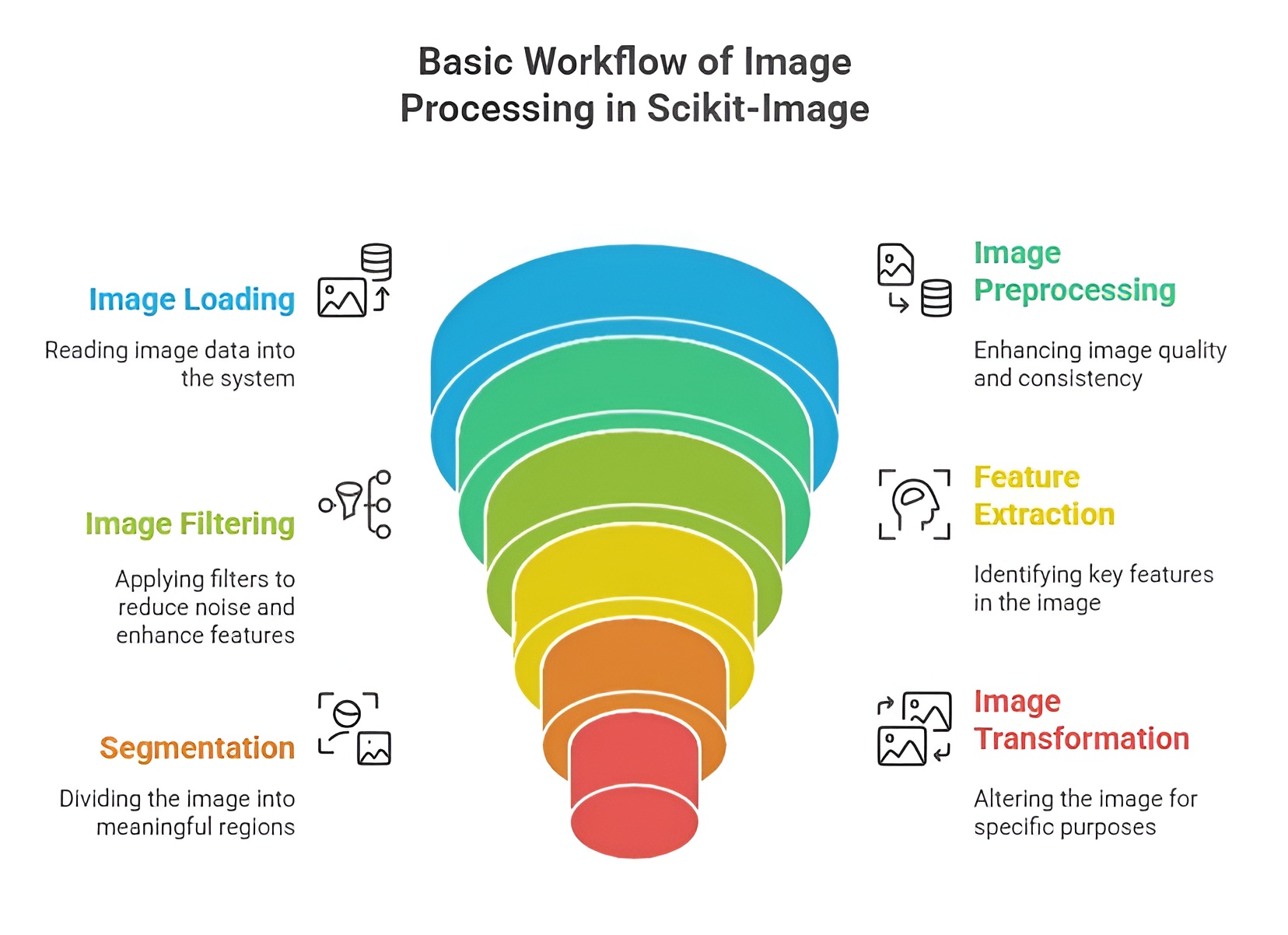
The basic workflow of image processing in Scikit-Image follows a simple, structured approach designed to make complex tasks more manageable. First, an image is loaded into the program using Scikit-Image’s io module, which allows you to read image files in various formats. After loading, the next step is preprocessing, where the image may be converted to grayscale, resized, denoised, or normalized to prepare it for further analysis. Following this, different operations such as filtering, segmentation, edge detection, or feature extraction are applied depending on the requirements of the task. Finally, the processed image and results are visualized using Matplotlib or saved again using the io module. This workflow ensures a clean and systematic process for analyzing, enhancing, and interpreting images.
Importing Scikit-Image Modules
Importing Scikit-Image modules is straightforward and allows users to access the library’s wide range of tools in an organized manner. The library follows a modular structure, meaning specific functions are grouped under dedicated submodules such as io for image input/output, color for color conversions, filters for applying image filters, feature for extracting meaningful attributes, and transform for geometric operations. To use these functionalities, the required modules are imported using simple Python import statements, for example: from skimage import io, filters, color. This modular approach ensures that users only import what they need, improving clarity, reducing memory usage, and making code cleaner and easier to maintain.
Reading and Writing Images in scikit-image
Reading and writing images in scikit-image is the foundational process through which raw image files are converted into structured numerical data for analysis and modification. This concept revolves around transforming real-world visual content into NumPy array representations so that operations like enhancement, filtering, transformation, segmentation, or machine learning become possible. scikit-image plays a crucial role here because it provides simple functions to load, display, manipulate, and save images while maintaining the consistency and accuracy of pixel-level information. When images are read, they become multidimensional arrays, and when they are written, the numerical matrices are converted back into viewable image formats like JPG, PNG, or TIFF. This conversion cycle forms the backbone of the entire image-processing pipeline.
Loading Images from Files
Loading images refers to the process of reading an image stored on disk and converting it into a structured NumPy array that scikit-image can process. When io.imread() loads an image, it transforms each pixel into numerical intensity values arranged in rows and columns. This step is essential because every form of image manipulation—such as resizing, edge detection, filtering, or thresholding—begins only after the image is available as numerical data. The function automatically handles color formats, scaling, and data type conversions, making the image ready for scientific computation.
from skimage import io
img = io.imread("nature.jpg") # image loaded into NumPy array
print(img.shape) # prints dimensions like (height, width, channels)
Displaying Images
Displaying an image means rendering the NumPy pixel matrix back into a visual form so users can see what the image actually looks like. scikit-image uses io.imshow(), and because it integrates with matplotlib, the image is shown as a structured visual output. This step is crucial for verification because visual inspection ensures the image has been read correctly and helps confirm whether further processing steps, such as cropping or filtering, are working as intended.
from skimage import io
import matplotlib.pyplot as plt
img = io.imread("nature.jpg") # read the image again
io.imshow(img) # convert pixel matrix to displayable image
plt.show() # show it in a window
Saving Images in Different Formats
Saving images refers to writing the processed pixel data back to a file format like PNG, JPEG, or TIFF. scikit-image uses io.imsave() to convert the NumPy array of pixel values into an actual physical file on disk. This is an important part of the image-processing cycle because once modifications such as resizing, filtering, or annotation are applied, the output needs to be preserved or shared. Saving ensures that transformed images can be used in reports, machine learning datasets, applications, or further processing workflows.
from skimage import io
io.imsave("output.png", img) # saves current NumPy array as a PNG image
Understanding Image Data as NumPy Arrays
Understanding image data as NumPy arrays means recognizing that every image inside scikit-image becomes a numerical grid that stores pixel intensity values. A grayscale image becomes a 2D array with each element representing brightness, while a colored RGB image becomes a 3D array with separate layers for red, green, and blue. This numerical structure allows powerful mathematical operations—such as convolution, thresholding, blurring, or edge detection—to be applied directly on pixel values. Working with arrays also makes images compatible with machine learning models, data science algorithms, and image enhancement techniques. Because NumPy arrays support slicing, indexing, and reshaping, developers can access individual pixels, modify specific regions, or transform entire images with ease.
from skimage import io
img = io.imread("nature.jpg") # load as array
print(type(img)) # verifies NumPy array
print(img.ndim) # 2 → grayscale, 3 → RGB
print(img[100, 50]) # displays pixel values at specific location
Image Color Spaces in scikit-image
Image color spaces in scikit-image refer to the different ways images represent visual information using numerical values. A color space defines how pixel data is structured, interpreted, and processed. Whether an image is RGB, grayscale, binary, or contains transparency, each format describes intensity using different channels and levels. scikit-image makes it easy to read, convert, and manipulate these color spaces so images can be used for filtering, segmentation, analysis, or visual enhancement. By understanding color spaces, developers gain precise control over how light, shades, and colors behave inside an image-processing workflow.
RGB, Grayscale, and Binary Images
RGB images are stored using three channels—Red, Green, and Blue—where each pixel is represented by a combination of these values. This model is widely used in digital screens and color photography. Grayscale images simplify this by using only one intensity channel, representing different brightness levels without color. Binary images go further and use only two values, typically 0 and 1, to represent foreground and background regions. In scikit-image, these formats are represented as NumPy arrays with 3D shapes for RGB and 2D shapes for grayscale and binary images, allowing mathematical operations to be performed based on pixel intensity.
from skimage import io, color
img_rgb = io.imread("flower.jpg") # original RGB image
img_gray = color.rgb2gray(img_rgb) # convert to grayscale
img_binary = img_gray > 0.5 # simple threshold to get binary image
Converting Between Color Spaces
Converting between color spaces is the process of transforming images from one representation to another, such as RGB to Grayscale, RGB to HSV, or RGB to LAB. Each color space highlights different visual characteristics—HSV emphasizes hue and saturation, while LAB separates luminance from color information. scikit-image uses skimage.color methods to convert images, allowing algorithms to operate more effectively depending on the task, such as segmentation, filtering, or feature extraction.
from skimage import color, io
img = io.imread("flower.jpg") # load RGB image
hsv_img = color.rgb2hsv(img) # convert to HSV
lab_img = color.rgb2lab(img) # convert to LAB
Working with Alpha Channels
Alpha channels represent transparency levels in an image. An image with an alpha channel has four components—Red, Green, Blue, and Alpha (RGBA). The alpha channel controls how opaque or transparent a pixel appears. scikit-image automatically reads this channel when present, and it can be manipulated like any other NumPy array. Transparency becomes important in image overlays, blending, watermarking, and compositing operations.
from skimage import io
img_rgba = io.imread("logo.png") # RGBA image including transparency
alpha = img_rgba[:, :, 3] # extract alpha channel
print(alpha.shape) # shows transparency layer dimensions
Understanding Color Channels (R, G, B)
Understanding color channels means recognizing that each channel in an RGB image stores different intensity values that combine to form a full-color output. The Red channel emphasizes warm tones, the Green channel highlights midrange intensities, and the Blue channel controls cooler regions. By isolating or modifying these channels independently, scikit-image allows users to analyze color distribution, enhance specific tones, detect objects, or perform feature extraction. Since RGB images are stored as 3D NumPy arrays, accessing each channel is as simple as slicing the third dimension.
from skimage import io
img = io.imread("flower.jpg") # load RGB image
R = img[:, :, 0] # red channel
G = img[:, :, 1] # green channel
B = img[:, :, 2] # blue channel
print(R[100, 200]) # intensity value at row 100, col 200 (Red)
Image Transformations in scikit-image
Image transformations in scikit-image refer to the mathematical and geometric operations used to alter the structure, orientation, size, or position of an image. These transformations are essential because many computer vision tasks require resizing for model input, rotation for alignment, flipping for augmentation, cropping for region selection, and geometric manipulation for warping or correcting perspective. scikit-image provides powerful transformation functions that operate on NumPy arrays representing images, enabling seamless modification while preserving pixel integrity and image quality. Transformations form a core part of preprocessing in machine learning, industrial inspection, face alignment, document scanning, medical imaging, and many other real-world applications.
Resizing Images
Resizing refers to modifying the dimensions of an image—either increasing or decreasing its resolution—while maintaining the structure of its pixel content. In scikit-image, resizing uses interpolation techniques that estimate new pixel values as the image is scaled. This is crucial when preparing images for neural networks, standardizing dataset dimensions, or creating thumbnails for display. Resizing does not merely stretch an image; it mathematically recomputes pixel values to maintain clarity and proportionality.
from skimage import io, transform
img = io.imread("city.jpg") # original image
resized_img = transform.resize(img, (300, 300)) # resize to 300x300 pixels
Rotating and Flipping Images
Rotating an image means turning it around a central point by a specified angle, while flipping refers to mirroring the image along the horizontal or vertical axis. These operations help correct orientation, augment datasets, analyze images from different viewpoints, or simulate transformations common in real-world scenarios. scikit-image performs these tasks using geometric rotation matrices and axis-based inversions that adjust pixel positions to create the new orientation.
from skimage import io, transform
img = io.imread("city.jpg")
rotated_img = transform.rotate(img, 45) # rotate 45 degrees
flipped_h = img[:, ::-1] # horizontal flip
flipped_v = img[::-1, :] # vertical flip
Cropping Images
Cropping refers to selecting and extracting a specific rectangular region from an image. This process is essential for focusing on important subjects, removing irrelevant borders, preparing training samples, or performing region-of-interest analysis. Since scikit-image images are NumPy arrays, cropping is done using array slicing, making it extremely efficient and precise. The cropped region contains only the pixels within the selected boundaries, allowing targeted processing.
from skimage import io
img = io.imread("city.jpg")
cropped_img = img[100:400, 200:500] # crop rows 100–400, columns 200–500
Affine and Geometric Transformations
Affine and geometric transformations involve mathematically mapping an image to a new coordinate system using translation, rotation, scaling, reflection, or shearing operations. These transformations preserve straight lines but may change angles and distances depending on the applied matrix. In scikit-image, affine transformations allow images to be warped or repositioned through transformation matrices, making them essential for correcting perspective distortions, aligning images, or performing complex warping tasks. These operations create new pixel arrangements based on geometric rules, enabling advanced manipulation in computer vision pipelines.
from skimage import io, transform
import numpy as np
img = io.imread("city.jpg")
matrix = transform.AffineTransform(scale=(1.2, 1.2), rotation=0.3, translation=(50, 30))
warped_img = transform.warp(img, matrix) # apply affine transformation
Image Filtering and Enhancements in scikit-image
Image filtering and enhancement in scikit-image refers to the collection of mathematical techniques used to improve image quality, remove noise, highlight important features, and adjust brightness or contrast. These operations modify pixel intensities based on neighborhood information, making images clearer, more meaningful, and more suitable for analytical tasks. Filters smooth or sharpen textures, enhance edges, remove unwanted distortions, and transform dull images into more expressive representations. Enhancements are essential in medical imaging, surveillance systems, OCR preprocessing, satellite imaging, and machine learning pipelines where clarity and detail strongly influence results.
Smoothing and Blurring Filters
Smoothing and blurring filters reduce noise or harsh pixel transitions by averaging or blending pixel values across neighboring regions. In scikit-image, these operations soften the image, making objects appear smoother and reducing random variations caused by sensors or lighting. Blurring is widely used before edge detection, segmentation, or object recognition to stabilize image features and remove unwanted speckles. The filters mathematically compute smoothed intensity values to create a gentle, noise-free appearance.
from skimage import io, filters
img = io.imread("forest.jpg")
blurred_img = filters.gaussian(img, sigma=2) # smooth image using Gaussian blur
Sharpening Filters
Sharpening filters increase the clarity and definition of edges by enhancing the contrast between adjacent pixels. Instead of averaging, sharpening emphasizes differences, making boundaries and textures more pronounced. In scikit-image, sharpening helps highlight fine details, making images appear more crisp and suitable for feature extraction. This process is achieved through specialized kernels that accentuate edges while maintaining the original structure.
from skimage import io, filters
img = io.imread("forest.jpg")
sharpened_img = filters.unsharp_mask(img, radius=2, amount=1.5) # enhance edges
Gaussian, Median, and Sobel Filters
Gaussian filters smooth images using a weighted blur that reduces noise naturally by giving more importance to nearby pixels. Median filters replace each pixel with the median of its neighborhood, making them excellent for removing salt-and-pepper noise while preserving edges. Sobel filters detect intensity changes by calculating gradients, highlighting edges and structural boundaries within an image. Together, these filters provide noise reduction, smoothing, and edge detection capabilities required for almost every computer vision workflow.
from skimage import io, filters
img = io.imread("forest.jpg")
gauss = filters.gaussian(img, sigma=1) # Gaussian smoothing
median = filters.median(img) # Median noise removal
edges = filters.sobel(filters.rgb2gray(img)) # Sobel edge detection
Noise Removal Techniques
Noise removal techniques aim to eliminate random variations, distortions, or graininess caused by sensors, lighting conditions, compression, or environmental interference. scikit-image provides filters such as median, Gaussian, bilateral, and non-local means to remove noise without destroying edges or important details. These techniques enhance clarity, stabilize pixel patterns, and prepare images for segmentation and detection tasks where noise can cause errors or false interpretations.
from skimage import io, restoration
img = io.imread("forest.jpg")
denoised_img = restoration.denoise_nl_means(img, h=0.8) # non-local means denoising
Histogram Equalization
Histogram equalization improves image contrast by redistributing pixel intensities more evenly across the available range. Dark regions become more visible, bright regions become more distinguishable, and overall contrast increases. In scikit-image, this technique expands the dynamic range of intensities, making important features pop out more clearly. It is especially useful in medical images, night-time photos, document scans, and low-light scenes.
from skimage import io, exposure, color
img = io.imread("forest.jpg")
gray = color.rgb2gray(img)
equalized_img = exposure.equalize_hist(gray) # improve contrast using histogram equalization
Contrast Stretching
Contrast stretching enhances an image by expanding its pixel intensity values to occupy the full available range. Unlike histogram equalization, stretching does not alter distribution shape—it simply spreads intensities to make shadows darker, highlights brighter, and the overall image more vibrant. scikit-image performs this by scaling intensities based on minimum and maximum pixel values, producing a clearer, more dynamic appearance for both grayscale and color images.
from skimage import io, exposure
img = io.imread("forest.jpg")
p2, p98 = exposure.percentile(img, (2, 98)) # find intensity limits
stretched_img = exposure.rescale_intensity(img, in_range=(p2, p98))
Edge Detection Techniques in scikit-image
Edge detection techniques in scikit-image refer to the mathematical methods used to identify sharp intensity changes or boundaries within an image. These edges represent important structural details such as object outlines, texture transitions, and surface boundaries. Detecting edges is essential in segmentation, object recognition, medical imaging, document analysis, and automated inspection systems. scikit-image provides various operators that compute gradients, identify intensity discontinuities, and extract meaningful boundaries. Each technique has its own method of computing pixel changes, making edge detection one of the most critical steps in computer vision pipelines.
Canny Edge Detection
Canny edge detection is a multi-stage algorithm that identifies strong and thin edges with high precision. It works by smoothing the image using Gaussian filtering, computing gradients, applying non-maximum suppression to thin out edges, and using double thresholding to isolate true edges from noise. This approach produces clean, continuous edge maps and avoids false detections. In scikit-image, the Canny function simplifies this complex process into a single call.
from skimage import io, feature, color
img = io.imread("road.jpg")
gray = color.rgb2gray(img)
edges = feature.canny(gray, sigma=2) # detect edges using Canny algorithm
Sobel, Prewitt, and Roberts Operators
Sobel, Prewitt, and Roberts are gradient-based operators that compute intensity changes in horizontal and vertical directions. Sobel is the most widely used because it applies smoothing while detecting gradients, making it robust and stable. Prewitt performs similar gradient calculations but with a simpler kernel, often used for basic edge detection tasks. Roberts uses very small (2×2) kernels and detects edges at diagonals, making it more sensitive to noise but effective for fine details. These operators generate gradient magnitude images where edges appear as bright regions.
from skimage import io, filters, color
img = io.imread("road.jpg")
gray = color.rgb2gray(img)
sobel_edges = filters.sobel(gray) # Sobel gradient detection
prewitt_edges = filters.prewitt(gray) # Prewitt operator
roberts_edges = filters.roberts(gray) # Roberts operator
Gradient-Based Edge Detection
Gradient-based edge detection refers to analyzing how pixel intensities change across neighboring regions. A gradient measures the rate of change in brightness, meaning sharper changes indicate the presence of edges. scikit-image computes gradients by applying convolution kernels that highlight these transitions. This technique forms the basis of all classical edge detectors, where the magnitude of the gradient represents edge strength, and the direction represents edge orientation. Gradient-based methods are fundamental because they reveal where objects begin and end based strictly on pixel intensity behavior.
from skimage import io, filters, color
import numpy as np
img = io.imread("road.jpg")
gray = color.rgb2gray(img)
gx = filters.sobel_h(gray) # horizontal gradient
gy = filters.sobel_v(gray) # vertical gradient
gradient_magnitude = np.hypot(gx, gy) # combine gradients to compute overall edge stre
Image Segmentation in scikit-image
Image segmentation in scikit-image is the process of dividing an image into meaningful regions so that objects, boundaries, textures, or features can be analyzed separately. Segmentation transforms raw pixel data into structured groups where each region represents a distinct part of the scene. This step is fundamental in medical imaging, satellite image analysis, biometric detection, industrial inspection, and machine learning pipelines because it allows systems to focus on specific components rather than the entire image. scikit-image provides a variety of segmentation methods, each based on different principles such as intensity thresholds, regional growth, topology, or pixel similarity. Together, these methods help isolate objects, separate backgrounds, and create detailed maps of image structure.
Thresholding (Global, Otsu, Adaptive)
Thresholding separates an image into foreground and background by choosing an intensity value that divides pixels into two categories. Global thresholding uses a single fixed threshold for the entire image, making it useful when lighting is uniform. Otsu’s thresholding automatically computes the optimal threshold based on image intensity distribution, ideal for images with clear bimodal histograms. Adaptive thresholding calculates thresholds for small regions, allowing segmentation even when illumination varies across the image. These methods convert grayscale images into clear binary regions where objects become distinct from their surroundings.
from skimage import io, filters, color
img = io.imread("cells.jpg")
gray = color.rgb2gray(img)
global_thresh = gray > 0.5 # simple global threshold
otsu_thresh = gray > filters.threshold_otsu(gray) # automatic Otsu segmentation
adaptive_thresh = filters.threshold_local(gray, 35) # adaptive threshold map
binary_adaptive = gray > adaptive_thresh
Region-Based Segmentation
Region-based segmentation works by grouping neighboring pixels that share similar intensity or texture characteristics. Instead of dividing based on simple thresholds, this method grows regions from seed points or initial markers, expanding them until differences in pixel properties become too large. scikit-image applies region-growing or region-merging algorithms to create smooth, continuous segments that accurately follow object boundaries. This method is particularly effective for medical scans, homogeneous texture areas, and images where objects have uniform internal patterns.
from skimage import io, color, segmentation
img = io.imread("cells.jpg")
gray = color.rgb2gray(img)
markers = segmentation.flood(gray, (100, 100)) # region growing from a seed point
Watershed Algorithm
The watershed algorithm treats the image like a topographic map where grayscale intensities resemble altitude. Light areas act as peaks and dark areas as valleys. The algorithm “floods” the image from predefined markers, filling basins until they meet at boundaries. This creates precise object divisions, especially in clustered or touching objects like cells, stones, seeds, or blobs. scikit-image implements watershed using distance transforms and markers to control how the flooding expands.
from skimage import io, filters, segmentation, color, morphology
img = io.imread("cells.jpg")
gray = color.rgb2gray(img)
edges = filters.sobel(gray) # gradient map
markers = morphology.label(gray < 0.4) # marker generation
segmented = segmentation.watershed(edges, markers) # watershed segmentation
Morphological Segmentation
Morphological segmentation relies on shape-based operations such as erosion, dilation, opening, and closing to extract meaningful regions. These transformations modify pixel connectivity and help remove noise, separate touching objects, and enhance shapes. In scikit-image, morphological segmentation uses structuring elements to analyze how objects expand or shrink, enabling segmentation based on geometric form rather than intensity alone. This approach is effective for separating overlapping components and refining segmentation masks.
from skimage import io, morphology, color
img = io.imread("cells.jpg")
gray = color.rgb2gray(img)
opened = morphology.opening(gray) # smooth shapes
closed = morphology.closing(opened) # close gaps
Superpixel Segmentation
Superpixel segmentation divides an image into compact, visually meaningful clusters called superpixels. Instead of operating on individual pixels, this method groups pixels with similar color, intensity, and texture into larger regions, reducing computational complexity while preserving object boundaries. scikit-image uses the SLIC (Simple Linear Iterative Clustering) algorithm to generate superpixels that follow natural contours, making them ideal for object detection, texture classification, and deep learning preprocessing.
from skimage import io, segmentation
img = io.imread("nature.jpg")
superpixels = segmentation.slic(img, n_segments=200) # generate superpixel regions

Class Sessions
Sales Campaign

We have a sales campaign on our promoted courses and products. You can purchase 1 products at a discounted price up to 15% discount.