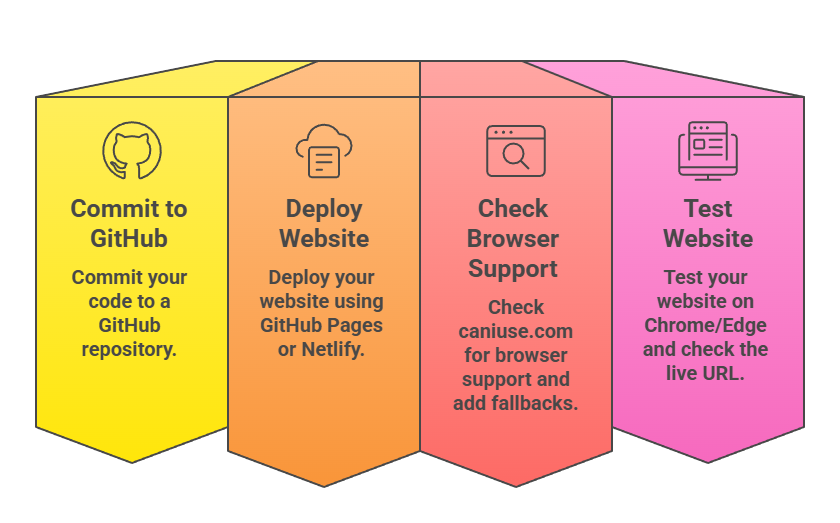
Deployment and browser compatibility are important final steps in the web development process.
Deployment platforms like GitHub Pages and Netlify allow developers to host and share websites easily, making projects accessible to users worldwide.
Browser compatibility ensures that a website works consistently across different browsers and devices.
Tools such as caniuse.com help developers check support for HTML, CSS, and JavaScript features, reducing unexpected issues for users.
Deployment Overview
Deployment involves uploading your static site files to a hosting service that serves them over the internet.
This process handles HTTPS, custom domains, and scaling, freeing you to focus on development.
GitHub Pages and Netlify stand out for beginners due to their Git integration and zero-cost tiers, supporting unlimited sites on GitHub Pages and 500 on Netlify's free plan.
GitHub Pages Deployment
GitHub Pages hosts static sites directly from GitHub repositories, ideal for simple HTML/CSS/JS projects.
It uses Jekyll by default but works with plain files, offering free custom domains and HTTPS.
Step-by-Step Setup
Follow these numbered steps to deploy your first site, taking under 10 minutes.
1. Create a repository named username.github.io (replace username with your GitHub handle) and initialize it with a README.
2. Push your index.html, CSS, and JS files to the main branch using git add ., git commit -m "Initial site", and git push.
3. Go to repository Settings > Pages, select Deploy from a branch (main), and save—your site lives at https://username.github.io within minutes.
4. Edit _config.yml for title and description, like title: My Web Project, then commit changes.
Advanced Features
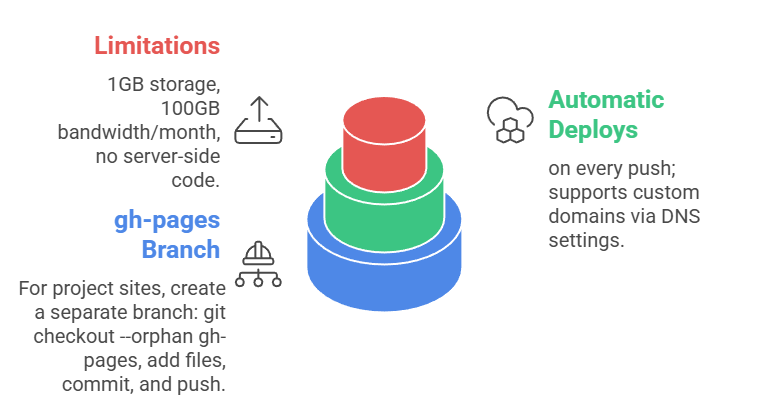
Your site updates propagate in under 10 minutes, perfect for rapid prototyping.
Netlify Deployment
Netlify excels in modern workflows with drag-and-drop, Git auto-deploys, and built-in forms/CDN. It offers 100GB bandwidth and 300 build minutes free, surpassing GitHub for teams.
Quickstart Methods
Netlify supports multiple entry points for flexibility.
1. Drag-and-drop: Visit app.netlify.com/drop, drag your public or dist folder—get a live URL instantly.
2. Git integration: Connect GitHub repo, set build command (e.g., none for static sites), and publish directory (/ or dist); deploys trigger on push.
3. CLI: Install netlify cli, run netlify deploy --prod from your project folder.
Custom names and HTTPS activate automatically.
Browser Compatibility Essentials
Browser compatibility confirms your features work across Chrome (71%), Safari (14%), Edge (5%), and others.
Tools like caniuse.com provide support tables, preventing breakage for 95%+ users.
Using caniuse.com Effectively
caniuse.com lists real-world support data, updated regularly for HTML5, CSS3, and JS.
1. Search features like Flexbox or Grid to view browser versions with/without support.
2. Check Global Usage percentage and polyfill needs (e.g., ES6 via Babel).
3. Examples CSS Grid supports 97% (2025 stats); older IE needs fallbacks.
Integrate checks during development: Target Chrome 90+, Firefox 90+, Safari 14+ for modern features.
Best Practices

Aim for 95% coverage; ignore <1% outliers like ancient Chrome.
Practical Example: Deploying a Portfolio
Build a simple portfolio: index.html with Flexbox layout, JS for smooth scroll.