HTML forms the skeleton of every webpage, defining its structure much like the frame of a house supports the walls and roof.
In this topic, we dive into semantic HTML5 elements and proper document structure, which go beyond basic tags to create meaningful, machine-readable code.
This matters because semantic markup improves SEO rankings, enhances accessibility for users with disabilities, and makes your code easier for other developers to maintain—skills you'll apply throughout this course as we layer on CSS styling and JavaScript interactivity.
The HTML Document Structure
Every HTML page follows a standardized blueprint called the DOCTYPE declaration and root elements, ensuring consistent rendering across browsers.
This structure, outlined in the HTML5 specification by the W3C, prevents quirks mode and enables modern features. Let's break it down step by step.
Core Components of an HTML Document
1. <!DOCTYPE html>: Placed at the very top, this declares the document as HTML5. Without it, browsers revert to outdated rendering modes, breaking layouts.
2. <html>: The root element enclosing everything; always include lang="en" for accessibility and SEO.
3. <head>: Contains metadata—not visible on the page but crucial for browsers and search engines.
4. <body>: Holds all visible content, from text to images.
<!DOCTYPE html>

<html lang="en">

<head>

    <meta charset="UTF-8">

    <meta name="viewport" content="width=device-width, initial-scale=1.0">

    <title>Your Page Title</title>

</head>

<body>

    <!-- Your content goes here -->

</body>

</html>
Key Elements Inside <head>
The <head> is your page's control center. Populate it correctly to optimize performance and discoverability.
1. <title>: Defines the browser tab text (under 60 characters for SEO). Example: <title>Portfolio - Jane Doe</title>.
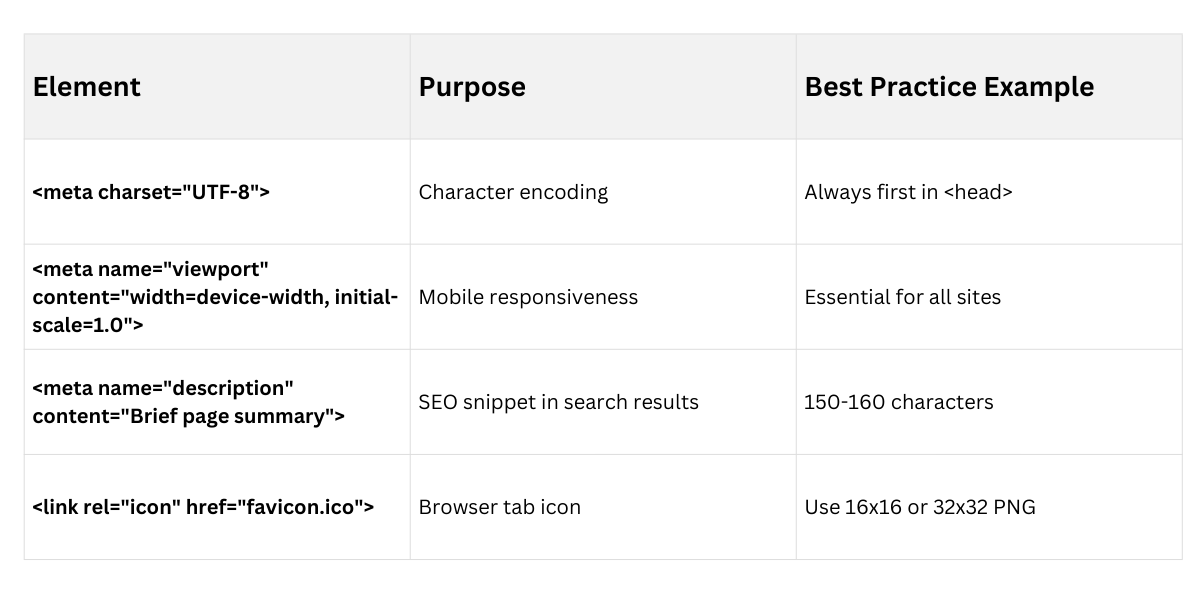
2. <meta> tags: Provide essential metadata.
3. <link> for stylesheets: <link rel="stylesheet" href="styles.css">.
4. <script> for external JS: Place at end of <body> for faster loading, or use <script defer> in <head>.
 Semantic HTML5 Elements
Semantic elements describe their meaning to browsers, not just appearance—think <p> for paragraphs versus <div> for generic containers.
Introduced in HTML5, they boost accessibility (e.g., screen readers announce "header" correctly) and SEO (Google prioritizes semantic content). Use them to replace div soup, making your code self-documenting.
Understanding Semantics vs. Presentational Tags
Semantics focus on content purpose, not styling (leave that to CSS). Avoid outdated tags like <b> or <i>; opt for <strong> and <em> instead.
Non-semantic: <div class="header"> – Tells nothing about content.
Semantic: <header> – Clearly indicates a page or section header.
Benefits in Practice

1. Screen readers jump to <nav> for menus:
Using the <nav> element helps screen readers quickly identify and skip directly to navigation menus.
This improves accessibility by allowing users to move efficiently through the page without listening to irrelevant content.
2. Search engines index <article> content higher:
The <article> tag clearly defines self-contained, meaningful content, making it easier for search engines to understand page structure.
As a result, important content is indexed more accurately and can gain better visibility in search results.
3. Future-proofs your code as AI crawlers evolve:
Semantic HTML provides clear meaning and context to your code, which modern and future AI-based crawlers rely on.
This ensures your websites remain understandable, adaptable, and optimized as web technologies continue to advance.
Primary Semantic Elements for Page Structure
HTML5 provides built-in tags for common layouts. Group them logically to mirror your site's information architecture.
1. <header>: Introductory content or site-wide banner (logo, nav).
2. <nav>: Main navigation menus—use only for primary links.
3. **<main>`: Primary content area; only one per page.
4. <article>: Self-contained pieces like blog posts or product cards.
5. <section>: Thematic groupings within <main>, e.g., "Features" section.
6. <aside>: Sidebars, ads, or tangential info.
7. <footer>: Closing content like copyright or contact links.
Example: Semantic Homepage Layout
<header>

    <h1>My Awesome Site</h1>

    <nav><!-- menu --></nav>

</header>

<main>

    <section aria-labelledby="features">

        <h2 id="features">Key Features</h2>

        <!-- content -->

    </section>

    <article><!-- blog post --></article>

</main>

<aside><!-- sidebar --></aside>

<footer><!-- copyright --></footer>
Headings and Content Hierarchy
Headings create an outline for your page, like chapters in a book. Use them sequentially (h1 → h6) for logical flow, aiding SEO and accessibility.
Best Practices for Headings
1. Start with one <h1> per page as the main title. Skip levels (h1 to h3 is fine).
2. h1-h6: Denote importance and nesting.
3. Always pair with text content.
4. Use id attributes for anchor links: <h2 id="setup">Setup Guide</h2>.
Practical Example: Outline Structure
h1: Welcome to My Portfolio

  h2: About Me

    h3: My Skills

  h2: Projects

    h3: Project 1

    h3: Project 2
Add scope="col" to <th> for screen readers.
Embedding Multimedia
1. <figure> and <figcaption>: Wrap images/videos semantically.
2. **<picture>: Responsive images: <source media="(min-width: 768px)" srcset="large.jpg">`.
3. **<iframe>: Embed YouTube/maps with title` for accessibility.
ARIA Basics (Accessible Rich Internet Applications):


Class Sessions
Sales Campaign

We have a sales campaign on our promoted courses and products. You can purchase 1 products at a discounted price up to 15% discount.