CSS custom properties, commonly known as variables, allow developers to define reusable values that can be shared across stylesheets.
Combined with inheritance, they enable consistent styling, easier updates, and more flexible design systems in modern CSS.
Declaring and Using CSS Custom Properties
CSS custom properties store values under custom names, scoped to elements and inherited naturally through the cascade.
Defined with -- syntax, they work in all modern browsers (96%+ global coverage per CanIUse 2025 data). Start simple, then layer complexity.
Basic Syntax and Scope
Custom properties live on any element and cascade down to children, mimicking font-family inheritance but for any value.
1. Declare: --primary-color: #3498db;
2. Use: color: var(--primary-color);
3. Global scope: Root level affects everything
4. Local scope: Component-specific overrides
Quick Example:
:root {

  --brand-blue: #1e40af;

  --spacing-unit: 1rem;

}


.header {

  background: var(--brand-blue);

  padding: var(--spacing-unit);

}
Fallbacks add resilience: color: var(--color, #000); defaults to black if undefined.
Property Names and Best Practices
Names should be descriptive and namespaced to avoid clashes in team projects.
1. Use kebab-case: --button-bg-primary
2. Namespace by component: --card--padding
3. Avoid CSS keywords: No --color-blue, use --blue-500
CSS Custom Property Naming Best Practices

Pro Tip: Tools like Style Dictionary convert these to JS tokens for React/Vue consistency.
Inheritance and the Cascade in Action
CSS variables inherit like any property, flowing from parent to child unless overridden. This cascading magic powers theme systems without deep nesting.
How Inheritance Works
Variables follow normal CSS rules: specificity, order, and inheritance.
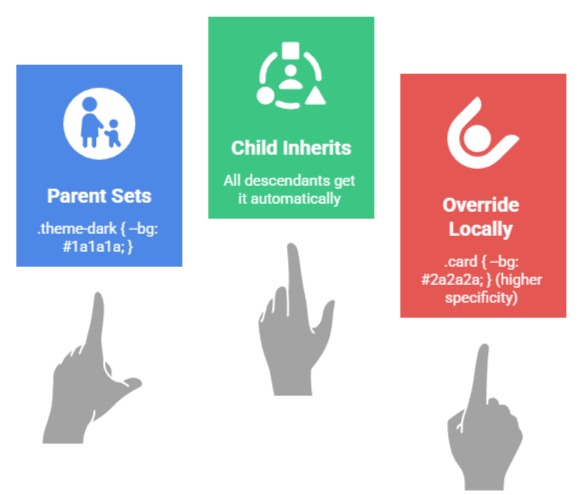
Visual Cascade Example:
html (root)

├── --primary: blue (inherits everywhere)

├── body

│   └── --accent: green (body + children)

└── .dark-theme (override)

    └── --primary: navy (scoped override)
Debug Trick: Use currentColor keyword: --border: 2px solid currentColor; inherits text color dynamically.
Dynamic Updates with JavaScript
Variables shine with JS—update via element.style.setProperty() for runtime themes.
Theme Toggle Example:
// Toggle dark mode

document.documentElement.classList.toggle('dark');

/* CSS handles: .dark { --bg: #000; --text: #fff; } */
Advanced: Computed Values
--full-width: 100vw;

--sidebar-width: 300px;

--main-width: calc(var(--full-width) - var(--sidebar-width));
Advanced Techniques and Real-World Applications
Move beyond basics to industry patterns like design tokens and CSS-in-JS hybrids.
Theme Switching and Design Systems
Variables enable instant global changes, core to modern design systems.
1. Dark/Light Mode: Single class swap updates 50+ values
2. Brand Colors: --brand-50 to --brand-900 scale
3. Responsive Spacing: --space-mobile: 0.5rem; --space-desktop: 2rem;
Implementation Steps:
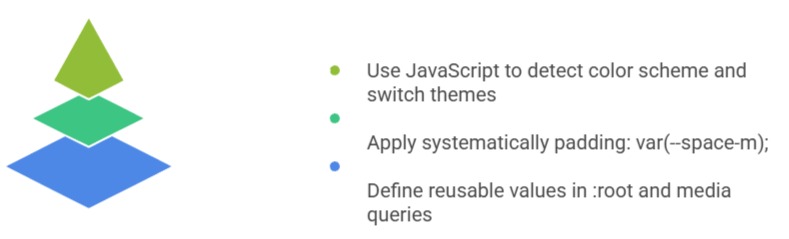
Practical Examples:
/* Safe fallbacks */

color: var(--text-primary, #333);


/* Math magic */

--aspect-ratio: 16/9;

width: var(--aspect-ratio);


/* Relative to viewport */

--vh-unit: 1vh;

height: calc(var(--vh-unit) * 50);
Performance Note: Browsers optimize var() lookups (under 1ms), faster than JS color parsing.
Common Pitfalls and Debugging
Avoid these traps for production-ready code.
Top Issues
1. Typo mismatch: --primary-color declared, var(--primary) used
2. Specificity wars: Inline styles override :root
3. Unsupported browsers: Rare, but IE11 needs PostCSS polyfill
Debug Steps:
1. DevTools > Computed > Search "var("
2. getComputedStyle(el).getPropertyValue('--var-name')
3. Lighthouse audit flags unused variables
