Event handling is a core concept in JavaScript that allows web pages to respond to user interactions such as clicks, key presses, mouse movements, form submissions, and more.
It enables developers to make web applications interactive and dynamic by defining how the application should behave when a specific event occurs.
JavaScript provides powerful mechanisms like addEventListener to attach event handlers, and concepts such as event bubbling, capturing, and event delegation to efficiently manage events, especially in complex and dynamic DOM structures.
Understanding Events in JavaScript
Events represent user actions—clicks, keypresses, scrolls—that trigger JavaScript code.
Browsers fire these events in a predictable flow, giving you precise control over when and how your code responds. This foundation unlocks responsive UIs without constant polling.
What Are DOM Events?
The Document Object Model (DOM) treats every HTML element as a node that can receive events.
When a user interacts, the browser creates an event object containing details like target element, coordinates, and type.
Key Events

Live Example: Hover over this <div id="demo">Test Me</div> to see mouseover fire.
The Event Object
Every event handler receives an event object (often e or event) packed with useful properties.
element.addEventListener('click', function(e) {

    console.log(e.target);      // Element clicked

    console.log(e.type);        // "click"

    console.log(e.clientX);     // Mouse X position

});
Common Properties
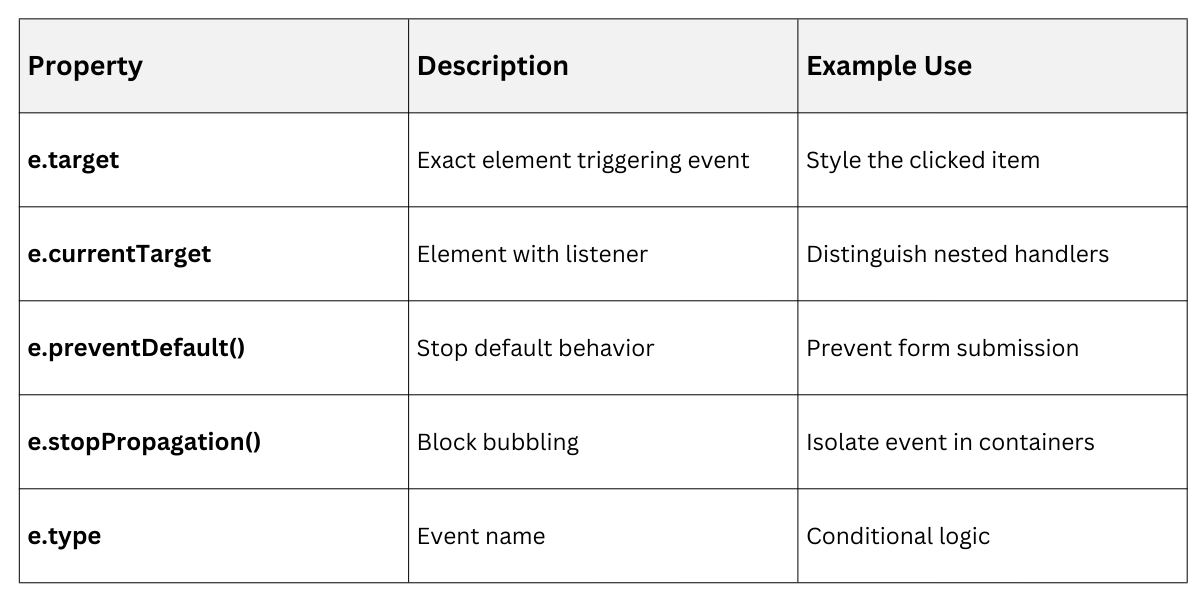
This object gives you surgical control over interactions.
addEventListener: The Modern Standard
Forget onclick attributes—they're messy and unscalable. addEventListener() is the professional way to attach multiple handlers to one element with clean removal.
Why addEventListener Beats Inline Handlers
Inline handlers like <button onclick="myFunction()"> pollute HTML and can't handle multiple listeners. addEventListener keeps concerns separated.
Basic Syntax
element.addEventListener('click', handlerFunction, options);Options Object and Best Practices
The third parameter accepts booleans or objects for advanced control.
1. Capture phase: { capture: true } (runs before bubbling)
2. Once-only: { once: true } (auto-removes after firing)
3. Passive listeners: { passive: true } (improves scroll performance)
// Scroll listener (2025 performance best practice)

window.addEventListener('scroll', handleScroll, { passive: true });


// Fires once after load

window.addEventListener('load', initApp, { once: true });
Pro Tip: Always use arrow functions or .bind() for this context control.
Event Propagation: Bubbling and Capturing
Events don't stop at their target—they travel through the DOM tree in two phases. Understanding this flow prevents common bugs and enables powerful delegation patterns.
The Event Flow Journey
Capturing phase (top-down): Event travels from window → document → target element
1. Target phase: Fires on exact element
2. Bubbling phase (bottom-up): Returns from target → parents → window
Visualized
window → document → <body> → <main> → [TARGET: button] → <main> → <body> → document → windowMost handlers run in bubbling (default), but { capture: true } intercepts early.
Controlling Propagation
Use these methods strategically:
1. e.stopPropagation(): Stops travel up/down tree
2. e.stopImmediatePropagation(): Stops others on same element + propagation
3. e.preventDefault(): Cancels browser defaults (links, forms)
Example: Nested Click Handler
<div id="parent">Parent

  <button id="child">Child Button</button>

</div>document.getElementById('parent').addEventListener('click', () => console.log('Parent'));
document.getElementById('child').addEventListener('click', (e) => {
console.log('Child');
// e.stopPropagation(); // Uncomment to isolate
});Clicking child logs both unless stopped.
Event Delegation: The Performance Powerhouse
Instead of attaching listeners to hundreds of dynamic elements (like list items), bind one listener to a parent and use e.target to identify children. This scales beautifully for SPAs and large lists.
Why Delegation Wins
Modern sites generate content dynamically—think infinite scroll or search results. Individual listeners = memory leaks. Delegation = elegant solution.
Benefits

Real-World Implementation
// Menu with dynamic items

document.querySelector('#menu').addEventListener('click', (e) => {

    if (e.target.matches('.menu-item')) {

        const itemId = e.target.dataset.id;

        loadContent(itemId);

    }

});
Practical Patterns and Debugging
Combine techniques for production-grade code.
Common Patterns
1. Form Validation
form.addEventListener('submit', (e) => {

    if (!isValid()) {

        e.preventDefault();

        showErrors();

    }

});
2. Keyboard Shortcuts
document.addEventListener('keydown', (e) => {

    if (e.ctrlKey && e.key === 's') {

        e.preventDefault();

        saveDraft();

    }

});
3. Cleanup
function removeListener() {

    element.removeEventListener('click', handler);

}
Debugging Tools
1. Chrome DevTools: Elements panel shows all listeners
2. console.log(e) reveals full event object
3. Breakpoints on event properties
Performance Checklist
1. Use { passive: true } for scroll/touch
2. Delegate whenever possible
3. Remove listeners on unmount
