Working with APIs allows web applications to communicate with external services and exchange data efficiently.
RESTful APIs provide a standard way to request and manipulate resources using HTTP methods such as GET, POST, PUT, and DELETE.
JSON is commonly used as the data format for sending and receiving information, making it easy for applications to parse and use responses.
Proper error handling ensures that applications can manage failed requests, invalid responses, or network issues gracefully, improving reliability and user experience.
Understanding RESTful APIs
REST (Representational State Transfer) is the standard architecture for web APIs, treating data like web pages with URLs.
Most public APIs follow REST principles, making it essential for frontend work. Let's break down how they operate and why they're reliable.
REST Methods and HTTP Status Codes
REST uses familiar HTTP methods to perform CRUD operations (Create, Read, Update, Delete).

Common Status Codes
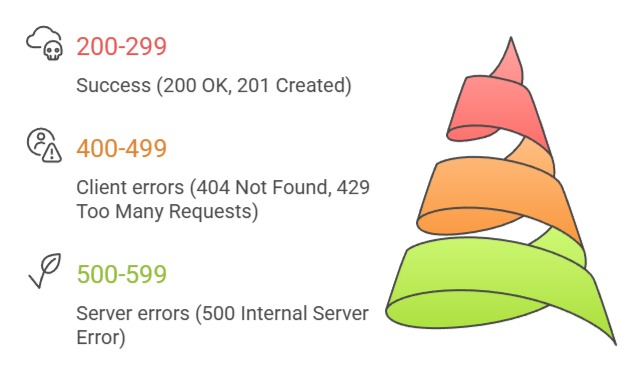
Pro Tip: Always check status codes before processing responses—it's your first line of defense.
API Endpoints and Authentication
Endpoints are specific URLs exposing data. Many require authentication via API keys or Bearer tokens.
Example: JSONPlaceholder (free testing API)
GET https://jsonplaceholder.typicode.com/users

GET https://jsonplaceholder.typicode.com/users/1
Authentication Example
fetch('https://api.example.com/data', {

  headers: {

    'Authorization': 'Bearer YOUR_TOKEN_HERE'

  }

})
Making API Requests with Fetch API
The Fetch API is JavaScript's built-in tool for HTTP requests—modern, promise-based, and replacing XMLHttpRequest.
It works seamlessly across browsers and integrates with async/await from our ES6+ module. Start with simple GET requests, then add complexity.
Basic GET Request Pattern
Follow this 5-step process for reliable API calls:
1. Open connection: Use fetch(url).
2. Check response: Verify response.ok (status 200-299).
3. Parse JSON: Call response.json().
4. Handle data: Process the returned object.
5. Catch errors: Use try/catch or .catch().
Complete Example: Fetch Users
async function getUsers() {

  try {

    const response = await fetch('https://jsonplaceholder.typicode.com/users');

    if (!response.ok) {

      throw new Error(`HTTP ${response.status}`);

    }

    const users = await response.json();

    console.log(users); // Array of user objects

  } catch (error) {

    console.error('API Error:', error.message);

  }

}

getUsers();
This pattern handles 95% of real-world API interactions.
POST Requests and Sending Data
POST sends data to create resources. Include JSON in the request body.
Example: Create a New Post
async function createPost(title, body) {

  try {

    const response = await fetch('https://jsonplaceholder.typicode.com/posts', {

      method: 'POST',

      headers: {

        'Content-Type': 'application/json'

      },

      body: JSON.stringify({ title, body, userId: 1 })

    });


    const newPost = await response.json();

    console.log('Created:', newPost);

  } catch (error) {

    console.error('POST failed:', error);

  }

}
JSON Parsing and Data Manipulation
JSON (JavaScript Object Notation) is the universal data format for APIs—lightweight and native to JS. Parsing converts string responses into usable objects/arrays. Modern browsers handle this automatically, but understanding structure prevents common pitfalls.
JSON Structure and Common Patterns
API responses follow predictable patterns:
1. Objects: { "name": "John", "age": 30 }
2. Arrays: [{ "id": 1, "title": "Post 1" }]
3. Nested data: { "user": { "posts": [...] } }
Parsing Best Practices
1. Use response.json()—it auto-parses strings to objects.
2. Validate data structure before use (check Array.isArray()).
3. Handle null/undefined with optional chaining (?.).
Real-World Example: Display Weather Data
async function showWeather(city) {

  const response = await fetch(`https://api.openweathermap.org/data/2.5/weather?q=${city}&appid=YOUR_KEY`);

  const data = await response.json();


  // Safely access nested properties

  const temp = data.main?.temp ? (data.main.temp - 273.15).toFixed(1) : 'N/A';

  document.getElementById('temp').textContent = `${temp}°C`;

}
Transforming API Data for Display
Raw API data rarely matches UI needs. Transform it:
1. Map arrays: users.map(user => ({ name: user.name, email: user.email }))
2. Filter: posts.filter(post => post.userId === 1)
3. Sort: posts.sort((a, b) => b.id - a.id)
Example Table Population
const usersTable = document.querySelector('#users');

users.forEach(user => {

  usersTable.innerHTML += `

    <tr>

      <td>${user.name}</td>

      <td>${user.email}</td>

    </tr>

  `;

});
Error Handling Strategies
APIs fail—networks drop, servers crash, rate limits hit.
Robust error handling prevents broken UIs and frustrated users. Implement multiple layers: network errors, HTTP errors, and data validation.
Comprehensive Error Handling
Layered Approach

Advanced Example with Retry Logic:
async function fetchWithRetry(url, maxRetries = 3) {

  for (let i = 0; i < maxRetries; i++) {

    try {

      const response = await fetch(url);

      if (!response.ok) throw new Error(`HTTP ${response.status}`);

      return await response.json();

    } catch (error) {

      if (i === maxRetries - 1) throw error;

      await new Promise(resolve => setTimeout(resolve, 1000 * (i + 1)));

    }

  }

}
Loading States and User Feedback
Never leave users hanging. Show loading spinners and success messages.
function updateUI(state, data = null) {

  const loader = document.querySelector('.loader');

  const content = document.querySelector('.content');

  const errorMsg = document.querySelector('.error');


  if (state === 'loading') {

    loader.style.display = 'block';

    content.style.display = 'none';

  } else if (state === 'success') {

    loader.style.display = 'none';

    content.style.display = 'block';

    // Render data

  } else {

    errorMsg.textContent = data;

    errorMsg.style.display = 'block';

  }

}
Usage: updateUI('loading'); before fetch, updateUI('success', users); after.
Best Practices and Real-World Integration
Combine everything into production-ready patterns. Use these in your portfolio projects.
Performance Checklist
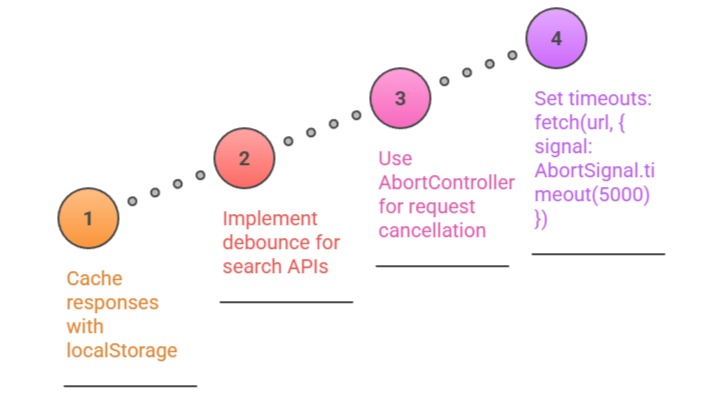
CORS Note: Browser security blocks cross-origin requests. Use proxies or serverless functions for private APIs during development.
Quick Project: Build a GitHub user search app pulling repos, followers, and profile data with full error handling.

Class Sessions
Sales Campaign

We have a sales campaign on our promoted courses and products. You can purchase 1 products at a discounted price up to 15% discount.