Performance tools in JavaScript help optimize how applications handle frequent or resource-intensive operations.
Techniques like debounce and throttle control how often functions are executed in response to repeated events such as scrolling, resizing, or typing, preventing unnecessary workload.
The requestAnimationFrame method provides an efficient way to run animations and visual updates by synchronizing them with the browser’s repaint cycle.
API Fundamentals and Fetch Integration
APIs (Application Programming Interfaces) let your frontend communicate with servers to load dynamic content like user profiles or weather data.
The modern Fetch API replaces outdated XMLHttpRequest with cleaner Promise-based syntax. Understanding request patterns and error handling forms the backbone of real-world apps.
Making API Requests with Fetch
Fetch returns Promises, making async operations readable and chainable.
Basic GET request pattern
async function fetchUsers() {

  try {

    const response = await fetch('https://api.example.com/users');

    if (!response.ok) throw new Error('Network error');

    const users = await response.json();

    return users;

  } catch (error) {

    console.error('Fetch failed:', error);

  }

}
Key Practices for APIs
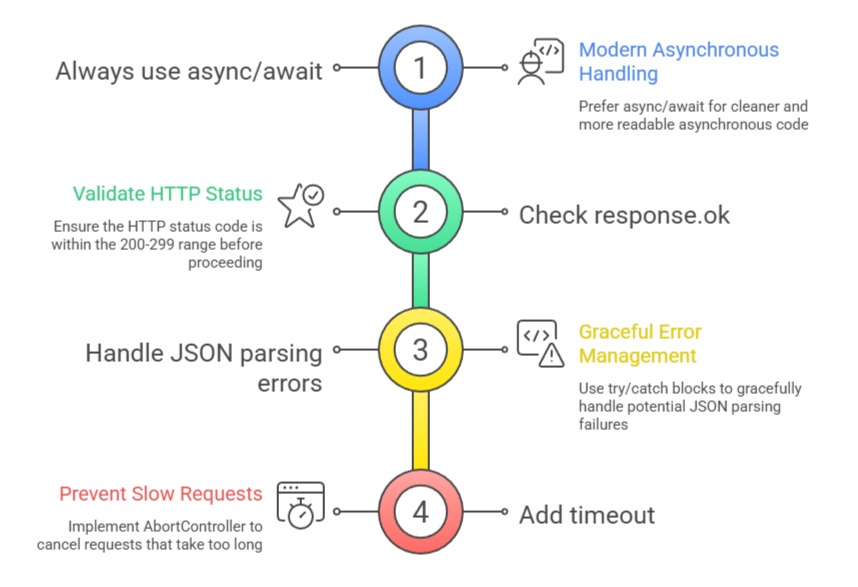
Common API Patterns and Error Handling
Real APIs return structured JSON, but networks fail. Build resilience from day one.
API Response Structure

Error Handling Strategies
1. Network errors → Show offline message
2. 4xx errors → User action needed (invalid login)
3. 5xx errors → Server issue, retry later
4. Empty responses → Graceful fallbacks
Practical example - Weather API
async function getWeather(city) {

  const controller = new AbortController();

  const timeout = setTimeout(() => controller.abort(), 5000);


  try {

    const res = await fetch(`/api/weather/${city}`, { signal: controller.signal });

    clearTimeout(timeout);

    return await res.json();

  } catch (err) {

    return { error: 'Weather unavailable', city };

  }

}
Performance Bottlenecks in Interactive Apps
Fast APIs mean nothing if your UI chokes on rapid user input or heavy animations.
Performance tools prevent layout thrashing and dropped frames. These techniques scale your vanilla JS apps to enterprise levels without frameworks.
Why Performance Matters
Core Web Vitals (LCP, FID, CLS) now determine Google rankings. Users abandon 53% of mobile sessions over 3 seconds.
Common Culprits
1. Search input firing API calls per keystroke
2. Scroll listeners recalculating layouts 60x/second
3. Animations triggering reflows on every frame
Measuring Performance First
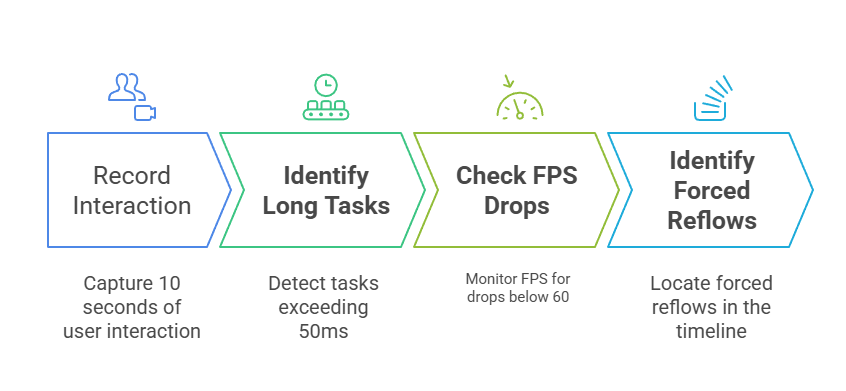
Use Chrome DevTools Performance tab before optimizing.
Quick Audit Checklist
Debounce and Throttle Techniques
Debounce waits for user input to "settle" before executing expensive operations. Throttle limits execution to fixed intervals. Both prevent API spam and layout thrashing.
Debounce: Perfect for Search and Forms
Wait until typing stops, then search.
function debounce(fn, delay) {

  let timeout;

  return function(...args) {

    clearTimeout(timeout);

    timeout = setTimeout(() => fn.apply(this, args), delay);

  };

}


const searchAPI = debounce(async (query) => {

  const results = await fetchUsers(query);

  displayResults(results);

}, 300);


// Usage

input.addEventListener('input', (e) => searchAPI(e.target.value));
Use Cases
1. Live search (300ms delay)
2. Form validation on blur
3. Resize handlers
4. Scroll-to-load APIs
Throttle: Consistent Execution Rate
Fire at most once per interval, ideal for scroll/resize.
function throttle(fn, limit) {

  let inThrottle;

  return function(...args) {

    if (!inThrottle) {

      fn.apply(this, args);

      inThrottle = true;

      setTimeout(() => inThrottle = false, limit);

    }

  };

}


const handleScroll = throttle(() => {

  // Infinite scroll API call

  loadMorePosts();

}, 100);
requestAnimationFrame for Smooth Animations
requestAnimationFrame (rAF) syncs code to browser's 60fps refresh cycle (~16ms/frame). Replace setInterval to eliminate jank.
The rAF Pattern
Browser calls your callback before each repaint.
function animateCircle(progress) {

  circle.style.transform = `translateX(${progress * 200}px)`;

  if (progress < 1) {

    requestAnimationFrame((time) => animateCircle(time / 1000));

  }

}


button.addEventListener('click', () => {

  requestAnimationFrame((time) => animateCircle(time / 1000));

});
Lifecycle
1. rAF schedules before next repaint
2. Returns request ID for cancelAnimationFrame(id)
3. Always use time parameter for progress calculation
Real-World Animation Loop
Combine with easing for professional motion.
let startTime;

function animate({ duration = 1000, draw }) {

  startTime = performance.now();


  function step(now) {

    const elapsed = now - startTime;

    const progress = Math.min(elapsed / duration, 1);


    draw(progress);

    if (progress < 1) requestAnimationFrame(step);

  }


  requestAnimationFrame(step);

}


// Usage: Smooth slide-in

animate({

  duration: 500,

  draw: (progress) => {

    element.style.opacity = progress;

    element.style.transform = `translateY(${50 * (1 - progress)}px)`;

  }

});
Performance wins
1. No dropped frames
2. Battery efficient (stops when tabbed away)
3. Hardware acceleration via transform
Complete Integration Example
Live search dashboard combining all techniques
const searchInput = document.querySelector('#search');

const resultsList = document.querySelector('#results');


const debouncedSearch = debounce(async (query) => {

  if (!query) return;


  resultsList.innerHTML = '<li>Loading...</li>';

  const users = await fetchUsers(query);

  renderUsers(users);

}, 350);


const throttledScroll = throttle(() => {

  if (isNearBottom()) loadMoreUsers();

}, 150);


searchInput.addEventListener('input', (e) => debouncedSearch(e.target.value));

window.addEventListener('scroll', throttledScroll);
This handles 1000+ keystrokes/minute at 60fps with minimal API calls.

Class Sessions
Sales Campaign

We have a sales campaign on our promoted courses and products. You can purchase 1 products at a discounted price up to 15% discount.