System authentication and access control are fundamental elements in Linux security aimed at verifying user identities and regulating user actions on the system.
Authentication ensures that users are who they claim to be, typically through passwords, keys, or other credentials. Access control governs what authenticated users are permitted to do, protecting system integrity and sensitive data.
Together, these mechanisms provide a robust security framework essential for multi-user Linux systems.
Authentication Fundamentals
The list below outlines how user identities are confirmed before access is granted. It also introduces PAM as the backbone of Linux authentication.
1. User Identity Verification: Authentication confirms a user’s identity before granting access.
2. Common Methods:
Password-based authentication
Public key authentication (especially in SSH)
Biometric authentication (in some systems)
Two-factor authentication (2FA)
3. Pluggable Authentication Modules (PAM):
They provide a flexible and centralized authentication framework that controls how users and services are verified.
PAM modules define the specific methods used for authentication, such as password checks, token validation, and other security mechanisms, allowing different services to use consistent authentication rules.
These configurations are stored in the /etc/pam.d/ directory, where each file specifies how a particular service should authenticate users.
Access Control Mechanisms
The following are the key methods used to control who can access system resources. They define how permissions and privileges are assigned in Linux..png)
Authentication Flow Overview
The authentication flow defines how users are checked before access is allowed. The following steps describe this process in a structured way.
1. User provides credentials (password/key).
2. PAM framework validates credentials against system/user database.
3. Upon success, user gains access with defined privileges.
4. Access control policies enforce permissions on resources.
Authentication Configuration and Files
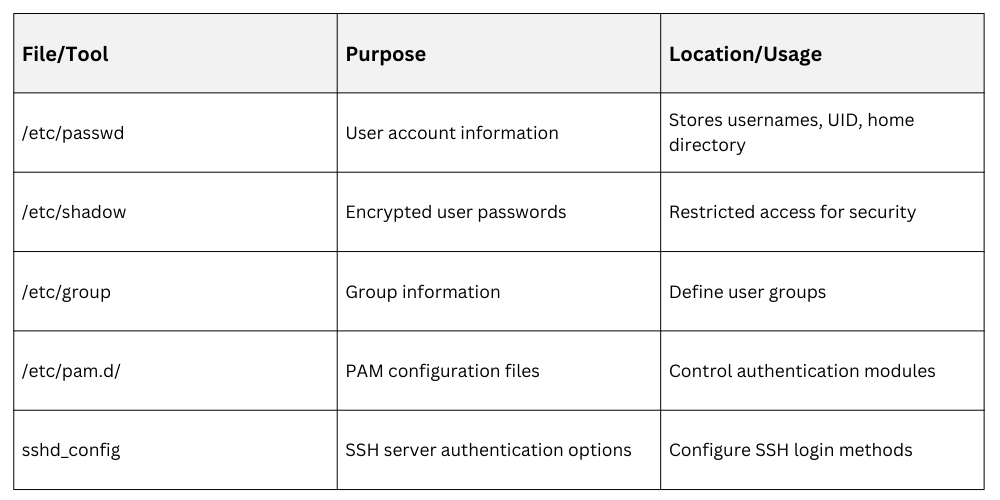 Common Authentication Methods
Different authentication methods offer varying levels of security. The list below highlights the most commonly used ones.
1. Password Authentication: Users enter passwords verified against stored hashes.
2. Public Key Authentication (SSH): Users authenticate with cryptographic keys, more secure and often preferred.
3. Kerberos: Network-based single sign-on system using tickets.
4. Two-Factor Authentication: Adds an additional verification step, e.g., OTP via an app.
Access Control Best Practices
1. Assign minimal privileges needed for users’ roles.
2. Manage group memberships carefully to control access scope.
3. Use sudo for controlled administrative access with logging.
4. Regularly audit user accounts and permissions.
5. Implement ACLs for granular resource control when needed.

Class Sessions
Sales Campaign

We have a sales campaign on our promoted courses and products. You can purchase 1 products at a discounted price up to 15% discount.