In Linux, links provide alternate ways to access files without duplicating the actual data. They are essential for efficient file system management, allowing multiple references to a single file. There are two primary types of links: symbolic (or soft) links and hard links.
What are Links in Linux?
Links act as pointers or references to files or directories. Instead of copying the content, links create a pathway to the original file, enabling multiple names and locations to point to the same data. This saves disk space and provides flexibility in organizing files.
Symbolic (Soft) Links
A symbolic link is a file that contains a path referencing another file or directory. Think of it as a shortcut or alias.
Characteristics:
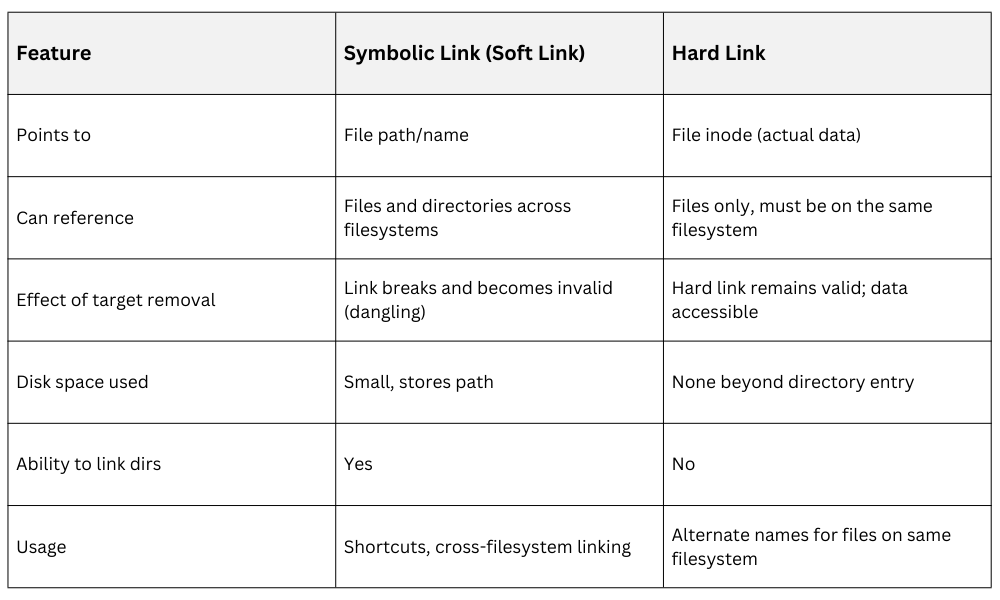
1. Points to the target file or directory by name/path, not the actual data.
2. Can link across different file systems or partitions.
3. Can link to directories as well as files.
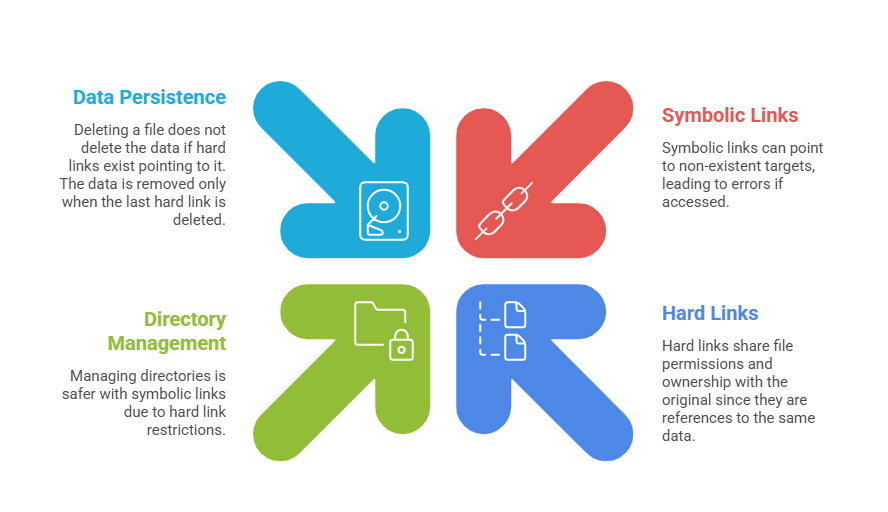
4. If the original file is deleted or moved, the symbolic link becomes broken or “dangling,” leading to an error when accessed.
5. Uses a small amount of disk space since it stores only the path.
Creation: Use the ln -s command:
ln -s /path/to/original /path/to/symlinkUse Cases: Commonly used for creating shortcuts, linking configuration files, or managing shared libraries.
Hard Links
A hard link is a directory entry that points directly to the inode (the actual data structure storing file content) of a file.
Characteristics:
1. Multiple filenames refer to the same inode and thus the same data.
2. Exists independently of the original filename; even if the original is deleted, hard links continue to provide access to the data.
3. Cannot link to directories (to prevent cycles and maintain file system integrity).
4. Cannot span across different file systems or partitions; both original and hard link must be on the same filesystem.
5. Uses no additional disk space for data; just additional directory entries.
Creation: Use the ln command without any options:
ln /path/to/original /path/to/hardlinkUse Cases: Useful for backup systems, ensuring data remains accessible even if one reference is removed.
Comparing Symbolic and Hard Links
Practical Examples and Commands
1. Create a symbolic link:
ln -s /usr/local/bin/script.sh ~/script_shortcut2. Create a hard link:
ln /usr/local/bin/script.sh ~/script_copy3. Listing links with ls -l shows symbolic links annotated with -> pointing to their targets, while hard links show multiple files sharing the same inode number (visible via ls -li).
Important Considerations

Class Sessions
Sales Campaign

We have a sales campaign on our promoted courses and products. You can purchase 1 products at a discounted price up to 15% discount.