USD ($)
$
United States Dollar
Euro Member Countries
India Rupee
د.إ
United Arab Emirates dirham
ر.س
Saudi Arabia Riyal

Loops and Iteration

Lesson 35/49 | Study Time: 15 Min

Loops are fundamental structures in shell scripting that allow repetitive execution of commands or blocks of code until a condition is met or for a specified number of times.

Utilizing loops makes scripts efficient, reduces code duplication, and automates repetitive tasks in Linux environments.

Understanding different types of loops, their syntax, and control mechanisms is essential for writing effective and flexible shell scripts.

Types of Loops in Shell Scripting

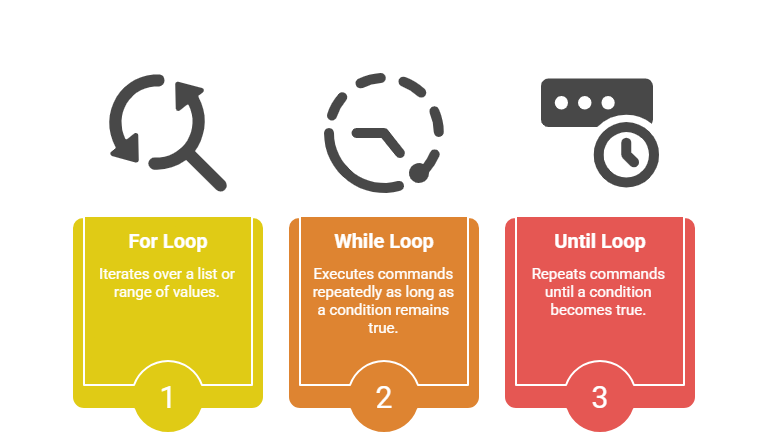
Linux shell scripting mainly supports three types of loops:
For Loop

The for loop iterates through a list of items or a sequence, executing the commands for each iteration.


Syntax:

bash
for var in list
do
commands
done


Example:

bash
for i in 1 2 3 4 5
do
echo "Iteration $i"
done


It can also iterate over a range using brace expansion:

bash
for i in {1..5}
do
echo "Number $i"
done

While Loop

The while loop executes as long as its condition stays true.


Syntax:

bash
while [ condition ]
do
commands
done


Example:

bash
count=1
while [ $count -le 5 ]
do
echo "Count: $count"
((count++))
done

Until Loop

The until loop runs until the specified condition becomes true.


Syntax:

bash
until [ condition ]
do
commands
done


Example:

bash
count=1
until [ $count -gt 5 ]
do
echo "Count: $count"
((count++))
done

Loop Control Statements

Below are important loop control mechanisms. They make scripts more flexible and responsive to conditions.


1. break: Exits loop immediately.

2. continue: Skips the rest of the current iteration and moves to the next.


Example:

bash
for i in {1..10}
do
if [ $i -eq 5 ]; then
echo "Encountered 5, breaking loop."
break
elif [ $i -eq 3 ]; then
echo "Skipping 3"
continue
else
echo "Current number: $i"
fi
done

Nested Loops

Loops can be nested within each other to iterate over multiple dimensions.


Example:

bash
for i in 1 2 3
do
for j in a b
do
echo "Outer loop: $i, Inner loop: $j"
done
done

Andrew Foster

Andrew Foster

Product Designer
Profile

Class Sessions

1- What is Linux and Operating System Concepts 2- Linux History and Evolution 3- Linux Distributions and Their Purposes 4- Open Source Software and Licensing 5- Graphical User Interface (GUI) and Desktop Environments 6- Terminal Access and Command-Line Fundamentals 7- Getting Help and Command Documentation 8- File System Hierarchy and Directory Structure 9- Navigating Directories and Listing Contents 10- Creating, Copying, and Moving Files and Directories 11- Deleting Files and Directories 12- Symbolic and Hard Links 13- Understanding File Permissions Model 14- Modifying Permissions and Ownership 15- User and Group Management 16- Sudo and Privilege Escalation 17- Text Searching and Pattern Matching 18- Text Processing and Stream Editing 19- Compressing and Archiving Files 20- Text Editing and File Creation 21- Package Management Systems Overview 22- Installing and Updating Software with APT 23- Installing and Updating Software with YUM/DNF 24- Managing Software from Non-Repository Sources 25- Understanding Processes and Process Management 26- Viewing Running Processes 27- Process Control and Termination 28- Task Scheduling with Cron 29- Networking Concepts and IP Addressing 30- Viewing and Configuring Network Interfaces 31- Basic Network Troubleshooting 32- Shell Script Basics 33- Variables and Data Types 34- Conditional Logic in Scripts 35- Loops and Iteration 36- Functions and Code Reuse 37- Input/Output and User Interaction 38- System Authentication and Access Control 39- File System Security 40- Software Updates and Patching 41- Basic Firewall Concepts 42- System Information and Monitoring 43- Service and Daemon Management 44- System Boot Process and Runlevels 45- System Backup and Disaster Recovery 46- Comprehensive File System Management 47- System Automation Workflows 48- Multi-Concept Troubleshooting Scenarios 49- Continued Learning Pathways

Sales Campaign

Sales Campaign

We have a sales campaign on our promoted courses and products. You can purchase 1 products at a discounted price up to 15% discount.
