You have written your code, committed it, pushed it to a branch, and now you want it merged into main. Before that happens, it goes through a pull request, and someone on your team reviews it.
This step is one of the most valuable parts of the entire software development process, and also one of the most commonly mishandled.
A good code review catches bugs before they reach production, spreads knowledge across the team, maintains code quality, and builds trust between team members. A bad code review is slow, vague, demoralising, and ultimately pointless.
What is a Pull Request
A pull request is a formal proposal to merge changes from one branch into another, combined with a structured review and discussion process.
When you open a pull request, you are not just asking for code to be merged. You are starting a conversation. The PR contains:
1. The diff — a visual comparison of exactly what changed, line by line.
2. A title and description explaining what the change does and why.
3. Automated check results — CI pipeline status, test results, linting reports, security scans.
4. Comments and discussions between reviewers and the author.
5. An approval mechanism — reviewers approve or request changes before the merge is allowed.
Pull requests exist on platforms like GitHub, GitLab, Bitbucket, and AWS CodeCommit. The mechanics differ slightly, but the concept is identical across all of them.
The Life of a Pull Request
Developer finishes work on a branch
│
▼
Opens Pull Request — writes title, description, assigns reviewers
│
▼
CI pipeline triggers automatically — runs tests, linting, security scan
│
├── Pipeline fails → Developer fixes issues → Pipeline reruns
│
▼
Reviewers are notified — they read the diff and leave comments
│
├── Changes requested → Developer updates code → Reviewers re-check
│
▼
Approved by required reviewers
│
▼
Merged into target branch — feature branch deleted
│
▼
CD pipeline triggers → Deployed to staging or production
Writing a Good Pull Request
The quality of your pull request directly affects the quality of the review it receives.
Most developers put a lot of effort into writing code but very little into writing the pull request itself. This is a mistake. A poorly written PR forces reviewers to waste time figuring out what the change does and why — time that should be spent on the actual review.
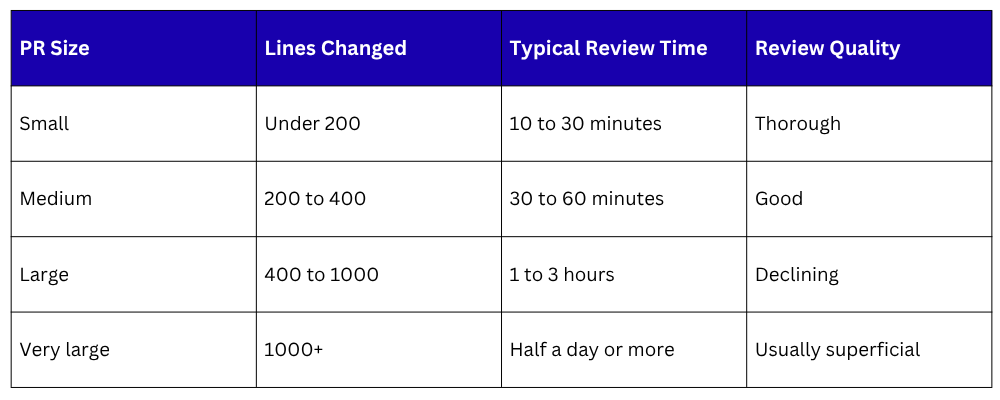
1. Keep It Small
This is the single most important rule for pull requests.
A small PR — one that changes fewer than 200 to 400 lines of code — is reviewed faster, catches more issues, gets approved sooner, and causes fewer merge conflicts.
A large PR — one that touches 2,000 lines across 30 files — takes hours to review, gets shallow feedback, and often just gets approved to get it out of the way.
If your feature is large, break it into multiple smaller PRs that can be reviewed and merged independently.
2. Write a Clear Title
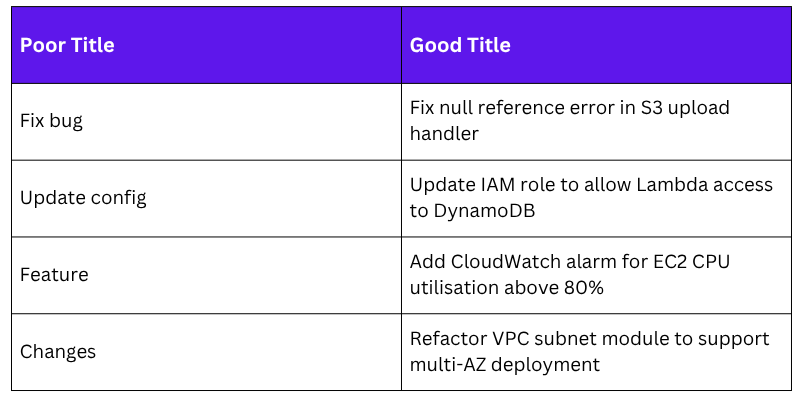
The title should tell the reviewer what the PR does in one line. It should be specific enough that someone reading a list of PRs can immediately understand what this one is about.
3. Write a Useful Description
The description is where you give the reviewer everything they need to understand your change without having to decode the code. A good PR description answers four questions:
1. What did you change?
A brief summary of the technical changes made.
2. Why did you change it?
The motivation — what problem does this solve, or what requirement does it fulfil?
3. How does it work?
Any important implementation decisions, trade-offs, or things that might not be obvious from reading the diff.
4. How can it be tested?
Steps the reviewer can take to verify the change works as expected.
A Good PR Description Template
## What changed
Added a CloudWatch alarm that triggers when EC2 CPU utilisation
exceeds 80% for five consecutive minutes.
## Why
We had a production incident last week where CPU usage spiked
to 100% and the team was not alerted until users reported issues.
This alarm ensures we are notified proactively.
## How it works
- New Terraform module: modules/cloudwatch-alarms/cpu-alarm.tf
- Alarm sends notification to the existing SNS topic (ops-alerts)
- Threshold and period are configurable via variables
## How to test
1. Apply the Terraform changes to the staging environment
2. Simulate high CPU using: stress --cpu 4 --timeout 300
3. Confirm SNS notification is received within 5 minutes
## Related
Jira ticket: OPS-247
4. Assign the Right Reviewers
Do not open a PR and leave it for anyone to pick up. Be intentional about who you assign:
1. Assign someone who is familiar with the area of the codebase your change touches.
2. If the change has security implications, include someone with security knowledge.
3. For infrastructure changes, assign a senior DevOps engineer or architect.
4. Keep the reviewer count to one or two people for most PRs. More than three reviewers often leads to conflicting feedback and slower approvals.
5. Label and Link Your PR
Most platforms let you add labels, link to tickets, and mark PRs with a status. Use these features:
1. Add labels like bug, feature, infrastructure, urgent, or do not merge.
2. Link to the relevant Jira, GitHub, or Linear ticket.
3. If the PR is not ready for review yet, mark it as a Draft PR — this signals to reviewers that it is work in progress and they should not review it yet.
How to Review Code Well
A code review is not a search for perfection. It is a search for problems that matter.
1. What to Look for in a Review
When you review someone's code, go through these areas systematically:
Correctness: Does the code actually do what it is supposed to do? Does it handle edge cases? Are there any obvious bugs or logic errors?
Security: Are there any security vulnerabilities? Common things to check:
1. Hardcoded credentials, API keys, or passwords — these should never be in code.
2. Improper input validation — can a user input break the system?
3. Overly permissive IAM policies — does this Lambda function really need admin access?
4. Sensitive data being logged — passwords or tokens should never appear in logs.
Readability: Can you understand what the code does without the author explaining it? Variable names should be clear. Functions should do one thing. Comments should explain the why, not just the what.
Performance: Are there any obvious performance issues? An N+1 database query inside a loop, an unnecessary API call on every request, or loading an entire file into memory when only one line is needed — these are the kinds of things to watch for.
Tests: Does the change include tests? Are the tests meaningful — do they actually test the right things? A test that always passes regardless of the code is worse than no test at all.
Infrastructure and Configuration
In DevOps contexts, also review:
1. Are Terraform or CloudFormation changes safe to apply? Could they cause downtime?
2. Are environment variables and secrets handled properly?
3. Does the change follow least-privilege principles in IAM policies?
4. Are there hardcoded values that should be variables or parameters?
2. How to Approach the Review
1. Read the description first: Before looking at a single line of code, read the PR description completely. Understand what the change is supposed to do. Then look at the code with that context in mind.
2. Look at the big picture first: Before diving into individual lines, get a sense of the overall structure. What files changed? What is the general approach? Does the architecture make sense?
3. Then go line by line: Once you understand the overall approach, review the details — logic, naming, error handling, security.
4. Run the code if you can: For significant changes, check out the branch locally and test it yourself. Reading code and running code are two different kinds of understanding.
5. Time-box your review: Set aside a focused block of time — 30 to 60 minutes for a medium-sized PR. Do not review code in between meetings or when distracted. A shallow review is almost as bad as no review.
Giving Good Feedback
How you say something matters as much as what you say.
This is where many code reviews go wrong. Feedback that is vague, harsh, or purely critical demoralises the person receiving it and creates a culture where people dread opening PRs.
Feedback that is clear, specific, and respectful improves the code and strengthens the team.
1. The Three Types of Review Comments
Not all comments carry the same weight. Make it clear what kind of comment you are leaving.
1. Blocking — must be fixed before merge
These are issues that genuinely prevent the code from being merged — bugs, security vulnerabilities, broken tests, or architectural problems.
Use language like:
"This needs to be fixed before merging — if X happens, the function will throw an unhandled exception."
"This IAM policy grants full S3 access. It should be scoped to the specific bucket used by this function."
2. Non-blocking — suggestion or preference
These are improvements you would like to see but that are not critical. The author can choose to address them now or in a follow-up.
Use language like:
"Not a blocker, but this variable name is a bit ambiguous — something like retry_count might be clearer than n."
"Optional: this logic could be simplified with a list comprehension, but the current version is fine too."
3. Question — genuinely asking, not criticising
Sometimes you do not understand a choice and want to learn the reasoning. Ask openly.
Use language like:
"I am not familiar with this pattern — can you explain why you chose to use a Step Function here instead of a direct Lambda invocation?"
"Curious — what happens if the S3 upload fails after the database record is created? Is there a rollback mechanism?"
2. Writing Comments That Actually Help
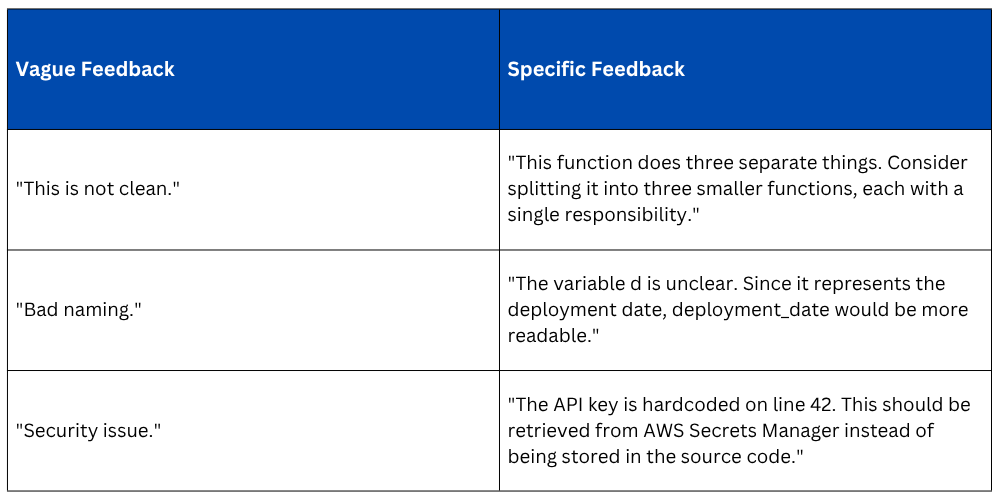
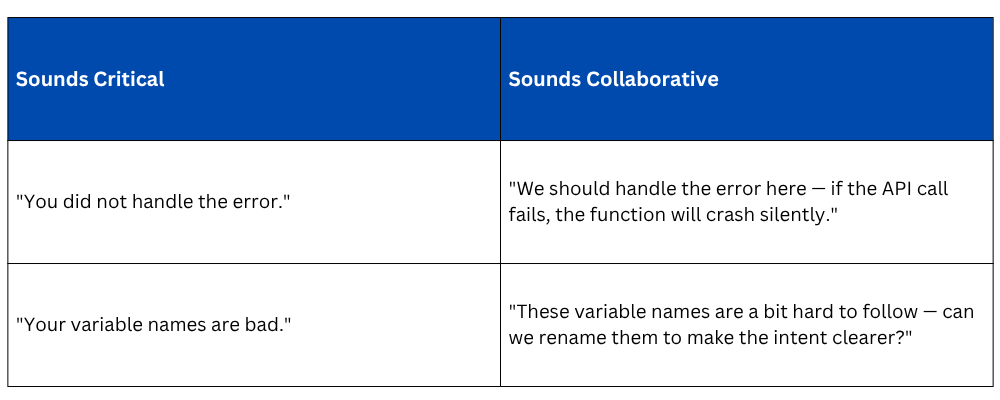
1. Be specific: Vague comments are not actionable. The author does not know what to change.
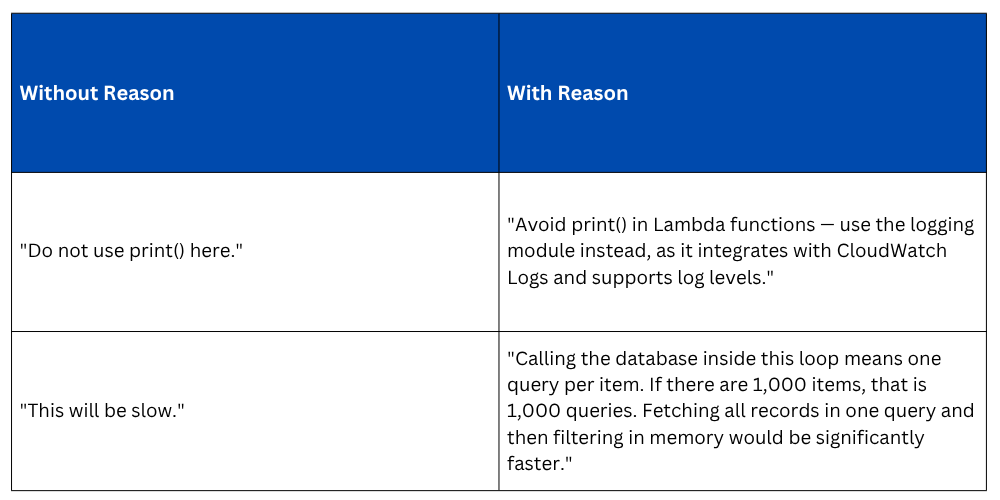
2. Explain the reason: Do not just say what is wrong — say why it matters. This turns a correction into a learning moment.
3. Use we, not you: Small language shifts reduce defensiveness.
3. Praise What is Good
Code reviews are not exclusively for finding problems. If you see something done particularly well — an elegant solution, a well-structured module, a clear and thorough test, say so. Positive feedback is not fluff. It reinforces good practices and makes people feel their work is valued.
"Really clean approach to handling the retry logic here — the exponential backoff is well implemented."
"This test covers the edge cases thoroughly — exactly what was missing before."
Receiving Feedback Well
Being reviewed is a skill, just like reviewing.
Receiving critical feedback on code you have worked hard on is not always easy. Here is how to approach it professionally.
1. Separate yourself from your code: The reviewer is commenting on the code, not on you as a person. A comment saying "this function is hard to follow" is not a judgement of your intelligence — it is useful information about how the code reads to someone seeing it for the first time.
2. Assume good intent: Unless there is a clear pattern of hostility, assume the reviewer is trying to help. Most reviewers leave feedback because they genuinely want the codebase to be better.
3. Respond to every comment: Even if you are not making a change, acknowledge the comment. Reply with "Good point — fixed", or "I considered this but kept the current approach because X — happy to discuss if you feel strongly." Do not leave comments hanging.
4. Ask questions if you do not understand: If a comment is unclear, ask for clarification before assuming the worst. "Could you explain what you mean by this? I want to make sure I understand the concern."
5. Do not take shortcuts under pressure: If a deadline is looming, it is tempting to accept all feedback superficially and push through. Resist this. A rushed review and a rushed fix are how bugs make it to production.
Code Review in a DevOps Context
In DevOps, code review is not limited to application code. Your team will also review:
1. Infrastructure as Code: Terraform, CloudFormation, and CDK changes can have serious consequences — destroying databases, changing network access, or altering IAM permissions. Infrastructure PRs deserve especially careful review because mistakes are often harder to roll back than application code changes.
Things to check specifically for IaC reviews:
1. Will terraform plan or aws cloudformation change-set show any resource deletions or replacements?
2. Are there any changes to IAM roles or policies that could grant excessive permissions?
3. Are secrets and sensitive values handled through Secrets Manager or Parameter Store — not hardcoded?
4. Does the change affect production resources, or only staging?
2. CI/CD Pipeline Configuration: Changes to pipeline files — GitHub Actions workflows, AWS CodePipeline definitions, Jenkinsfiles — control how your entire delivery process works. A mistake here could break your ability to deploy at all.
3. Dockerfiles and Container Configurations: Check for insecure base images, containers running as root, unnecessary packages being installed, or secrets being baked into the image.
4. Security and Compliance: Any PR that touches security group rules, network ACLs, S3 bucket policies, or IAM permissions should always be reviewed with security as the primary lens.
Keeping the Review Process Fast
1. Speed matters in DevOps: A PR that sits unreviewed for three days is a problem — it causes merge conflicts, blocks other work, and slows the team down. Here are practical ways to keep the review cycle moving.
2. Set a response time agreement: Teams should agree on a maximum time before a PR gets reviewed — typically two to four hours during working hours. This is not about rushing — it is about keeping work flowing.
3. Review little and often: Rather than saving all reviews for end of day, do a short review pass first thing in the morning and after lunch. Fifteen minutes twice a day keeps the queue clear.
4. Do not let PRs sit over a weekend: If a PR is opened on a Friday afternoon with no plan for it to be reviewed, either defer opening it until Monday or have someone commit to reviewing it before end of day.
5. Use automated checks to do the boring work: Linting, formatting, test coverage, security scanning — all of these should be automated in your CI pipeline. Reviewers should not be spending time pointing out a missing comma or a line that is too long. The pipeline catches those. Reviewers focus on logic, architecture, and correctness.
6. Limit review rounds: If a PR goes through more than two or three rounds of review without being approved, something is wrong — either the PR is too large, the feedback is inconsistent, or the standards are unclear. Discuss the PR s

Class Sessions
Sales Campaign

We have a sales campaign on our promoted courses and products. You can purchase 1 products at a discounted price up to 15% discount.