When you use AWS to deploy an application, your code does not just float somewhere in cyberspace. It runs on real physical hardware, servers sitting in real buildings, in real locations around the world.
AWS has built one of the largest and most sophisticated infrastructure networks on the planet to make this possible.
Understanding how AWS organises its global infrastructure is not just useful background knowledge, it directly affects how you design applications, how reliable they are, how fast they respond to users, and how much they cost.
AWS Infrastructure
AWS infrastructure is organised in three layers, from largest to smallest:
Regions
└── Availability Zones (AZs)
└── Data Centres
Edge Locations (separate — closer to end users)
Think of it like this:
1. A Region is a city.
2. An Availability Zone is a neighbourhood within that city.
3. A Data Centre is a building within that neighbourhood.
4. An Edge Location is a local post office — close to the customer for fast delivery.
AWS Regions
A Region is a specific geographic area in the world where AWS has built a cluster of data centres. For example, US East (Northern Virginia), Europe (London), or Asia Pacific (Mumbai). Each Region is completely separate from the others. They do not automatically share data or resources.
As of 2025, AWS has 33+ Regions worldwide and continues to expand.
What makes a Region: Each Region contains a minimum of three Availability Zones. This gives you the ability to build highly available, fault-tolerant applications within a single Region.
How Do You Choose a Region
This is an important decision. You should consider four factors:
1. Proximity to your users: The closer your application is to your users, the lower the latency — meaning faster response times. If most of your users are in India, deploying in the Mumbai Region makes sense.
2. Data residency and compliance: Some countries and industries have strict laws about where data can be stored. For example, certain European regulations require that data about EU citizens stays within Europe. AWS Regions let you control exactly where your data lives.
3. Service availability: Not every AWS service is available in every Region. Newer or specialised services often launch in a few Regions first and expand later. Always check that the services you need are available in your chosen Region.
4. Cost: Pricing varies between Regions. Running the same workload in US East (Virginia) may cost less than running it in São Paulo or Sydney. It is worth comparing pricing when cost is a priority.
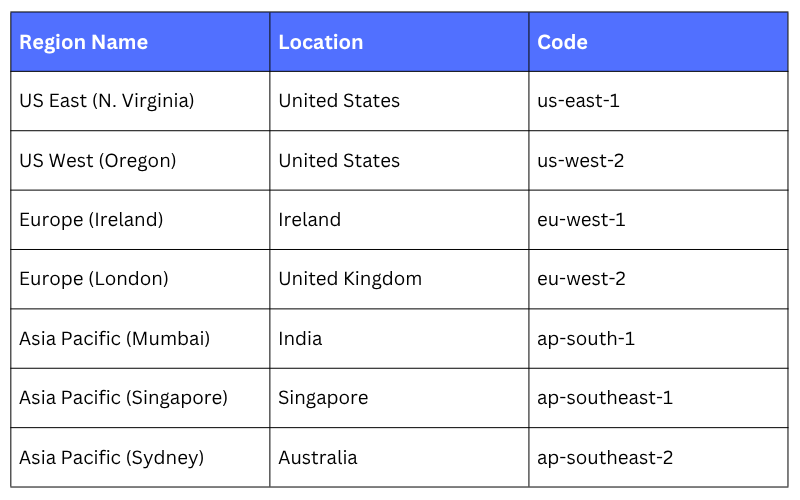
Key AWS Regions to know
Availability Zones (AZs)
An Availability Zone is one or more physical data centres within a Region. This is where your actual workloads run. Each AWS Region is divided into multiple Availability Zones — usually three to six. Each AZ is:
1. A separate physical location within the Region.
2. Connected to the other AZs in the same Region through high-speed, low-latency private links.
3. Designed to be isolated from failures in other AZs — separate power, cooling, networking, and physical security.
So if one AZ experiences a power outage, fire, or flooding — the other AZs in the same Region continue running normally.
Why does this matter: This is where high availability becomes real. If you deploy your application across multiple AZs, it keeps running even if one AZ goes down. Your users experience no disruption.
If you only deploy in a single AZ and that AZ has a problem — your application goes offline. That is a risk most production systems cannot afford to take.
A practical example:
Imagine you are running a web application on AWS. You deploy it like this:
1. Without multiple AZs: Your app runs in one data centre. If that data centre has a network issue, your app goes down. Users cannot access it.
2. With multiple AZs: Your app runs in three data centres simultaneously. If one goes down, the other two take over automatically. Users notice nothing.
This is why every serious production deployment on AWS uses multiple AZs.
AZ naming: AZs are identified by the Region code plus a letter. For example:
us-east-1a
us-east-1b
us-east-1c
These are three separate AZs within the US East (N. Virginia) Region.
Data Centres
The physical buildings where AWS hardware actually lives. You do not interact with individual data centres directly on AWS. They sit inside AZs and are managed entirely by AWS. However, it is worth knowing what they look like:
1. Each data centre holds tens of thousands of servers.
2. They have redundant power supplies, cooling systems, and physical security.
3. AWS never publicly discloses exact data centre locations for security reasons.
4. Each AZ may consist of one or more data centres, all operating together.
For a DevOps engineer, data centres are mostly invisible. You think at the AZ and Region level. But knowing they exist, and that AWS puts serious work into keeping them secure and reliable, gives you confidence in the platform you are building on.
Edge Locations
Edge Locations bring content closer to your users for faster delivery, anywhere in the world. An Edge Location is a small AWS facility located in cities and towns around the world — far more locations than Regions.
As of 2025, AWS has 600+ Edge Locations across more than 90 cities worldwide.
Edge Locations are not full data centres like AZs. They are lightweight caching and content delivery points. Their job is one thing: get content to the user as fast as possible.
How do Edge Locations work: When a user requests content — say, a video, image, or web page — instead of the request travelling all the way to your main server in a Region, it is served from the nearest Edge Location.
This dramatically reduces the time it takes for content to reach the user.
This service is called Amazon CloudFront — AWS's Content Delivery Network (CDN).
A simple example:
You run a news website. Your servers are in the Mumbai Region. A user in London requests your homepage.
1. Without Edge Locations: The request travels from London → Mumbai → back to London. High latency. Slow load.
2. With Edge Locations (CloudFront): Your content is cached in an Edge Location in London. The request never leaves London. Fast load.
What Else Uses Edge Locations?
Edge Locations are not only used for CloudFront. Other AWS services that rely on them include:
1. AWS Global Accelerator — Routes user traffic through AWS's private global network for faster, more reliable connections.
2. Amazon Route 53 — AWS's DNS service uses Edge Locations to resolve domain names quickly from the nearest point.
3. AWS WAF (Web Application Firewall) — Security rules are enforced at the Edge, blocking threats before they even reach your application.
AWS Local Zones and Wavelength Zones
These are two additional concepts worth knowing, you will not use them in every project, but they are part of AWS's infrastructure picture.
Local Zones
Local Zones place AWS compute, storage, and database services closer to large population centres where there is no full Region.
For example, AWS has Local Zones in cities like Los Angeles, Delhi, and Bangalore. They are useful when you need very low latency for a specific city but a full Region is not available nearby.
Wavelength Zones
Wavelength Zones are designed for 5G applications. They place AWS infrastructure inside telecommunications providers' networks, so applications running on 5G devices get ultra-low latency responses — measured in single-digit milliseconds.
This is used for things like real-time gaming, AR/VR, and connected vehicles.
For most of this course, Regions and AZs are what you will work with directly. But knowing these exist helps you understand the full scope of AWS infrastructure.
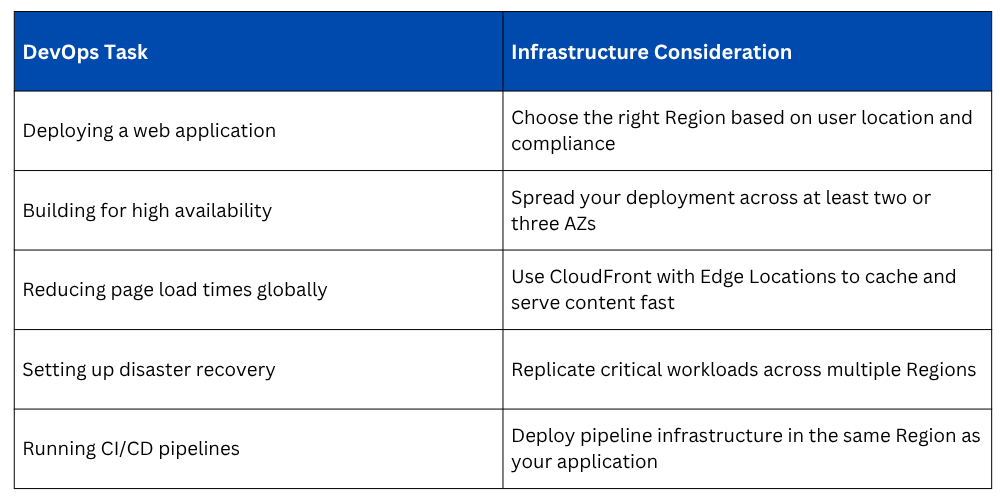
How This Connects to DevOps
As a DevOps engineer on AWS, infrastructure decisions are part of your daily work. Here is how these concepts apply directly:

Class Sessions
Sales Campaign

We have a sales campaign on our promoted courses and products. You can purchase 1 products at a discounted price up to 15% discount.