USD ($)
$
United States Dollar
Euro Member Countries
India Rupee
د.إ
United Arab Emirates dirham
ر.س
Saudi Arabia Riyal

Core AWS Services Overview

Lesson 5/10 | Study Time: 60 Min

AWS offers over 200 services — databases, machine learning, security, analytics, and much more. That number can feel overwhelming at first. But the truth is, the vast majority of what you will build on AWS starts with just five core services.

These five services are the foundation of almost every cloud application on AWS. Whether you are deploying a simple website or building a complex DevOps pipeline, you will use these again and again. 

Service 1 — Amazon EC2

EC2 gives you virtual servers called instances, that run in the cloud. You choose the operating system, the amount of CPU and memory, the storage, and the network configuration.

Once launched, it behaves just like a physical server, except it lives on AWS infrastructure and you can start or stop it whenever you want.

Think of EC2 as renting a computer that lives in an AWS data centre. You have full control over it.

Key Concepts in EC2


1. Instances: An instance is a single virtual server. You can run one instance or thousands simultaneously, depending on your needs.


Instance Types

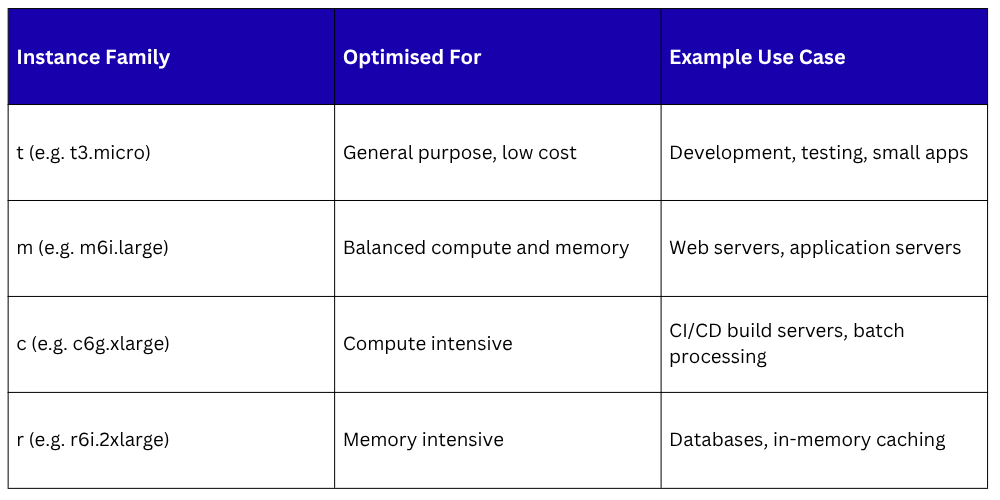
AWS offers different instance types optimised for different workloads. The naming convention tells you what the instance is built for:

2. AMI — Amazon Machine Image

An AMI is a template that contains the operating system and pre-installed software for your instance. When you launch an EC2 instance, you choose an AMI. AWS provides standard AMIs — Amazon Linux, Ubuntu, Windows — and you can also create your own custom AMIs.


3. Security Groups

A Security Group acts like a firewall for your EC2 instance. You define rules that control which traffic is allowed in and out — for example, allowing HTTP traffic on port 80 but blocking everything else.


4. Key Pairs

To connect securely to a Linux EC2 instance, you use a key pair — a public key stored on the instance and a private key you keep on your machine. This is how SSH access works on AWS.


5. Elastic IP

By default, an EC2 instance gets a new public IP address every time it restarts. An Elastic IP is a fixed, static public IP address you can attach to your instance so it always has the same address.


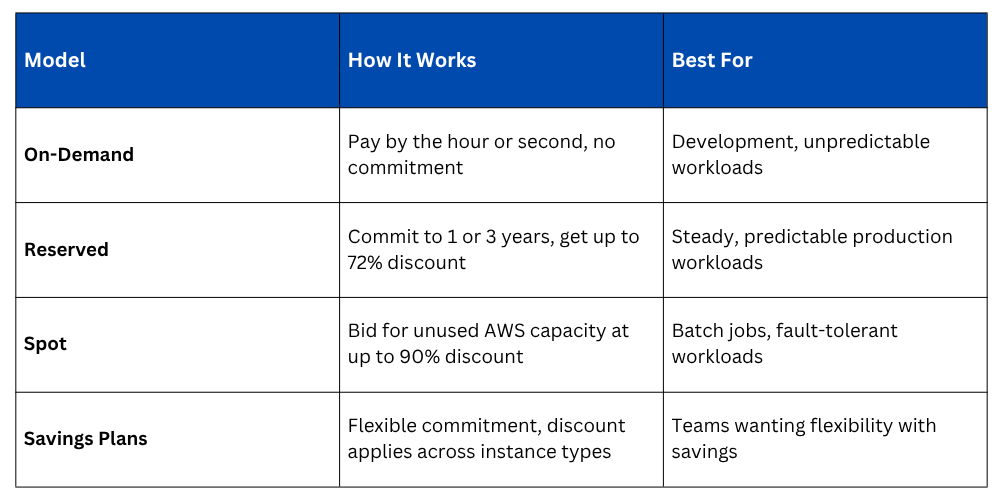
EC2 Pricing Models
How EC2 fits into DevOps


1. Host your application servers, build servers, and CI/CD agents.

2. Run self-hosted tools like Jenkins or SonarQube.

3. Create custom environments for testing and staging.

4. Automate instance management using Infrastructure as Code tools like Terraform or AWS CDK.

Service 2 — Amazon S3

S3 is object storage. That means you can store any type of file-documents, images, videos, application binaries, database backups, log files, and retrieve them from anywhere, at any time, at virtually unlimited scale.

You do not manage any servers or disks. You just upload files and S3 handles everything else.

Key Concepts in S3


1. Buckets: A bucket is a container for your files. Every file you store in S3 must live inside a bucket. Bucket names must be globally unique across all of AWS — no two customers can have a bucket with the same name.


2. Objects: An object is the file you store in S3 — along with its metadata. Every object has a unique key, which is essentially its file path within the bucket.


Example:

Bucket name:   my-devops-project-artifacts

Object key:    builds/v1.2.3/app.zip

Full path:     s3://my-devops-project-artifacts/builds/v1.2.3/app.zip


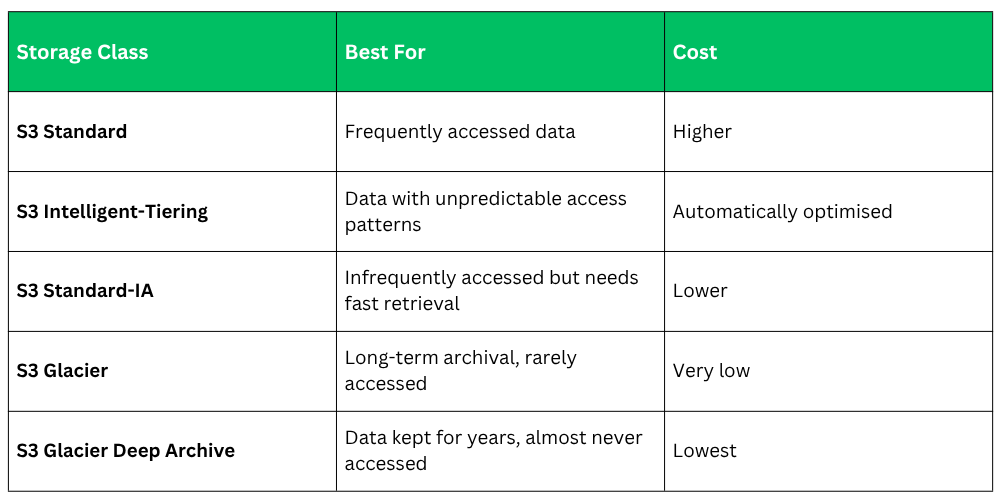
3. Storage Classes: S3 offers different storage classes depending on how frequently you access your data:


4. Versioning: S3 can keep multiple versions of the same file. If you overwrite or accidentally delete a file, you can restore a previous version. This is very useful for storing deployment artifacts and configuration files.


5. S3 Bucket Policies and ACLs: You control access to your S3 buckets using bucket policies — JSON-based rules that define who can read, write, or delete objects. By default, all buckets are private.


How S3 fits into DevOps


1. Store build artifacts produced by your CI/CD pipeline.

2. Host static websites directly from an S3 bucket.

3. Store Terraform state files for Infrastructure as Code.

4. Archive application logs for long-term storage and compliance.

5. Store Docker images alongside Amazon ECR.

6. Serve as a source stage in AWS CodePipeline.

Service 3 — AWS IAM

IAM is the security backbone of your entire AWS account. It lets you define and manage:


1. Who can access your AWS account — users, applications, and services.

2. What they are allowed to do — read, write, delete, deploy, and so on.

3. Which resources they can access — specific S3 buckets, specific EC2 instances, specific services.


Everything in AWS goes through IAM. Every API call, every CLI command, every automated process — IAM checks whether it is allowed before anything happens.


Key Concepts in IAM


1. Users: An IAM User is a person or application with a specific identity inside your AWS account. Each user has their own credentials — a username and password for the console, or access keys for programmatic access via the CLI or API.


2. Groups: A Group is a collection of IAM Users. Instead of assigning permissions to each user individually, you assign permissions to a group and add users to it. For example, a "Developers" group might have permissions to access EC2 and S3, but not billing or IAM settings.


3. Roles: A Role is a set of permissions that can be assumed — temporarily — by a user, an application, or an AWS service. Roles are extremely important in DevOps because they allow services like EC2 or Lambda to interact with other AWS services securely, without using hardcoded credentials.

For example — if your EC2 instance needs to read from an S3 bucket, you attach an IAM Role to the EC2 instance with S3 read permissions. The instance assumes the role automatically. No passwords, no access keys stored on the server.


4. Policies: A Policy is a document written in JSON, that defines what is allowed or denied. Policies are attached to users, groups, or roles.

A Simple Example of an IAM Policy:


json
{
  "Effect": "Allow",
  "Action": "s3:GetObject",
  "Resource": "arn:aws:s3:::my-devops-bucket/*"
}
```

This policy says: **Allow** the action of **reading objects** from the S3 bucket named **my-devops-bucket**.

**The Principle of Least Privilege**
This is one of the most important security principles in IAM — and in cloud security generally.

> Give every user, role, and service only the minimum permissions they need to do their job — nothing more.

A developer who only needs to read from S3 should not have permission to delete EC2 instances. A Lambda function that only needs to write logs should not have admin access. Least privilege reduces the damage if credentials are ever compromised.

**Root Account**
When you first create an AWS account, you get a root account. This account has unrestricted access to everything. Best practice — use the root account only for the initial setup, then lock it down, enable multi-factor authentication (MFA), and use IAM users for all day-to-day work.

### How IAM fits into DevOps

- Create IAM Roles for CI/CD pipelines to deploy infrastructure and applications securely.
- Assign Roles to EC2 instances and Lambda functions instead of using hardcoded credentials.
- Use IAM Groups to manage permissions for developers, DevOps engineers, and read-only auditors separately.
- Enforce MFA for all human users accessing the AWS console.
- Integrate IAM with AWS services like CodePipeline, CodeBuild, and EKS for secure automation.

---

## Service 4 — Amazon VPC

### Virtual Private Cloud
*Your own private, isolated section of the AWS network — fully under your control.*

### What is a VPC?

When you deploy resources on AWS, they do not just sit on a public, open network. AWS lets you create a **Virtual Private Cloud** — a logically isolated network that you define and control. Think of it as your own private data centre network, built inside AWS.

Within a VPC, you control:

- The IP address range.
- How the network is divided into sub-sections.
- What traffic is allowed in and out.
- How your resources connect to the internet — or whether they connect at all.

### Key Concepts in VPC

**CIDR Block**
When you create a VPC, you define an IP address range using CIDR notation. For example, `10.0.0.0/16` gives you 65,536 IP addresses to work with within your VPC.

**Subnets**
A subnet is a smaller division of your VPC's IP range, tied to a specific Availability Zone. You typically create two types:

- **Public Subnet** — Resources here can communicate directly with the internet. Used for web servers, load balancers, and NAT Gateways.
- **Private Subnet** — Resources here have no direct internet access. Used for databases, application servers, and anything that should not be publicly reachable.

**Internet Gateway**
An Internet Gateway is what connects your VPC to the public internet. You attach it to your VPC and update your route tables to allow traffic to flow through it. Without an Internet Gateway, nothing in your VPC can reach the internet.

**Route Tables**
A Route Table contains rules that determine where network traffic is directed. For example, a rule might say: "Send all internet-bound traffic (0.0.0.0/0) to the Internet Gateway."

**NAT Gateway**
A NAT Gateway allows resources in a **private subnet** to access the internet — for example, to download software updates — without exposing them to inbound internet traffic. The connection is outbound only.

**Security Groups vs. Network ACLs**

| | Security Group | Network ACL |
|---|---|---|
| **Level** | Instance level | Subnet level |
| **State** | Stateful — return traffic is allowed automatically | Stateless — you must explicitly allow return traffic |
| **Rules** | Allow rules only | Allow and deny rules |
| **Best used for** | Controlling traffic to individual resources | Adding an extra layer of subnet-wide protection |

### A Typical VPC Architecture for a Web Application
```
VPC (10.0.0.0/16)
├── Public Subnet (10.0.1.0/24)  ←→  Internet Gateway  ←→  Internet
│     └── Load Balancer
├── Private Subnet (10.0.2.0/24)
│     └── Application Servers (EC2)
└── Private Subnet (10.0.3.0/24)
      └── Database (RDS)
```

The load balancer sits in the public subnet and receives traffic from the internet. The application servers and databases sit in private subnets — they are never directly accessible from the internet.

### How VPC fits into DevOps

- Isolate production, staging, and development environments in separate VPCs or subnets.
- Keep databases and internal services in private subnets for security.
- Use VPC Peering or AWS Transit Gateway to connect multiple VPCs.
- Define infrastructure including VPCs and subnets entirely through Terraform or CloudFormation.
- Ensure CI/CD pipeline agents can reach the resources they need to deploy to.

---

## Service 5 — AWS Lambda

### Serverless Compute
*Run code without managing any servers. Pay only for the exact time your code runs.*

### What is Lambda?

Lambda is AWS's serverless compute service. You write a function — a small piece of code — and upload it to Lambda. AWS runs it whenever it is triggered. You do not provision servers, manage operating systems, or worry about scaling. AWS handles all of that automatically.

You are charged only for the number of times your function runs and the time it takes to execute — measured in milliseconds. When your function is not running, you pay nothing.

### How Lambda Works

1. You write a function in a supported language — Python, Node.js, Java, Go, Ruby, or .NET.
2. You define a trigger — what event causes the function to run.
3. When the trigger fires, Lambda runs your code automatically.
4. Lambda scales automatically — if one million events fire simultaneously, Lambda runs one million instances of your function in parallel.

### Common Lambda Triggers

| Trigger | Example Use Case |
|---|---|
| **API Gateway** | A user calls an API endpoint — Lambda handles the request |
| **S3 Event** | A file is uploaded to S3 — Lambda processes it automatically |
| **CloudWatch Events / EventBridge** | Run Lambda on a schedule, like a cron job |
| **DynamoDB Streams** | A database record changes — Lambda reacts to it |
| **SNS / SQS** | A message arrives in a queue — Lambda processes it |
| **CodePipeline** | A deployment pipeline step — Lambda runs a custom action |

### Key Concepts in Lambda

**Function**
The code you write and deploy to Lambda. Each function has a single, focused purpose.

**Handler**
The entry point of your function — the specific method Lambda calls when your function is triggered.

**Runtime**
The language environment your function runs in — Python 3.12, Node.js 20, Java 21, and so on.

**Memory and Timeout**
You configure how much memory your function gets (128 MB to 10 GB) and the maximum time it can run before timing out (up to 15 minutes). CPU is allocated proportionally to memory.

**Environment Variables**
You can pass configuration values to your Lambda function through environment variables — such as database connection strings, API keys, or feature flags — without hardcoding them in your code.

**Layers**
A Lambda Layer is a package of shared code or dependencies that multiple Lambda functions can use. Instead of including the same library in every function, you put it in a Layer and reference it from each function.

### Lambda vs. EC2 — When to Use Which

| | AWS Lambda | Amazon EC2 |
|---|---|---|
| **Server management** | None — fully managed | You manage OS, patching, scaling |
| **Scaling** | Automatic and instant | Manual or auto-scaling configuration needed |
| **Cost model** | Pay per execution (milliseconds) | Pay per hour the instance runs |
| **Max runtime** | 15 minutes per execution | Unlimited |
| **Best for** | Short, event-driven tasks | Long-running applications and services |
| **Startup time** | Milliseconds (with potential cold start) | Minutes to provision and start |

### How Lambda fits into DevOps

- Automate operational tasks — for example, automatically stop EC2 instances outside business hours.
- Run custom steps in a CI/CD pipeline without needing a dedicated build server.
- Process events from S3, queues, or databases as part of a data pipeline.
- Build lightweight APIs without managing servers, using API Gateway with Lambda.
- Trigger automated security scans, notifications, or remediation when infrastructure changes.

---

## How These Five Services Work Together

These services are not isolated — they work together constantly. Here is a real-world example:

**Scenario:** A web application deployed on AWS.
```
User Request
     │
     ▼
Amazon VPC (network boundary)
     │
     ▼
Load Balancer (public subnet)
     │
     ▼
EC2 Instances (private subnet — runs the application)
     │
     ├──► S3 (stores uploaded files and static assets)
     │
     ├──► Lambda (handles background tasks triggered by uploads)
     │
     └──► IAM (every service-to-service interaction is authorised by IAM roles)

Every single service in this example plays a distinct role, and all five work in concert to deliver a secure, scalable, and well-structured application.

Sales Campaign

Sales Campaign

We have a sales campaign on our promoted courses and products. You can purchase 1 products at a discounted price up to 15% discount.
