Without a clear branching strategy, teams run into serious problems, developers overwriting each other's work, half-finished features making it into production, nobody knowing which branch is the stable one, and deployments becoming unpredictable and risky.
A branching strategy is an agreed-upon set of rules that defines how your team creates branches, names them, merges them, and manages releases. It brings order to collaboration.
Why Branching Strategies Matter
Before we look at specific strategies, it is worth understanding what happens without one.
Imagine a team of five developers all working on the same project, all pushing directly to the main branch, with no rules about how or when to merge. Here is what typically goes wrong:
1. Developer A pushes untested code that breaks the build.
2. Developer B's feature is half-complete but is accidentally included in a release.
3. Developer C fixes a critical bug but cannot merge it cleanly because the main branch is in a broken state.
4. Nobody is sure which version of the code is actually running in production.
A branching strategy prevents all of this. It gives every team member a clear answer to: "Where do I make this change, and how does it get into production?"
Common Branch Types
Before diving into specific strategies, you need to know the standard branch types that appear across most strategies. These names are conventions — widely recognised and used by teams around the world.
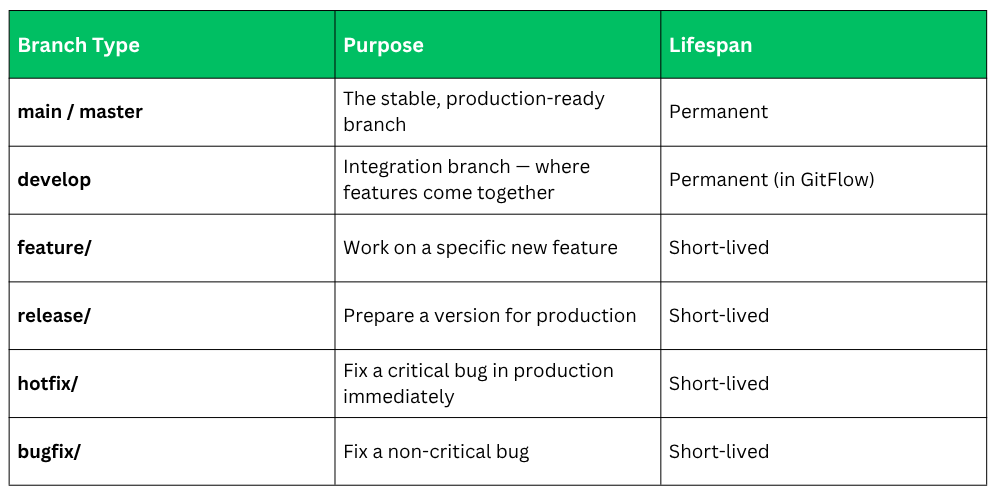
GitFlow
A structured, disciplined branching strategy designed for teams with scheduled releases.
GitFlow was introduced by Vincent Driessen in 2010 and became one of the most widely adopted branching models in software development. It defines a strict structure of branches and rules for how code moves between them.
GitFlow works around two permanent branches and several short-lived supporting branches.
The Two Permanent Branches
1. main: This branch always contains production-ready code. Every commit on main represents a version that has been fully tested and released. You never commit directly to main — code only arrives here through a completed release or hotfix.
2. develop: This is the integration branch. All feature branches are merged into develop when they are complete. Develop always contains the latest delivered development changes — it is the staging ground before a release.
The Supporting Branches
1. Feature Branches: Created from develop. Used to build a specific new feature. When the feature is complete and tested, it is merged back into develop.
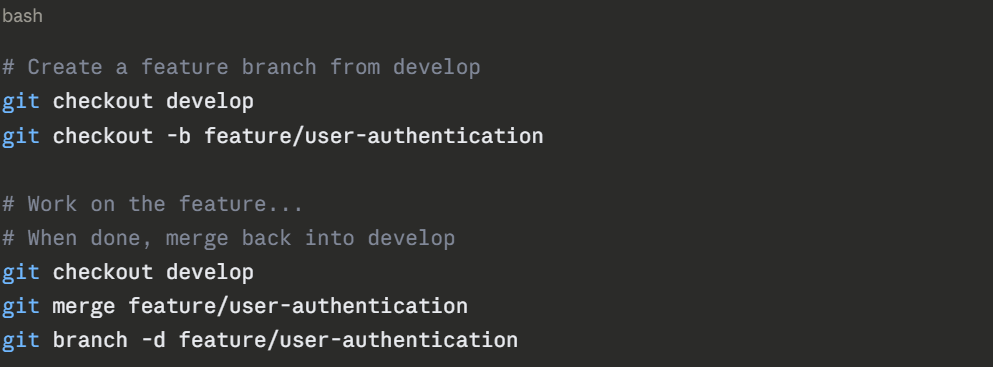
Naming convention: feature/short-description
2. Release Branches: When develop has enough features for a release, a release branch is created from develop. No new features are added here — only bug fixes, documentation, and release preparation. When ready, it is merged into both main (for the release) and develop (to capture the fixes).
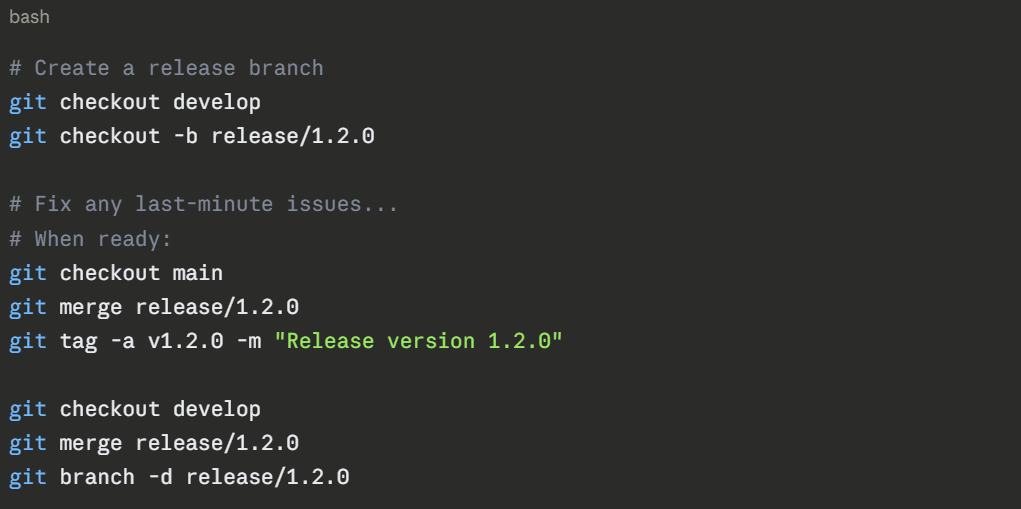
Naming convention: release/version-number
3. Hotfix Branches: When a critical bug is found in production, you cannot wait for the next release cycle. A hotfix branch is created directly from main, the fix is applied, and it is merged back into both main and develop immediately.
GitFlow — Pros and Cons
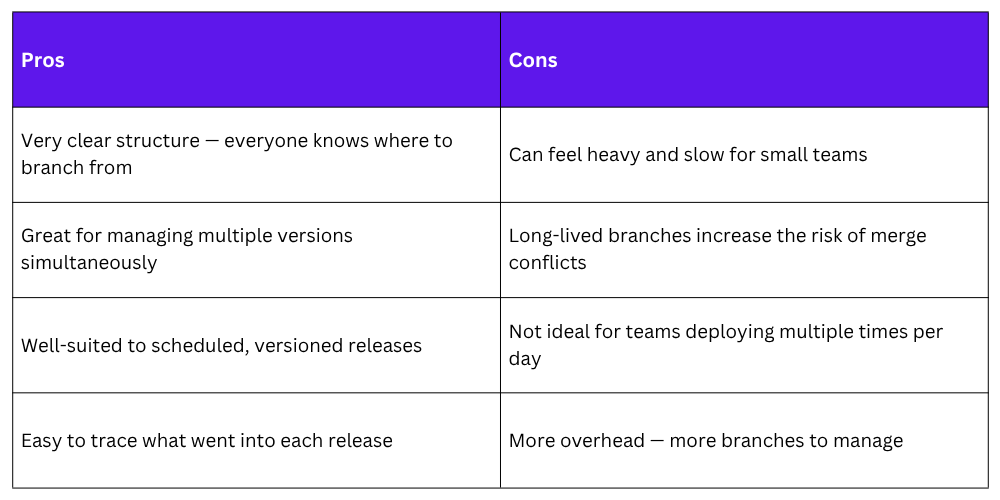
When to Use GitFlow
GitFlow works best when:
1. Your team ships software in scheduled, versioned releases — for example, version 2.1, version 2.2.
2. You need to support multiple versions at the same time — for example, enterprise software where different customers run different versions.
3. Your team is large and needs strict separation between development and production code.
4. You are building a mobile app or packaged software where releases go through an approval process.
Trunk-Based Development
A simpler, faster strategy where everyone works close to the main branch and integrates frequently.
Trunk-Based Development (TBD) is a branching strategy where all developers work on a single shared branch — called the trunk (which is just the main branch).
Branches, if used at all, are very short-lived — typically no longer than one or two days before being merged back.
The core idea is simple: integrate early, integrate often, and keep the trunk always in a deployable state.
This strategy is closely aligned with DevOps and CI/CD principles. It is the model used by high-performing engineering teams at companies like Google, Facebook, and Netflix.
How It Works
1. Option A — Direct commits to trunk (very small teams)
In very small teams or solo projects, developers commit directly to main multiple times a day. Each commit is small and focused. Automated tests run on every commit to catch issues immediately.
2. Option B — Short-lived feature branches (most common)
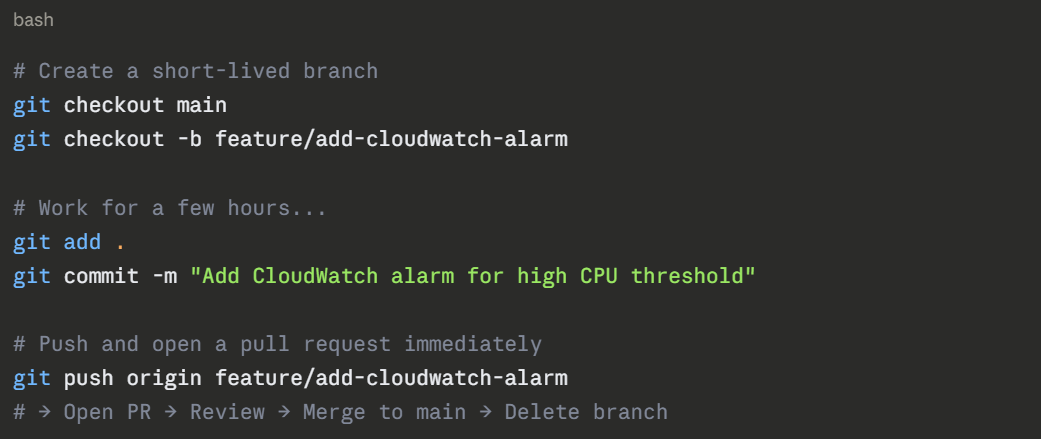
Developers create a branch, work on it for a few hours or at most one to two days, then merge it back to main via a pull request. The key rule — no branch lives longer than two days.
Feature Flags
One challenge with Trunk-Based Development is — what if your feature is not finished yet but you still need to merge frequently?
The answer is feature flags (also called feature toggles). A feature flag is a simple on/off switch in your code that controls whether a feature is active or not. You merge incomplete code to main but keep the feature disabled until it is ready.
# Example of a simple feature flag in Python
FEATURE_FLAGS = {
"new_dashboard": False, # Not ready yet
"dark_mode": True, # Ready and live
}
if FEATURE_FLAGS["new_dashboard"]:
show_new_dashboard()
else:
show_old_dashboard()
```
When the feature is complete and tested, you simply switch the flag to `True` — no code deployment needed. Feature flags also allow you to enable features for a specific subset of users, which is useful for gradual rollouts.
### Trunk-Based Development — Pros and Cons
| Pros | Cons |
|---|---|
| Faster integration — conflicts caught early and when they are small | Requires strong discipline — every commit must not break the trunk |
| Encourages small, focused commits | Needs a mature CI pipeline to catch issues immediately |
| Aligns perfectly with CI/CD and DevOps practices | Feature flags add complexity to the codebase |
| Reduces the risk of large, painful merges | Less structure — can feel uncomfortable for less experienced teams |
| The trunk is always deployable | Not well-suited for managing multiple release versions simultaneously |
### When to Use Trunk-Based Development
Trunk-Based Development works best when:
- Your team **deploys frequently** — multiple times per day.
- You have a **strong automated testing pipeline** that runs on every commit.
- Your team is comfortable with CI/CD and DevOps practices.
- You are building a **web application or cloud service** with a single live version.
- You want to move fast and keep integration overhead low.
---
## 5. GitFlow vs. Trunk-Based Development — Side by Side
| | GitFlow | Trunk-Based Development |
|---|---|---|
| **Number of long-lived branches** | 2 (main + develop) | 1 (main / trunk) |
| **Branch lifespan** | Days to weeks | Hours to 2 days maximum |
| **Release model** | Scheduled, versioned releases | Continuous delivery |
| **CI/CD compatibility** | Moderate | Excellent |
| **Merge conflict risk** | Higher (longer-lived branches) | Lower (frequent small merges) |
| **Best team size** | Medium to large | Any size |
| **Complexity** | Higher | Lower |
| **Feature isolation** | Strong | Uses feature flags |
| **Used by** | Enterprise, mobile, packaged software | SaaS, web apps, cloud-native teams |
---
## 6. Other Branching Strategies Worth Knowing
GitFlow and Trunk-Based Development are the two most important strategies. But two others are worth knowing as you grow in your DevOps career.
### GitHub Flow
A simplified version of GitFlow — without the develop branch and without release branches. It has just two concepts:
- **main** is always deployable.
- You create a feature branch, open a pull request, get it reviewed, and merge it to main.
```
main ──────●──────────────────●──────────────●──────▶
│ │ │
feature │ ●──●──●─────────┘ │
●──●───────┘
```
GitHub Flow is great for small to medium teams doing continuous deployment. It is simpler than GitFlow but not as minimal as pure Trunk-Based Development.
### GitLab Flow
GitLab Flow adds environment branches to GitHub Flow. Instead of deploying directly from main, you have branches that represent environments:
```
feature → main → staging → production
Code is promoted through environment branches rather than deployed directly. This gives you more control over what goes to production while keeping the structure simpler than full GitFlow.
Branch Naming Conventions
Whatever strategy you choose, consistent branch naming makes your repository easier to manage. Here are widely adopted conventions:
bash
# Features
feature/user-login
feature/s3-bucket-policy
feature/add-cloudwatch-dashboard
# Bug fixes
bugfix/fix-null-pointer-login
bugfix/correct-iam-permissions
# Hotfixes (production critical)
hotfix/fix-api-gateway-timeout
hotfix/patch-security-vulnerability
# Release preparation
release/2.3.0
release/2024-q1
# Chores (non-feature work like config, dependencies)
chore/update-terraform-version
chore/upgrade-node-runtime
```
**Rules for good branch names:**
- Use lowercase letters only.
- Use hyphens to separate words — not underscores or spaces.
- Keep it short but descriptive — a reader should know what the branch is about from the name alone.
- Include a ticket or issue number if your team uses a tracker like Jira: `feature/PROJ-142-add-ci-pipeline`.
---
## 8. Pull Requests — The Bridge Between Branches
No matter which branching strategy you use, **pull requests** (PRs) — also called **merge requests** in GitLab — are the standard way to merge a branch back into the main line.
A pull request is a formal request to merge your branch. It gives the team a chance to:
- **Review the code** before it reaches main.
- **Run automated checks** — CI pipeline, tests, linting, security scans.
- **Leave comments and suggestions**.
- **Approve or request changes** before the merge is allowed.
A healthy pull request workflow looks like this:
```
Developer pushes branch
│
▼
Opens Pull Request on GitHub / GitLab / CodeCommit
│
▼
CI pipeline runs automatically (tests, linting, security scan)
│
▼
One or more teammates review the code
│
▼
Changes requested? → Developer updates the branch → Review again
│
▼
Approved → Merge to main → Branch deleted
│
▼
CD pipeline triggers → Deployed automatically
Pull Request Best Practices
1. Keep PRs small: A pull request that changes 10 files is much easier to review than one that changes 100. Small PRs get reviewed faster and catch issues more reliably.
2. Write a clear PR description: Explain what changed, why it changed, and how to test it.
3. Link to the relevant ticket or issue: This gives reviewers context.
4. Respond to review comments promptly: Leaving a PR open for days creates merge conflicts and slows the team down.
5. Never merge your own PR without a review: Unless you are a solo developer or it is a trivial fix.
Choosing the Right Strategy for Your Team
There is no universally correct answer. The right strategy depends on your team, your product, and how you release.
Ask yourself these questions:
1. How often do you deploy?
Multiple times per day → Trunk-Based Development or GitHub Flow
Weekly or monthly releases → GitFlow
2. How many versions do you support simultaneously?
Just one live version → Trunk-Based Development or GitHub Flow
Multiple versions for different customers → GitFlow
3. How mature is your CI/CD pipeline?
Strong automated testing → Trunk-Based Development is safe
Limited automation → GitFlow gives more manual control points
4. How large is your team?
Small team, high trust → Trunk-Based Development
Large team, needs strict rules → GitFlow
5. What are you building?
Web app or cloud service → Trunk-Based Development or GitHub Flow
Mobile app or packaged software → GitFlow

Class Sessions
Sales Campaign

We have a sales campaign on our promoted courses and products. You can purchase 1 products at a discounted price up to 15% discount.