Basic Input and Output
1. Input in Python – input() Function
In Python, the input() function is used to take input from the user while a program is running. When Python executes the input() function, it pauses and waits for the user to type some data on the keyboard. Whatever the user enters is returned as a string, regardless of whether it looks like a number. This allows programs to interact dynamically with users and respond according to the input received. If numerical input is needed for calculations, the string returned by input() must be typecast to the required data type using functions like int() for integers or float() for decimal numbers.
The input() function can include a prompt message, which helps guide the user on what to enter. For example, writing name = input("Enter your name: ") will display the message Enter your name: on the screen and store the entered text in the variable name. Similarly, age = int(input("Enter your age: ")) converts the input into an integer so it can be used in arithmetic operations. For taking multiple values in a single line, the split() method can be used, such as a, b = input("Enter two numbers: ").split(), followed by converting each value into integers. This feature makes the input() function essential for creating interactive programs.
Example:
name = input("Enter your name: ")
age = int(input("Enter your age: "))
print(f"Hello {name}, you are {age} years old.")
2. Output in Python – print() Function
The print() function in Python is used to display information on the screen. It can show text, numbers, variable values, or results of expressions. By default, the print() function separates multiple values with a space and moves the cursor to a new line after printing.
However this behavior can be changed using optional parameters such as sep and end. The sep parameter allows specifying a custom separator between values, while the end parameter allows defining what appears at the end of the output instead of a newline. For example, print("Hello", "World", sep="-") prints Hello-World, and print("Hello", end="!!") followed by print("World") prints Hello!!World on the same line. The print() function is widely used for displaying results, debugging code, and providing information to the user.
Example:
print("Python", "Programming", sep=" - ")
print("Welcome", end="!!")
print("Let's learn Python")
Output:
Python - Programming
Welcome!!Let's learn Python
3. Print Formatting Techniques in Python
Python provides multiple ways to format output, which makes it easier to combine text and variable values in a readable form. String concatenation allows joining text and variables using the + operator, but non-string values must be converted using str(). For example, print("Hello " + name) joins the text with the variable name. Using comma separation in print() automatically converts variables to strings and separates them with spaces, as in print("Age:", age).
F-strings are the most modern and convenient way to format strings. They allow embedding variables directly inside the string using curly braces {}, for example, print(f"My name is {name} and I am {age} years old"). The format() method is another approach, which places variables into placeholders in a string: print("My name is {} and I am {} years old".format(name, age)). It also allows indexing to control the order of variables: print("I am {1} years old and my name is {0}".format(name, age)). An older method, % formatting, uses format specifiers like %s for strings and %d for integers, for instance, print("My name is %s and I am %d years old" % (name, age)). Python also supports number formatting, such as controlling decimal precision. For example, if pi = 3.14159265, writing print(f"Value of pi: {pi:.2f}") prints Value of pi: 3.14, rounding the value to two decimal places. These formatting techniques make program output clear, organized, and user-friendly.
Example:
name = "Alice"
age = 25
pi = 3.14159265
print("Hello " + name)
print("Age:", age)
print(f"My name is {name} and I am {age} years old")
print("My name is {} and I am {} years old".format(name, age))
print("Value of pi: %.2f" % pi)
Output:
Hello Alice
Age: 25
My name is Alice and I am 25 years old
My name is Alice and I am 25 years old
Value of pi: 3.14
Important Points to Remember While Using input()
The first important thing to remember is that the input() function always returns data as a string. For example, if you write age = input("Enter age: ") and the user types 20, then the value stored in age is "20" and not the number 20. Because of this, you must convert it using int(age) if you want to perform calculations such as age + 5.
Another important point is that a clear prompt message helps guide the user. For instance, writing name = input("Enter your name: ") makes the program easier to understand than using a blank input().
When taking multiple inputs in a single line, the split() method is needed. For example, if the user types 10 20, then x, y = input("Enter two values: ").split() stores "10" in x and "20" in y. After that, you must convert them using int(x) and int(y) to perform mathematical operations like x + y.
If the user enters data that does not match the required type, the program will show an error. For example, writing marks = int(input("Enter marks: ")) will cause an error if the user types "abc" because "abc" cannot be converted into an integer.
Using input() pauses the program until the user responds. For example, if you write x = input("Press Enter to continue"), the program will not move ahead until the user presses Enter, which is useful in interactive applications.
Important Points to Remember While Using print()
The print() function automatically adds a space between multiple values and ends the statement with a new line. For example, print("Hello", "World") displays Hello World, and the next output appears on a new line. If you want both words attached, you can use sep="" like print("Hello", "World", sep="").
When combining text and variables, f-strings make the output cleaner. For example, if name = "Mayank" and age = 20, then writing print(f"My name is {name} and I am {age} years old") produces a neat and readable output without manual type conversion.
The end parameter helps control how a line finishes. For example, print("Loading", end="...") keeps the cursor on the same line so the next print statement continues without breaking the line.
When printing values with the + operator, every value must be a string. For example, print("Age: " + age) will cause an error if age is an integer, so you must write print("Age: " + str(age)).
Number formatting becomes easier with f-strings. For instance, x = 3.14159 and writing print(f"Value of x rounded to two decimals: {x:.2f}") will display Value of x rounded to two decimals: 3.14, making the output clean and professional.
Operators in Python
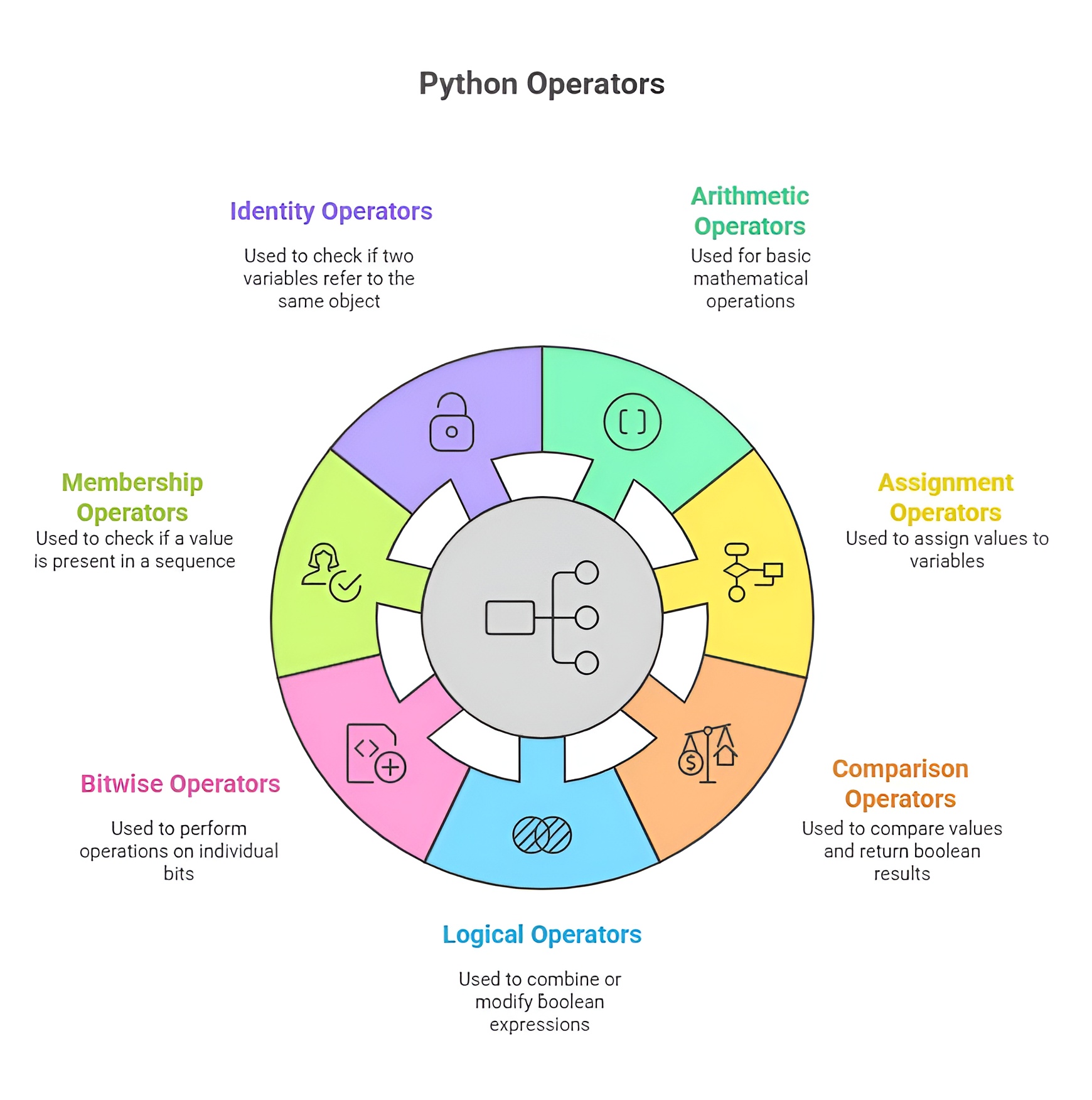
Operators in Python are predefined symbols that instruct the Python interpreter to perform specific operations on data. They act as the backbone of expressions, allowing programmers to combine values, compare conditions, manipulate variables, and control the logical flow of programs. Operators work on operands, and operands can be variables, constants, literals, lists, strings, or any supported Python data type. They make programming dynamic by enabling computation, decision-making, internal processing, and communication between different parts of a program.
1. Arithmetic Operators
Arithmetic operators are mathematical symbols used to perform numeric calculations inside a Python program. They handle all forms of arithmetic processing such as combining two numbers, breaking them down, dividing them, taking remainders, or raising values to powers. When Python encounters an arithmetic operator, it evaluates the expression from left to right following mathematical rules. These operators are essential whenever a program requires quantitative computation, such as financial calculations, measurements, percentages, statistical formulas, or mathematical modeling.
Example
a = 12
b = 5
print(a + b) # Addition: 12 + 5
print(a - b) # Subtraction: 12 - 5
print(a * b) # Multiplication: 12 * 5
print(a / b) # Division: gives float
print(a % b) # Modulus: remainder
print(a ** b) # Exponent: 12^5
print(a // b) # Floor division
Output:
Output–>
17
7
60
2.4
2
248832
2
2. Relational or Comparison Operators
Relational operators are used to compare two values or variables and determine their relationship. Instead of producing numerical output, they produce Boolean results: either True or False. They act as the decision-makers of Python, allowing the program to understand whether something is equal, different, greater, or lesser. These operators form the foundation of conditional statements such as if, elif, and while. Without relational operators, Python would not be able to evaluate conditions, check constraints, validate input, or control loops effectively.
Example
x = 15
y = 20
print(x == y) # Checks if equal
print(x != y) # Checks if not equal
print(x > y) # Greater than
print(x < y) # Less than
print(x >= y) # Greater or equal
print(x <= y) # Less or equal
Output:
False
True
False
True
False
True
3.Logical Operators
Logical operators are used to combine multiple Boolean expressions and determine a final truth value. They help create complex conditions that involve more than one comparison. The and operator checks if multiple conditions are simultaneously true. The or operator checks if at least one condition is true. The not operator reverses a condition and is used to check the opposite of something. Logical operators are essential when building decision-making structures, such as validating multiple rules, filtering data, applying combined conditions, or creating safety checks in a program.
Example:
a = 10
b = 4
print(a > 5 and b < 10) # True AND True
print(a == 10 or b == 20) # One condition True
print(not(a < b)) # a < b is False → not False = True
Output:
True
True
True
4. Assignment Operators
Assignment operators assign values to variables and can also modify them simultaneously. Their main purpose is to store and update data inside program memory. The basic assignment uses the = sign, which places the right-hand value into the left-hand variable. However, Python also supports compound assignment operators like += or *=, which perform an operation and update the variable in a single step. These operators increase efficiency, reduce code repetition, and make expressions more compact.
Example
x = 10 # assigning 10
x += 5 # x = x + 5
print(x)
x *= 3 # x = x * 3
print(x)
x -= 10 # x = x - 10
print(x)
Output:
15
45
35
5. Identity Operators
Identity operators check whether two variables refer to the same object in memory. Instead of comparing values, they compare object identity. Python internally stores objects at specific memory locations, and sometimes two variables may store the same value but not be the same object. The operator is verifies if both variables reference a single object. The operator is not checks if they refer to different objects. These operators are widely used when checking object uniqueness, comparing memory references, and in scenarios involving mutable objects like lists.
Example
a = [1, 2, 3]
b = a
c = [1, 2, 3]
print(a is b)
print(a is c)
print(a is not c)
Output
True
False
True
6. Membership Operators
Membership operators test whether an element exists inside a collection such as a list, tuple, string, or dictionary. Instead of comparing two values directly, they check for presence or absence inside a container. The operator in returns True when a value is present in the sequence. The operator not in returns True when a value is not present. These operators make it easy to search, filter, and verify elements in data structures without manually looping through them.
Example
text = "Python"
print("P" in text)
print("z" not in text)
Output
True
True
7. Bitwise Operators
Bitwise operators work at the binary level of integers. Every number in Python is stored in binary form, and bitwise operators allow direct manipulation of these bits. They perform actions such as turning specific bits on or off, shifting bits left or right, or comparing bits with AND, OR, or XOR logic. These operators are used in fields where performance and memory control is important, such as cryptography, networking, compression, embedded systems, and low-level computation.
Example
a = 6 # binary 110
b = 3 # binary 011
print(a & b)
print(a | b)
print(a ^ b)
print(~a)
print(a << 1)
print(a >> 1)
Output
2
7
5
-7
12
3
8. Ternary or Conditional Operator
The ternary operator is a compact way of writing an if-else condition in a single line. It evaluates a condition and chooses one value if the condition is true and another value if it is false. This operator is often used when assigning values based on a condition without writing a full if-else block. It helps keep code cleaner, shorter, and more readable when only one decision is needed.
Example
age = 17
status = "Adult" if age >= 18 else "Minor"
print(status)
Output
Minor

Class Sessions
Sales Campaign

We have a sales campaign on our promoted courses and products. You can purchase 1 products at a discounted price up to 15% discount.