Python Basics
Variables & Data Types
Variables in Python are used to store data values, and they make programs dynamic and flexible. Python is a dynamically typed language, so you don’t need to declare the data type of a variable before using it. Python supports various built-in data types such as integers, floats, strings, booleans, lists, tuples, sets, and dictionaries. These data types help in storing and managing different kinds of data efficiently. Understanding variables and data types is essential for writing effective and error-free Python programs.
Variables in Python
In Python, a variable is like a container that holds information or data which can be used and manipulated later in the program. Think of a variable as a label or a name attached to a value in memory. Unlike some programming languages, Python does not require you to declare the type of variable beforehand; the type is inferred from the value you assign.
For example:
age = 25
name = "Joe"
is_student = True
Here, age, name, and is_student are variables. The computer automatically understands the type of data each variable holds.Variables can hold different types of data, and their values can be changed anytime in the program.
Important things to remember while using variables in Python:
1) Variable names must start with a letter or underscore. For example, name = "Joe" is valid, but 1name = "Joe" is invalid.
2) Variable names can contain letters, numbers, and underscores. For example, student1_name = "Nick" is valid.
3) Python is case-sensitive. For example, age = 20 and Age = 25 are two different variables.
4) No need to declare type; Python detects it automatically. For example, x = 10 makes x an integer, and y = "Hello" makes y a string.
5) Variable names cannot be Python keywords. For example, for = 5 is invalid, but for_count = 5 is valid.
6) Multiple variables can be assigned in one line. For example, a, b, c = 1, 2, 3.
7) Variables can change type. For example, x = 10 can later be x = "Ten".
8 )Use meaningful names. For example, student_name = "Nick" is better than s = "Nick".
9) Constants are written in uppercase. For example, PI = 3.14159.
10) Variables must be assigned before use. For example, print(x) will give an error if x is not defined first.
Data Types in Python
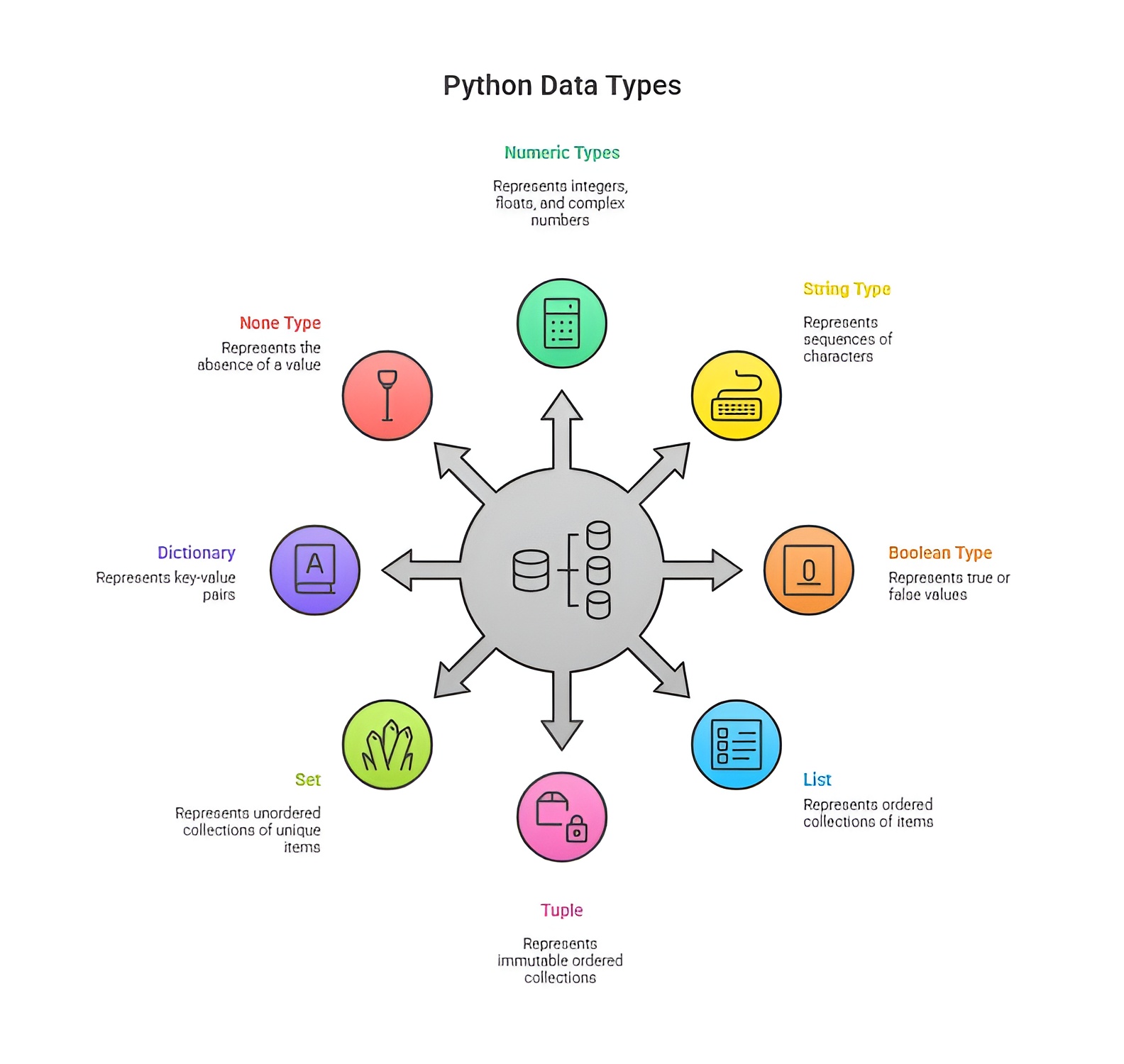
In Python, a data type is a classification that specifies the type of value a variable can hold and what operations are permissible on that value. Every value in Python has a specific data type, and understanding these types is essential for writing accurate and efficient programs. Python is dynamically typed, meaning that you do not need to explicitly declare a variable’s type; the interpreter automatically assigns the type based on the value.
Numeric data types are used to represent numbers and perform mathematical operations. An integer (int) represents whole numbers without any fractional part, such as 10, -5, or 0. Integers are used whenever exact whole number calculations are required, such as counting items or indexing. A floating-point number (float) represents real numbers with a decimal part, such as 3.14 or -0.001, and is used for precise calculations that require fractional values, like measurements or financial data. Complex numbers consist of a real part and an imaginary part, such as 2 + 3j, and are used in advanced mathematics, scientific computations, or engineering applications.
Strings (str) are sequences of characters used to store text, including letters, numbers, symbols, and whitespace. Strings can be defined using single quotes 'Hello', double quotes "Python", or triple quotes '''This is a string''' for multi-line text. Strings are highly versatile and allow operations like concatenation (joining strings), repetition, slicing (extracting a portion of a string), and formatting. They are essential for handling user input, displaying messages, or storing textual information.
Boolean (bool) is a data type that can only hold one of two values: True or False. Booleans are primarily used in decision-making and control flow. For instance, conditions in if statements or loops rely on boolean values to decide whether a block of code should execute. The boolean type is also the result of comparison operations, like 5 > 3, which evaluates to True.
Python provides sequence types to store collections of values. A list is an ordered and mutable collection, which means its elements can be changed, added, or removed. For example, fruits = ["apple", "banana", "mango"] allows storing multiple items of any type in a single variable. A tuple is similar to a list but immutable, meaning its contents cannot be modified after creation, such as colors = ("red", "green", "blue"). Tuples are useful when you want to ensure the integrity of data that should not change.
A dictionary (dict) is an unordered collection of key-value pairs, where each key is unique, and each value can be of any type. For example, person = {"name": "Nick", "age": 22} allows efficient retrieval of values using keys. Dictionaries are highly useful in applications where data is associated with identifiers, like storing configuration settings, user profiles, or mapping values.
A set is an unordered collection of unique elements, such as unique_numbers = {1, 2, 3}, and is used for operations like union, intersection, and difference. A frozenset is an immutable version of a set, which is useful when you need a constant set that cannot be changed after creation.
Python also has a special data type called None, which represents the absence of a value or a null value. A variable assigned None indicates that it exists but does not currently hold meaningful data, for example, result = None. None is commonly used as a placeholder in functions or to initialize variables before actual assignment.
Understanding data types in Python is crucial because it allows the interpreter to allocate memory, perform operations correctly, and prevent errors. Correct use of data types ensures that programs run efficiently, logically, and handle data in a structured way. Each data type has its own purpose and is suited for specific tasks, from simple arithmetic to complex data processing and text manipulation.
Important things to remember while using data types in Python:
1. Every value in Python has a data type, which determines what operations can be performed on it. For example, x = 10 is an integer, so you can perform addition like x + 5.
2. Python automatically detects the data type when a value is assigned to a variable, so explicit declaration is usually not required. For example, name = "Nick" automatically becomes a string without writing str(name).
3. Numeric types include integers, floating-point numbers, and complex numbers, and arithmetic operations behave differently for each type. For example, a = 5 (int), b = 3.2 (float), and c = 2 + 3j (complex) can be used in addition, subtraction, or multiplication, but complex numbers cannot be directly compared using > or <.
4. Strings are sequences of characters enclosed in quotes and support operations like concatenation, repetition, and slicing. For example, greeting = "Hello" + " World" results in "Hello World", and greeting[0:5] gives "Hello".
5 .Boolean values are either True or False and are commonly used in conditional statements and logical operations. For example, is_active = True can be used in an if statement like if is_active: print("Active").
6. Lists are mutable, meaning their elements can be changed, added, or removed. Tuples are immutable and cannot be modified once created. For example, fruits = ["apple", "banana"] allows fruits.append("mango"), whereas colors = ("red", "green") cannot be changed after creation.
7 .Dictionaries store data as key-value pairs, allowing fast access to values using unique keys. For example, person = {"name": "Nick", "age": 22} allows person["name"] to return "Nick".
8. Sets are unordered collections of unique items, and duplicate values are automatically removed. For example, numbers = {1, 2, 2, 3} becomes {1, 2, 3}.
9. Type casting allows you to convert a value from one data type to another. For example, x = 10 can be converted to a string using str(x) resulting in "10", or to a float using float(x) resulting in 10.0.
10 .Variables can be reassigned to values of different data types at any time, but using clear and consistent types makes code easier to read. For example, value = 5 can later become value = "five".
11. The special value None represents the absence of a value and is often used as a placeholder. For example, result = None indicates that result has no value yet.
12. Naming conventions matter: variable names should start with a letter or underscore and can include letters, numbers, or underscores; Python is case-sensitive. For example, age and Age are two different variables.
13. Constants are values that should not change during program execution, and by convention, they are written in uppercase letters. For example, PI = 3.14159 is treated as a constant.
Typecasting in Python:
In Python, typecasting is the process of converting a variable from one data type to another. It allows a value of one type, such as an integer, to be treated as another type, such as a string or float, so that it can be used in operations that require that type. Typecasting is important because sometimes operations between different data types are not allowed directly, and converting the type makes the operation possible. Typecasting in Python is the explicit conversion of a value from one data type to another using built-in functions. It helps in ensuring compatibility between different data types and allows for proper manipulation of data. Python performs implicit typecasting automatically in some cases, and explicit typecasting when the programmer specifically requests it.
1) Implicit typecasting happens when Python automatically converts one data type to another during operations to avoid errors. For example, if an integer is used in an expression with a float, Python converts the integer to a float automatically:
x = 5 # int
y = 3.2 # float
result = x + y # x is automatically converted to float
print(result) # Output: 8.2
2) Explicit typecasting is when the programmer manually converts a value to another data type using functions like int(), float(), str(), bool(), etc. For example:
num = 10 # int
num_str = str(num) # now num_str is "10" (string)
pi = 3.14
pi_int = int(pi) # now pi_int is 3 (float converted to int)
Typecasting is like changing the “form” of a value so it can fit into a different type of container. For instance, turning a number into a string lets you combine it with text, and turning a string of digits into an integer allows you to perform arithmetic operations on it.
It is important to note that some conversions can cause loss of data, such as converting a float to an integer because the decimal part is truncated. For example, int(3.9) becomes 3. Similarly, not all strings can be converted to numbers; "hello" cannot be converted to an integer or float.
In Python, typecasting is widely used in input handling because user input is always received as a string. If you want to perform arithmetic on it, you need to explicitly cast it to an integer or float:
age = input("Enter your age: ") # input returns a string
age_int = int(age) # convert string to int
print(age_int + 5) # now arithmetic works
Variables vs Constants
In Python, a variable is a name that holds a value in memory and can be changed whenever needed. For example, if you write age = 25, the variable age stores the number 25. Later in the program, you can reassign it to a new value like age = 30. Variables are useful for storing data that may change during program execution, such as user input, scores, counters, or any dynamic value.
A constant, on the other hand, is a value that is intended not to change once it is assigned. Python does not enforce constants like some other languages, but by convention, programmers write constants in uppercase letters to indicate that their value should remain fixed. Constants are used for values that are universal or unchanging, such as mathematical constants or configuration values. For example, PI = 3.14159 is a constant, and it should not be modified later in the code.
Here’s a practical example:
# Variable example
score = 50 # score initially 50
score = 75 # score changed to 75
print(score) # Output: 75
# Constant example (by convention)
GRAVITY = 9.8 # gravitational acceleration
# GRAVITY = 10 # This should not be done; constants are meant to remain unchanged
print(GRAVITY) # Output: 9.8
In this example, score is a variable because its value can change during program execution, while GRAVITY is treated as a constant because it represents a fixed value that should not change.
Important points to remember while using constants in Python:
1) Constants are values intended to remain unchanged throughout the program. For example, PI = 3.14159.
2) Python does not enforce constants, so it is a convention to write them in all uppercase letters to indicate that they should not be modified. For example, MAX_USERS = 100.
3) Constants are usually used for fixed values like mathematical constants, configuration settings, or thresholds. For example, GRAVITY = 9.8.
4) Modifying a constant is discouraged because it can lead to confusion and errors. For example, PI = 3.14 should be avoided after it has been defined.
5) Constants should be defined at the beginning of the program or in a separate configuration file to make them easy to locate and maintain.
6) Using descriptive names for constants improves code readability and makes their purpose clear. For example, MAX_ATTEMPTS = 5 clearly indicates the maximum number of attempts allowed.
7) Consistently using constants ensures that fixed values are not accidentally changed, which helps maintain predictable program behavior.

Class Sessions
Sales Campaign

We have a sales campaign on our promoted courses and products. You can purchase 1 products at a discounted price up to 15% discount.